Direct Fund a Credit Invoice
Direct Funding occurs when the MGA is bypassed by the insured or agent. The insured/agent sends a check directly to the market company or carrier usually for the premium, taxes, fees, and commissions. In this situation, debits and credits needs to be reversed to show the correct amount that is due from the carrier and also back to the
agent. In the Company Payables Module the Direct Funding option can be used for both debit and credit invoices.
At times, this situation can occur for a credit invoice. It commonly happens on a financed policy that is canceled. The carrier may send a cancellation credit directly to the finance company or agent. Currently in AIM Accounting, when this situation occurs, use the Direct Funding feature with a negative amount.
In this example, a credit of $60.00 is due from the carrier which we have found out that they have sent the amount directly to the finance company.
- In the Company Payables module, click the Company/Payables menu, and then click Enter Credit/Debit Memo.
- Click New.
- Click Add.
- Select the appropriate company or click
 to perform a company search.
 - Click OK.
- Click the appropriate invoice.
- Click Add.
- Click to select the adjustment account or other wash account as the Offset Acct.
- If the amount funded is for the full balance, select Zero this Invoice.
If not, enter the amount funded in the Change Amt. field. - In the Description field, enter a description for this adjustment.
- Click OK.
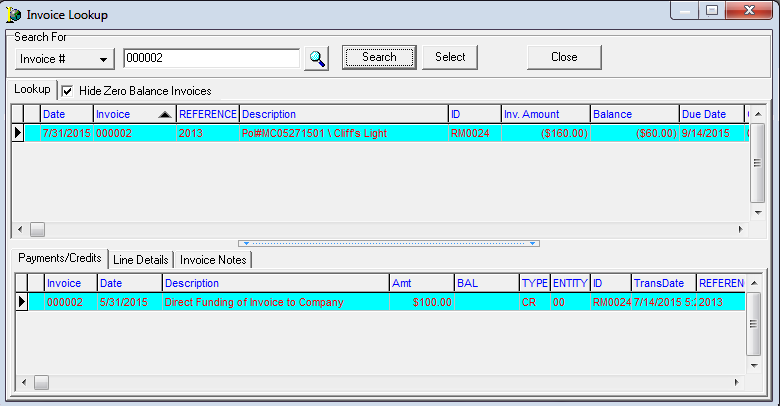
- Click the Batch tab.
- Print the journal.
- Post the batch.
 Enter the Debit/Credit Memo in Accounts Receivable
- In Accounts Receivable, click the Payments/Adjustments menu, and then click Enter Debit/Credit Memos.
- Click New.
- Click Add.
- Select the appropriate company or click to perform a company search.
- Click OK.
- Click the appropriate invoice.
- Click Add.
- Click to select the adjustment account or other wash account as the Offset Acct.
The Change Amt. should be the same amount used for the first debit/credit memo. - In the Description field, enter a description for this adjustment.
- Click OK.
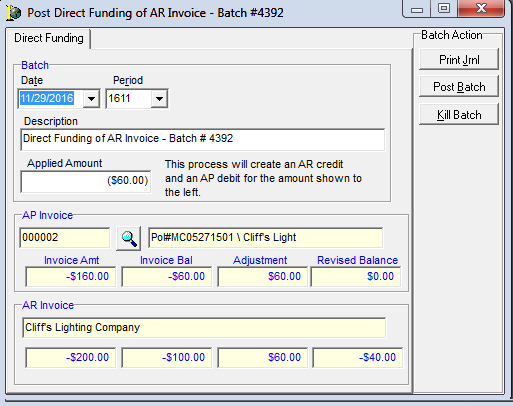
- Click the Batch tab.
- Print the journal.
- Post the batch.