Velocity AI Policy Check Agent
Overview
This guide explains how to use the Policy Check Agent to upload an issued or renewed policy document. It will also show you how to compare it against the matching policy in AMS360, review any differences the agent may find, and then resolve those differences.
What Does the Policy Check Agent Do?
The Policy Check Agent performs the following actions:
-
Compares an issued or renewed policy document against the AMS360 record for that policy.
-
Presents the data side by side while highlighting mismatches between the document and AMS360.
-
Shows a running count of remaining mismatches and groups forms under their respective policy or line of business.
-
Lets you resolve differences and, where supported, grants the ability to edit policy details and forms directly from the check.
-
Creates a printable Check Summary PDF that records what was dismissed, what was updated in AMS360, and what was matched, including the name of the person who acted, and when.
-
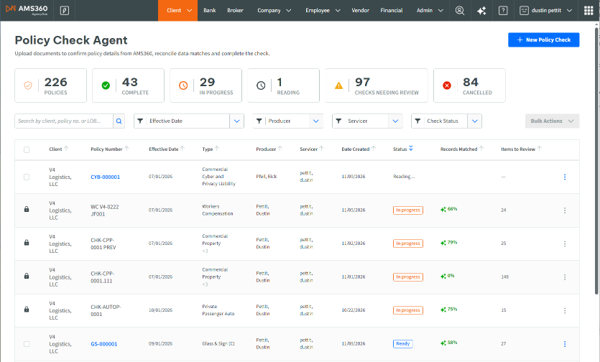
Provides an agency-wide Policy Checks area to review and manage all checks.
-
Reports when a policy is locked or already in use, which keeps you from intruding on another user.
-
Shows live progress as a check is run, so there is no need to refresh the page.
-
Adds an activity to the client when a check is completed, where the Check Summary PDF is also attached.
-
Opens each review with a summary that ranks findings by severity while adding links to each one.
-
Opens the source document at the value it used and highlights it, so you can confirm it before you act.
-
Shows a status for every check, so you can see where each one stands.
 The Setup Process
As part of the AMS360 New Experience, the Policy Check Agent is turned on (per agency) by an administrator. The Policy Intake and Policy Check Agents are enabled the same way.
Prerequisites: Your agency must be on AMS360 25R2 or later, have VSSO enabled, and have the New Admin Center and New Client Center experiences switched on. See the Getting Started guide for the full prerequisite checklist.
To turn on the Agent, follow these steps:
-
Go to Admin (located in the top nav bar), and then Admin (New Experience). This option will appear once the New Experience has been enabled.
-
Open Utilities followed by New Experience Management, located in the left-hand menu.
-
Under Centers, confirm that Admin Center and Customer (or Client) Center are both toggled to "On."
-
Under Agents, toggle "On" the Policy Check Agent.
|
NOTE: Vertafore's agents consume Velocity AI credits as they process your documents. Policy Check uses 30 credits per line of business, whereas Policy Intake uses 20 credits. Once an agency's credits are exhausted, Policy Checking is disabled until more credits are made available. |
Workflow
-
From a client's Policies page, begin a check against the policy you wish to verify.
-
Upload the issued / renewed Source Document(s).
-
Start the check. The agent will compare the document to the AMS360 record.
-
Review any highlighted mismatches and resolve each one.
-
Complete the check. AMS360 adds an activity to the client with the Check Summary PDF attached, and you can export the Check Summary to a PDF at any time.
-
Use the agency-wide Policy Checks area to track checks across all clients.
Each check in the Policy Checks list shows one status:
| status | meaning |
|---|---|
| Reading |
The agent is currently reading the uploaded documents. A gray spinner is displayed, and the check remains at the top of the list. |
| Ready | The documents have been read, and no action has yet been taken. |
| In Progress |
You have taken at least one action, which includes the following: approve, edit, dismiss, or resolve. Opening or viewing a check is not considered an "action." |
| Complete |
You have marked the check as "complete." A completed check resides in read-only mode. |
| Canceled | You canceled the check. A canceled check resides in read-only mode. |
| Failed | Processing has failed. |
|
NOTE: A check never completes on its own; also, it does not return to Ready once you have taken an action. |
Running a Policy Check
Follow these steps to run a check:
-
Open the client and proceed to the Policies page.
-
Start a check against the policy (for example, Check Policy from the policy's actions), or choose New Policy Check.
-
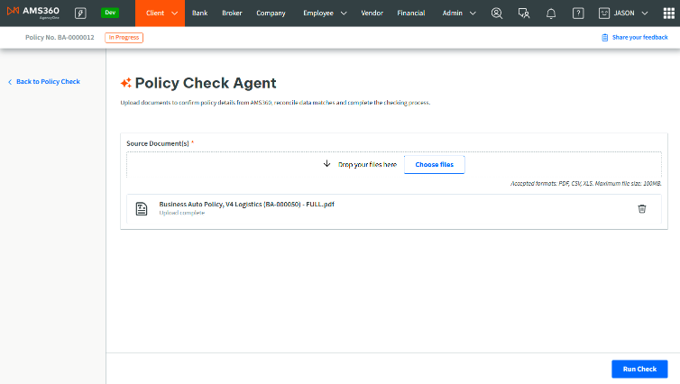
Upload the Source Document(s), which is the issued or renewed policy being compared against AMS360.
-
Begin the check. The check's status will update automatically as it runs; it is not necessary to refresh the page.
These are the supported source file types (up to 100 MB each): (1) PDF; (2) CSV; (3) XLS.
Reviewing and Resolving Mismatches
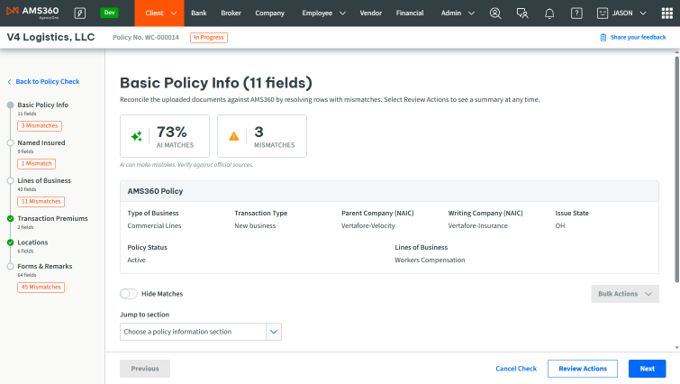
The agent presents the document and the AMS360 record side by side and highlights any differences:
-
Review each highlighted mismatch. The overview will display the number of remaining mismatches, which allows you to track your progress.
-
Use the grouping —forms are organized under their policy or line of business —to work through related items together.
-
Resolve each difference. Where supported, you can edit policy details and forms directly from the check.
|
NOTE: The agent will display differences for your review; however, you decide how to resolve each one. A minor display-only difference — such as a form name shortened to fit a column — is not a true mismatch. |
|
NOTE: A policy-level premium is reviewed in the "Transaction Premiums" section, as is done in Policy Intake. Premium amounts that belong to a line of business are reviewed in that line's section. |
Review summary: At the top of each review page, the summary lists the findings that require attention. These are grouped by severity. Select a severity to expand or collapse it. Each item has a plain-language explanation as to why it matters, plus a link that scrolls to and highlights that field. As items are resolved, they exit the summary and the count is reduced.
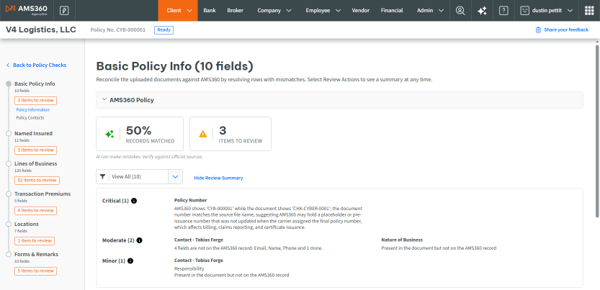
Use the filter alongside the summary to choose which findings the page will show. Findings are grouped under the following categories: Critical, Moderate, and Minor.
AMS360 policy information: The policy information box resides beneath the page title on every review page. Select the arrow to collapse or expand it. The page will remember your selection.
Viewing a value in the document: For a row whose value comes from a document, select the document link. The document viewer opens to the page from which the value was taken and then highlights it. If you are working with more than one document, this feature opens the document that supplied the value. If the exact location is not available, the viewer will open to the correct page. Rows that only come from AMS360 do not possess a document link.
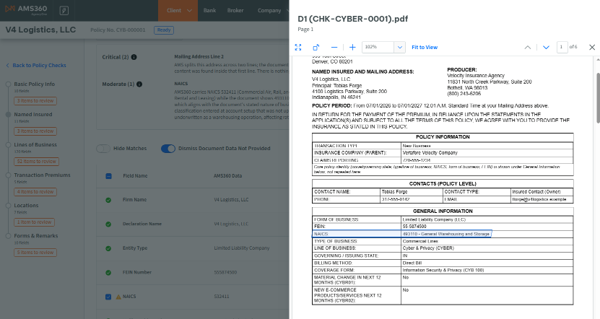
Dismissing fields the document does not cover: The "Dismiss Document Data Not Provided" option appears adjacent to "Hide Matches" on each section, and this feature is "on" by default. While it is on, every row where the document has zero data is dismissed, and the Resolve option shows as disabled Not Provided. Dismissed rows do not count toward Items to Review and instead appear in Review Actions. Switch the option "off" to return these items to review. Rows that include a document value are never affected.
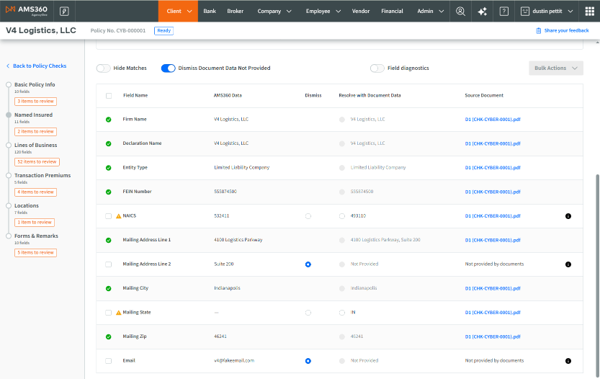
Long values: Long field names wrap across up to three lines. A name longer than this will extend the full width of the table above its values. Values wrap to up to seven lines; for longer values, hover over or tab to the value to see it all.
Completing a Check and Exporting the Check Summary
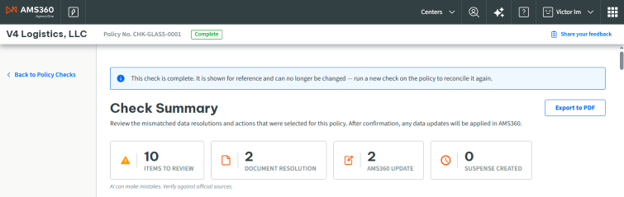
When you finish resolving mismatches, the "Check Summary" page lists every field and what happened to it.
To export the summary, perform these steps:
-
Open the "Check Summary" page for a completed check.
-
Select "Export to PDF."
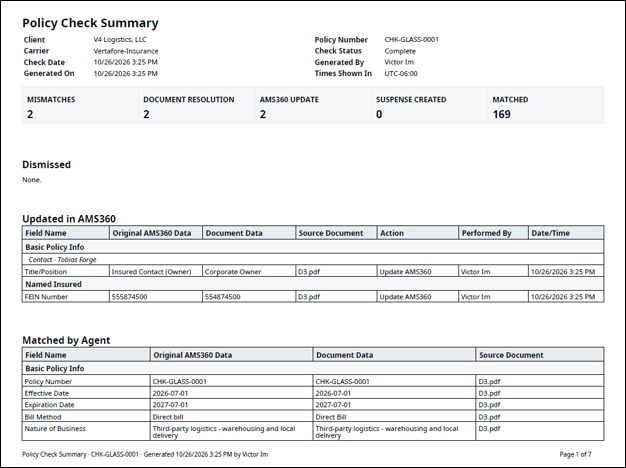
The resulting PDF will contain the following elements:
| part | contents |
|---|---|
| Header |
Client name, policy number, carrier, check status and date, plus the name of the person who generated the PDF, and when. |
| Summary Counts |
Mismatches, Document Resolution, AMS360 Update, Suspense Created, and Matched |
| Dismissed |
Each field whose mismatch was dismissed, who dismissed it, and when that dismissal took place. |
| Updated in AMS360 |
Each field written to AMS360, with the source document attached, plus who made the update, and when. |
| Other Outcomes |
Document resolution (keep AMS360), carrier correction requested, and suspense created, shown when present, each showing who performed these actions and when. |
| Matched | Every field that matched, listed under its respective policy section. |
Fields are grouped by policy section within each part; for example: Basic Policy Info, Named Insured, Lines of Business, Transaction Premiums, Locations, Additional Interests, and Forms & Remarks.
For each field, the PDF shows the field name, its resolution, the source (either AMS360 or a specific document), the source document, its activity, the person who performed the action, and the date and time of that event. Each resolved field also shows whether the write-to process within AMS360 had succeeded. This same write-status indicator appears on the Check Summary page.
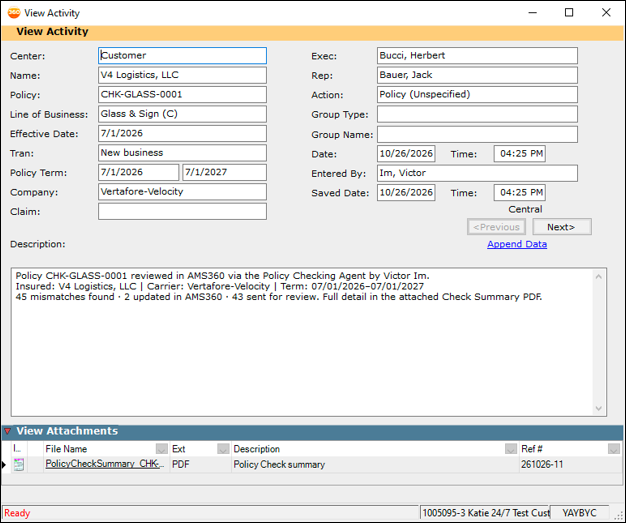
Activity Created in AMS360
Once a check process completes, Policy Check automatically adds an activity to the client in AMS360 and attaches the Check Summary PDF. This action occurs when you click the action via the kebab menu.
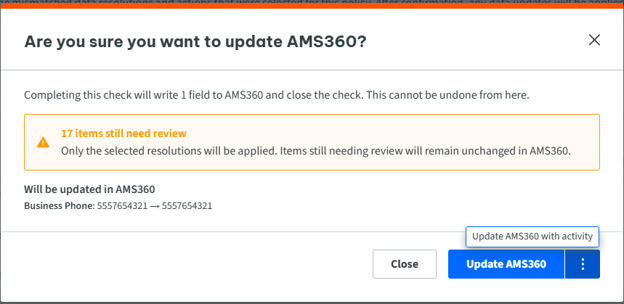
Users are not required to enter anything.
| activity field | value |
|---|---|
| Customer | The client to whom the checked policy belongs |
| Policy | The checked policy number |
| Effective Date | The policy effective date |
| Company | The policy's company |
| Action | Policy (unspecified) |
| Date / Time | When the check was completed |
| Description | A short summary (see below **) |
| Attachment | The Check Summary PDF |
** The description begins "Policy number reviewed in AMS360 via the Policy Checking Agent by user," followed by the insured, carrier, and policy term. The description then shows the number of mismatches found, the number updated in AMS360, and the number sent for review. If the check discovered zero mismatches, the description will says so. It is not possible to edit the description text.

|
NOTE: A policy-level premium is reviewed in the "Transaction Premiums" section, as is done in Policy Intake. Premium amounts that belong to a line of business are reviewed in that line's section. |
Policy Check only creates the activity, not a suspense. If your agency does not have the Policy (Unspecified) action, no activity is created. Even so, the check still completes as normal.
Reviewing All Checks (Policy Checks)
Use the Policy Checks area (available from the Clients list when the agent is enabled) to see and manage checks across the agency. These are the functions:
-
A dashboard of in-progress and completed checks for your customer contacts.
-
Search and filter to find a specific check.
-
Begin a new check with New Policy Check.
-
A context-aware Back control will return you your starting point, whether that is the Client List or the client's Policies page.
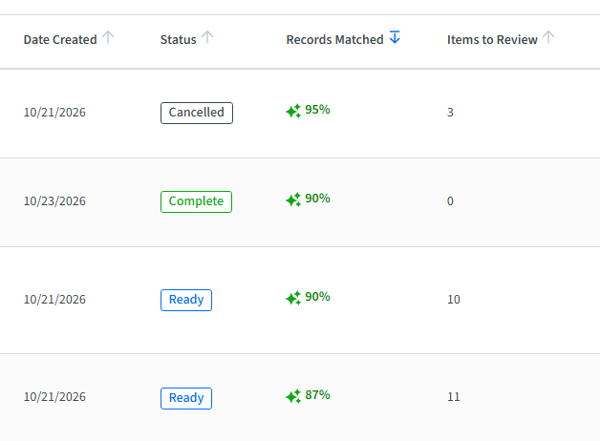
The list shows these columns, in this order: Client, Policy Number, Effective Date, Type, Producer, Servicer, Date Created, Check Status, Records Matched, and Items to Review.
-
Records Matched will display the percentage the AI automatically matched. It appears once the check is Ready bus is blank before that.
-
Items to Review will display the number of items remaining to be reviewed in the entire check.
Supported Policy Types
Policy checking is available for a growing set of policy types, including the following categories:
COMMERCIAL:
-
Commercial Property (including Commercial Fire, Crop & Hail, Earthquake, Agriculture Property, and BOP Property)
-
Business Auto
-
Garage & Dealers
-
Truckers / Motor Carriers
-
Inland Marine (EDP/Computers, Contractors Equipment, Installation/Builders Risk, Motor Truck Cargo, Transportation, Valuable Papers, Ocean Marine, and Commercial Articles)
-
Crime
-
Cyber & Privacy Liability
-
Commercial Umbrella
-
Commercial Flood
-
General Liability and related lines (Accountants, Architects, and Lawyers Professional; Directors & Officers; Employment Practices Liability; Errors & Omissions; Professional Liability; Liquor Liability; Media; Medical Malpractice; Internet; Insurance Agents; Artisans; Agriculture Liability)
-
Glass & Sign
-
Workers' Compensation (with Employers Liability)
-
Farm & Ranch (Farm & Ranch Owners)
|
NOTE: For Business Auto, Truckers, and Garage & Dealers policies, you can write corrections to vehicle coverages back to AMS360. |
PERSONAL:
-
Personal Auto (including Motorcycle and Recreational Vehicle)
-
Homeowners (including Mobile Homeowners, Comprehensive Personal Liability, and Earthquake)
|
NOTE: As this agent evolves over time, supported policy types will continue to be expanded. |
Release Notes
This section contains release notes for each respective new release.
November 11, 2026, Service Pack (v1.2.0)
Enhancements
| enhancement | description |
|---|---|
| New Policy Types |
Checking and write-back functions now cover Commercial Inland Marine (EDP/Computers, Contractors Equipment, Installation/Builders Risk, Motor Truck Cargo, Transportation, Valuable Papers, Ocean Marine, and Commercial Articles) and Farm & Ranch Owners. |
| Review Summary |
Each review page now opens with a summary of elements that require your attention. Findings are ranked by severity, each with a plain-language explanation as to why it matters, plus a link that jumps to that field. The summary is updated as you resolve each item. |
|
View a Value in the Source Document |
For a value taken from a document, select the document link to open the document viewer on the correct document and page, and then highlight the value so you can confirm it at the source. If the exact location is unavailable, the viewer will open to the correct page. |
|
Dismiss Document Data Not Provided |
A new Dismiss Document Data Not Provided option, which is "on" by default, dismisses findings where AMS360 has a value but the document has none. Dismissed rows leave the Items to Review count and instead appear in Review Actions. Switch this option "off" to return them to review. |
| Check Status |
Every check now shows one status: Reading, Ready, In Progress, Complete, Cancelled, or Failed. A check is shifted to "In Progress" after your first action, and Complete and Canceled are set by you. |
| Policy Checks List |
The Policy Checks list has a new column order and adds Records Matched (the percentage the AI has automatically matched) plus Items to Review (the number of items yet to be reviewed in the check). |
|
Vehicle Coverage Corrections |
Corrections to vehicle-level coverages on Business Auto, Truckers, and Garage & Dealers policies can now be written to AMS360. Remaining Business Auto schedules, including other coverages, other owned vehicles, modified vehicles, and driver convictions, are now paired between the document and AMS360. |
| Review Experience |
The AMS360 policy information box now appears beneath the page title on every review page and can be collapsed; this box will remain collapsed or expanded, exactly the way you left it. Long field names and long values now wrap around instead of being cut off, and the full value is available in a tool tip. The "Policy check started" message closes on its own after five seconds and no longer stacks. This page will also respond more quickly when you resize the window. |
Defects Fixed
| description of fix |
|---|
| Saving a correction or removal on a Homeowners policy to AMS360 no longer fails. |
|
Saving a correction on a Farm & Ranch policy to AMS360 no longer fails with a "source changed" message. |
|
Accepting two rows that write the same AMS360 field no longer causes "Submit" to fail. |
| The document preview drawer now properly scrolls and pages through the PDF. |
| Items that are noted as matches are now counted as matched in the review counts. |
|
Differences in document wording that mean the same thing are now treated as agreements instead of mismatches. |
| The arrow on the collapsed AMS360 policy box now points in the correct direction. |
October 26, 2026, Service Pack (v1.1.0)
| enhancement | description |
|---|---|
|
Export Check Summary to PDF |
From the Check Summary page of a completed check, you can now export a PDF record of the check. This PDF shows the client, policy number, carrier, check status and date, plus the person who generated it and when. It includes summary counts and every field grouped as Dismissed or Updated in AMS360, as well as other resolutions and Matched, where each denotes who acted and when. Each resolved field also shows whether it was successfully written to AMS360. |
|
Activity Created in AMS360 When a Check Completes |
When a check is completed, Policy Check automatically creates a client activity that includes a short summary and an attached Check Summary PDF. This enhancement provides users with an audit record without needing to enter the data manually. A check with no mismatches also creates an activity. Even if the activity cannot be created, the check will still complete. |
| Live Check Status |
The status of an in-progress check now updates on its own. You no longer need to refresh the page to view the update progress. |
| Clearer Premium Review |
Policy-level premiums now appear in their own transaction premium section, as is done with Policy Intake. Premium amounts that belong to a line of business remain in that line's section. This process eliminates the appearance of duplicate premium fields. |
Defects Fixed
| description of fix |
|---|
| Policy Check no longer shows a "Limit 1 (Numeric)" field that has no matching field in AMS360. |
| "Resolve with Document Data" is now available on writable fields that have a document value. |
|
Records that differ only in how they are identified, such as formatting variants, are now paired so that real changes are no longer missed. |
|
Resuming an in-progress check now reopens the uploaded document, so you no longer have to restart the check. |
|
"Review" now flags an accepted value that is longer than its AMS360 field, which means "Submit" no longer fails with an unexplained error. |
October 14, 2026, Service Pack
Enhancements
| enhancement | description |
|---|---|
| New Policy Types |
Added policy checking and write-back functionality for Commercial Flood, Crime, and Cyber policies. |
|
Policy Check Admin Console |
A new console is available with run overview, run detail, and quality dashboards, plus first-check tenant setup. |
| Mismatch Count | The review overview now shows a count of remaining mismatches. |
|
Credit Visibility & Guardrails |
One's credit status is displayed in the app, and Policy Checking is automatically disabled once credits have been exhausted. |
| Lock Awareness |
Policy Checking now reports when a policy is in use or already being worked. |
| Review Experience |
Refined dashboard, client search, and review page; forms grouped under their policy/line; add/edit forms from a check; Cyber checks preserve prior answer history. |
Defects Fixed
| description of fix |
|---|
| Policy saves no longer fail when a workstation ID is missing. |
|
Review and completion indicators have been corrected in regard to missing records. |
|
Stored Flood addresses and line interests are now retained instead of being dropped. |
|
Workers' Compensation round-trip comparison discrepancies were resolved. |
|
A form title truncated by column width is no longer flagged as a mismatch. |