Proposal Builder Release Notes
Proposal Builder: AMS360 25R2 Release Notes
October 1, 2025
Vertafore is pleased to release Proposal Builder 25R2 for AMS360.
With each release, we are incrementally improving and updating Proposal Builder to provide you with the best possible experience.
Feature Updates
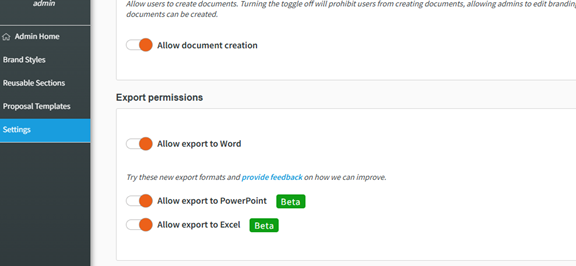
Beta Feature — Admin Settings: New Permission Toggles for Excel & PowerPoint File Export
-
This Beta feature is in development and will continue to be updated. Please provide your feedback in this short survey as to how we can improve it!
-
In Admin Settings, admin users now have two additional toggles for disabling / enabling an export to PowerPoint and Excel.
-
Updates include:
-
When toggled ON, the corresponding file type appears on the Preview & Share page of a proposal.
-
When toggled OFF, the corresponding file type does not appear on the Preview & Share page of a proposal.
-
Beta Feature — Document Export Options: Excel and PowerPoint File Formats Added
-
This Beta feature is in development and will continue to be updated. Please provide your feedback in this short survey as to how we can improve it!
-
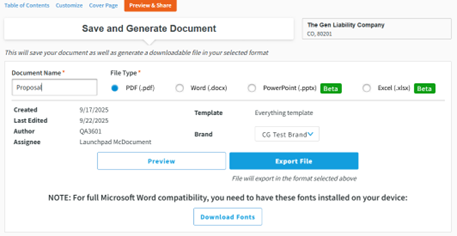
On the Preview & Share page, two additional file export options have been added:
-
Microsoft PowerPoint (.pptx)
-
Microsoft Excel (.xlsx).
-
-
To allow for export to these file types, admins must toggle them on within admin settings.
-
Updates include:
-
One “Export File” button that requires users to select a file type next to "Document Name."
-
For agencies using InsurLink, the “Export to InsurLink" button remains unchanged.
-
Policy Tables Allow for Reordering of Policies with Same Effective Dates and Policy Numbers
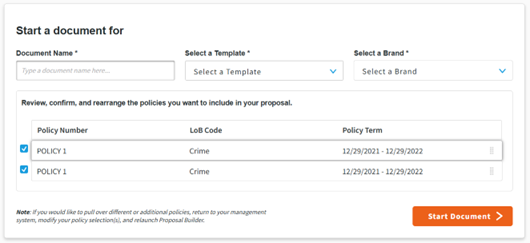
Policies that share the same policy number and effective dates may now be selected and reordered in the Policy Table on the "Document Start Page."
Dynamic Tables — Commercial Property: Premise Information & Subjects of Insurance Table Displays Location No. with a Period
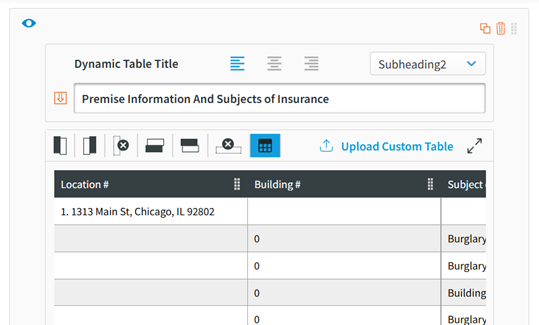
In the Premise Information & Subjects of Insurance Table, the location number is now followed by a period.
Dynamic Tables — General Liability: Liability Classification Table Displays Exposure Data as an Integer
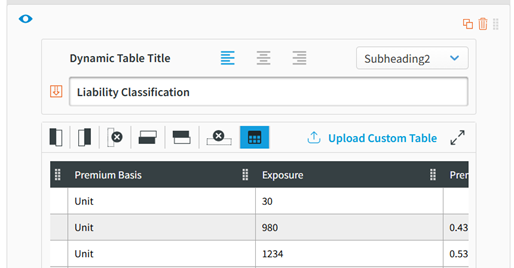
In the Liability Classification dynamic table, exposure data now appears as an integer with no decimal point to match the way data is entered in AMS360.
Dynamic Tables — General Liability: Liability Classification Table Includes Rates

-
In the Liability Classification Dynamic Table, an additional column has been added to populate Prem/Ops Rate, Prem/Ops Premium, Product Rate, and Product Premium data from AMS360.
-
To apply this change to your reusable sections, admins must first remove the existing table and re-add the Liability Classification table.
Defects Resolved
| DE48811 | Text Element: Alignment of Bullet Points |
-
Original Issue:When using bullet points in a text box, changing the alignment of the text would leave the bullet point as left-aligned while the text moved to its desired alignment.
-
Fix Deployed: Each bullet point now follows its respective text alignment.
| DE51921 | Run Proposal Report: Modal Error Not Clearing |
-
Original Issue: In the "Run Proposal Report" modal, validation errors for business units and dates persisted when closing / reopening the modal.
-
Fix Deployed: Validation errors are now cleared when the modal is closed and then reopened.
| DE52583 | Changes to Brand Category Names Not Updating in Brand Drop Down |
-
Original Issue: When a brand category name was edited, the updated name did not appear when selecting a brand for a proposal. Instead, the old category name was shown.
-
Fix Deployed: Edited brand category names are now are visible when selecting a brand for a proposal.
| DS11983 | Proposal Not Populating Policy Contact Data if Policy Term is Future-Dated |
-
Original Issue: If a policy or a submission had its effective dates set in the future, policy contact data from AMS360 did not populate.
-
Fix Deployed: Policy contact data now populates into Proposal Builder, even when future-dated.
| DS11997 | Document Start Page Displays Wrong Term Dates if Effective Date is 1/1/2024 |
-
Original Issue: If a policy's effective date was 1/1/2024, the document start page was instead incorrectly displaying 12/1/2023.
-
Fix Deployed: The document start page now displays the correct term dates for policies that started on 1/1/2024.
| DS12536 |
Edited Column Headers Not Displaying in Proposal Creation Workflow if Dynamic Table Name Removed |
-
Original Issue: If column headers were edited and the dynamic table name was subsequently removed in the admin workflow process, the proposal creation / customize workflow failed to display the edited column headers.
-
Fix Deployed: Column headers are now displayed correctly, per admin settings, when going through the proposal creation workflow.
| DE62651 | Text Element: Bullet Point Disappearing |
-
Original Issue: When using bullets points in a text box, each bullet point would disappear when copying and pasting text.
-
Fix Deployed: Bullet points now remain in their proper place whenever text is copied and pasted.
| DE62919 | Generating a Proposal Changes its Status to "In Progress" |
-
Original Issue: When exporting a proposal, its status would remain as “In Progress” as opposed to “Generated.”
-
Fix Deployed: Proposal status now shows as “Generated” when exported.
| DE63240 | Policy Number Not Displaying for Policy Comparisons Dynamic Table |
-
Original Issue: When customizing sections with policy comparison dynamic data, no policy number was being displayed after “Section Includes Data From.”
-
Fix Deployed: A policy number now appears after "Section Includes Data From.”
| DE63247 | Undelete Button Not Displaying Hover Text |
-
Original Issue: After deleting element from a section, the Undelete button did not display any hover text.
-
Fix Deployed: Text is now visible when hovering over the Undelete button.
Proposal Builder: AMS360 25R1 Release Notes
February 18, 2025
Vertafore is pleased to release Proposal Builder 25R1 for AMS360.
With each release, we are incrementally improving and updating Proposal Builder to provide you with the best possible experience.
Feature Updates
Proposal Creation — Customize: Intuitive Scroll added to Page Navigator
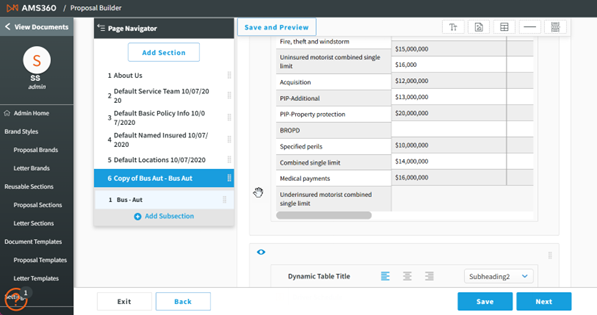
The Page Navigator in Customize now remains visible as you scroll, thereby providing easier navigation when editing various sections.
Floating Toolbar Update: Save and Preview
-
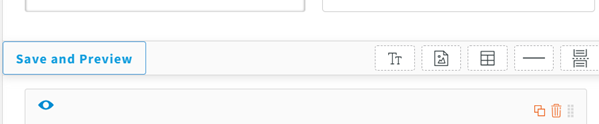
The Save & Preview function will now be accessible from the left side of the floating toolbar, which eliminates the need to scroll back to the top of a subsection to preview your edits.
-
This update applies to BOTH Proposal Creation and Admin – Reusable Sections.
Admin - Brand Customization: Option to Underline Text Added
-
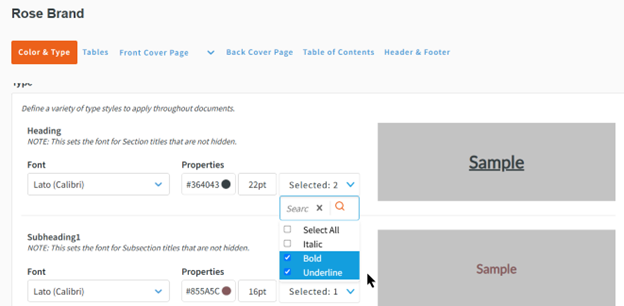
A new Underline option has been added to the Color & Type settings for Brands.
-
Updates include the following elements:
-
The Underline option is available for all options and can be applied wherever selected.
-
A new Style drop-down menu replaces the existing Bold option, thus allowing users to select multiple font styles.
-
Style selections are still reflected in the preview panel on the right.
-
The default style is set to Regular if no selection is made.
-
|
Note: The Regular option has been removed from the drop-down menu. |
Cover Page Editor: Autosave Update
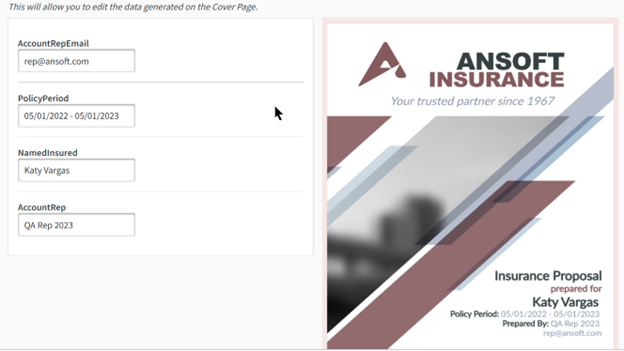
-
Autosave functionality has been added to the Cover Page Editor within the proposal creation / edit flow, thus ensuring that a user's work is saved automatically .
-
Autosave triggers the following actions:
-
When a user clicks out of the text box, an autosave function is initiated.
-
A Save message appears to the left of the Next button, providing confirmation of the save.
-
Defects Resolved
| DS11922 |
Motor Truck Cargo Section Not Allowing Default Subsection Name to Be Removed |
-
Original Issue: When employing a Motor Truck Cargo section with dynamic tables that uses Commercial Inland Marine, removing the table names in the subsections did not save. Upon saving, it reverted back to the default name.
-
Fix Deployed: Table names in the specified subsections now save as intended.
| DE52605 |
Upload PDF Not Working as per Functionality |
-
Original Issue: When uploading PDF with multiple pages, pages were splitting between text elements.
-
Fix Deployed:Uploaded PDF pages now display continuously.
 October 2024
October 25, 2024
Vertafore is pleased to release Proposal Builder 24R3 for AMS360.
With each release, we are incrementally improving and updating Proposal Builder to provide you with the best possible experience.
Feature Updates
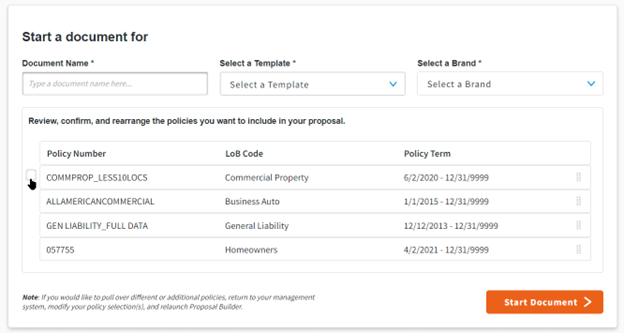
Start Proposal: Display and Reorder Policies from AMS360
-
Proposal Builder’s Start Proposal page will now allow proposal creators to view and reorder policies sent from AMS360 on the "Start Proposal" page, thereby enabling a customized arrangement and ensuring the Table of Contents reflects the new policy order.
Auto Removal of Duplicate Data from Tables
-
When this new agency preference is enabled, Proposal Builder will remove duplicate rows of policy information from the Locations, Named Insured, and Service Team tables.
-
The preference will be toggled “off” by default and will need to be enabled by a Proposal Builder admin.
-
When this feature is enabled, only exact matches will be removed automatically .
-

Premium Column Added to Basic Policy Information Table
-
The premium column from the Policy Comparison table is now available in the Basic Policy Information table.
|
NOTE: A Proposal Builder admin will need to add the updated table to their Basic Policy Information reusable section for it to appear in proposals. |
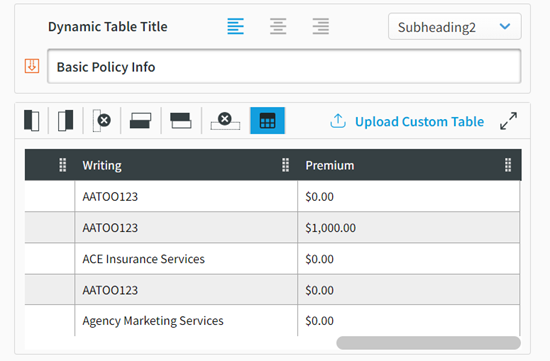
"Hide Element" Option
-
Proposal creators can now hide an element.
-
The "Hide Element" option is available in the top left corner of every element throughout the proposal.
-
Enabling this feature will hide the element from both the proposal preview and the exported proposal.
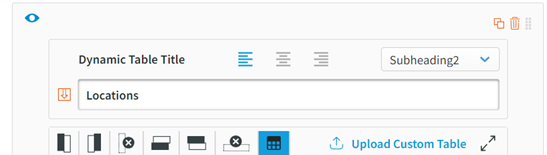
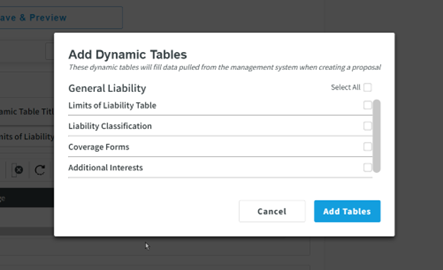
“Select All” Option for Adding Dynamic Tables
-
Proposal Builder admins now have the option to add all available tables when creating a reusable section.
-
Clicking “Select All” will select all the available tables for a given Line of Business.
Proposal Creation Flow – Autosave
-
Autosave is now enabled for the entire proposal creation flow process.
-
Any time a user makes a change throughout the creation flow, autosave is activated and displays a message with a time stamp located at the bottom of the screen.

Homeowners Mapping Update
-
Proposal Builder now maps the appropriate symbols for different deductible types within AMS360, thereby providing accurate and clear information for proposal creators.
Additional Business Unit Dynamic Fields Added
-
Proposal Builder now has dynamic fields for city, state, and ZIP code information for agency, division, branch, department, and group, which enhances the customization and robustness of proposals.
Updated Navigation Bar
-
Proposal Builder now has a top navigation bar that displays the Agency Management System from which a user was launched.

Defects Resolved
| DS10689 |
Truckers Reusable Section: Removing Table Name and Custom Column Headers Not Displaying on Customize |
-
Original Issue: When the table name within a Truckers section is removed, the change was not displaying in the “Customize” view. Additionally, when columns headers were renamed, this change was not displayed on the “Customize” view.
-
Fix Deployed: Proposal Builder now displays the most recent version of the tables within the Truckers Reusable Section.
| DE40536 |
Admin - Templates: Changes Not Triggering Autosave Message |
-
Original Issue: When making a change to an existing Template, the autosave message was not being triggered.
-
Fix Deployed: When changes are made to the Template, the autosave message is now displayed at the bottom of the screen.
| DE48779 |
Proposal Creation: "Back" Button on Cover Page Editor Does Not Trigger Autosave Message |
-
Original Issue: If a user made Cover Page edits and then hit “Back” to return to Customize, the autosave message was not being triggered.
-
Fix Deployed: Now, when changes are made to the cover page and "Back" is clicked, the autosave message is displayed at the bottom of the screen.
| DE49351 |
Proposal Creation – Commercial Inland Marine – Additional Coverage: Line of Business Coverage Levels Sort Order is Not Retained |
-
Original Issue: Coverage level additional coverages sorting was not being retained or displaying the correct coverage level when the policy is sent to Proposal Builder.
-
Fix Deployed: Coverage level now displays "Line of Business" and retains the proper sort order for this type of additional coverage.
| DE51942 |
Search: Search is Case-Sensitive |
-
Original Issue: Search was case-sensitive and caused the incorrect results (or no results) to appear when searching throughout Proposal Builder.
-
Fix Deployed: Case sensitivity is now removed from search criteria.
(This is the Drop-down text)
May 2024
May 3, 2024
Vertafore is pleased to release Proposal Builder 24R1 for AMS360. With each release, we are incrementally improving and updating Proposal Builder to provide you with the best possible experience.
Feature Updates
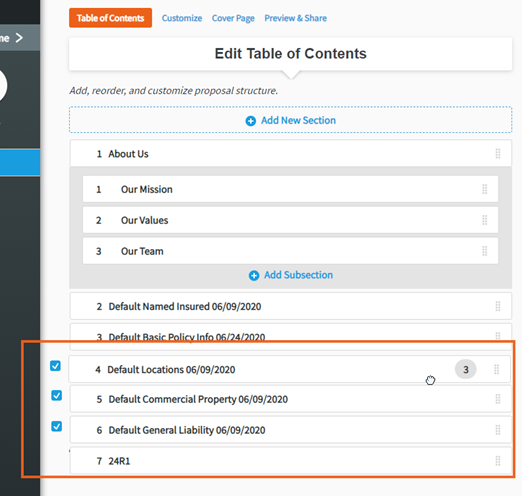
Create Proposals Table of Contents – Select and Rearrange Multiple Sections at Once
-
Proposal Builder’s Table of Contents will now allow proposal creators to select and drag multiple sections at once to rearrange.
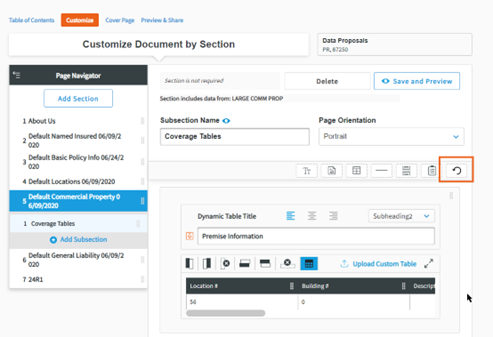
Customize – Reusable Sections Elements - Undelete Element
-
Reusable Sections in the Customize tab will now include an undelete option.
-
This element will be available to drag-and-drop after an element has been deleted.
-
Undelete will apply for a singular deleted element in each Reusable Section.
-
Undelete will only be available while on the Customize tab.
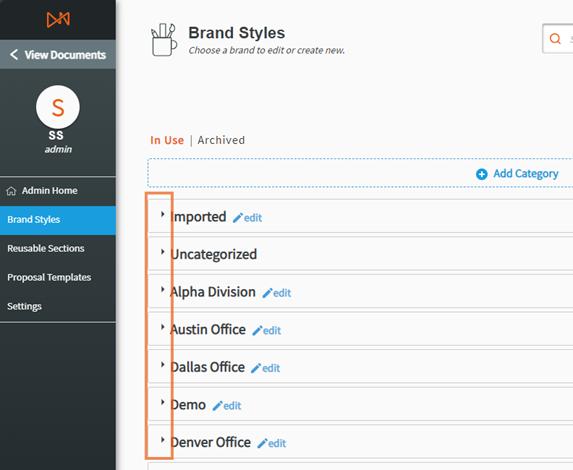
Improved Document Library Navigation: Collapsible Category Headers
-
With this release, all Brand, Reusable Section, and Template libraries will now have collapsible category headers.
-
By default, all headers are collapsed.
-
Search will automatically expand categories containing matching keywords, ensuring quick and efficient access to relevant brands, reusable sections, and templates.
Commercial Property - Subjects of Insurance Mapping Update
-
Now, if the Cause of Loss field is left blank within a Commercial Property Policy, AMS360 proposal creators can ensure accurate translation of applicable policy data to their proposals.
October 2023
Proposal Builder: AMS360 23R10.1 Release Notes
Vertafore is pleased to release Proposal Builder 23R10.1 for AMS360. With each release, we are incrementally improving and updating Proposal Builder to provide you with the best possible experience.
Feature Updates
Table of Contents: Policy Labels on Reusable Sections
The Table of Contents page will now display all policy numbers associated with their applicable Reusable Section.
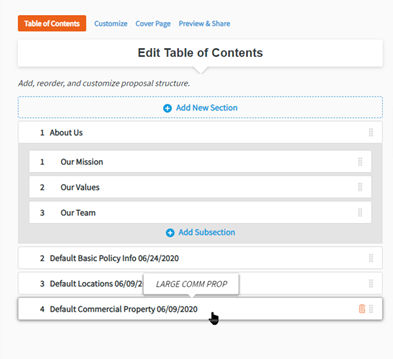
The policies will display when hovering the cursor over the Reusable Section.
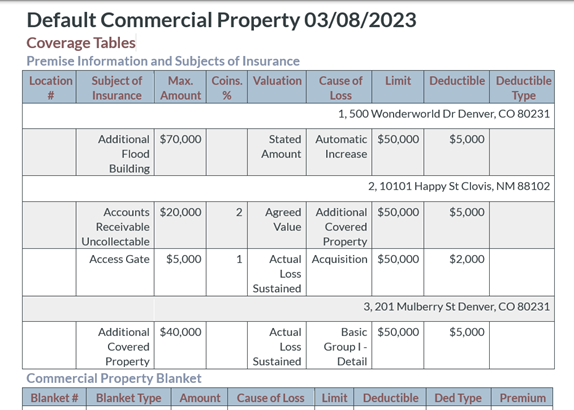
Commercial Property: Consolidated Premise and Subjects of Insurance Table
Proposal Builder’s Commercial Property section will now include a table that consolidates the Premise and Subjects of Insurance tables. This new table will need to be manually added to any applicable Commercial Property sections.
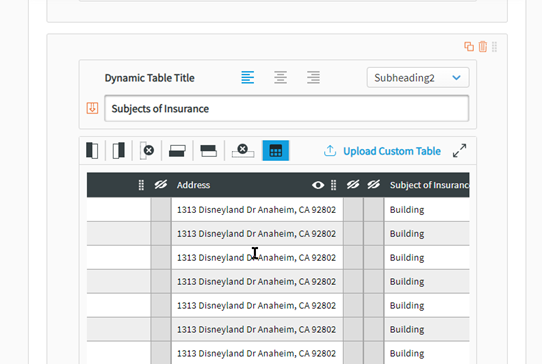
Commercial Property: Address Column Added to the Subjects of Insurance Table
The Subjects of Insurance table now includes an Address column that displays the location each coverage belongs to.
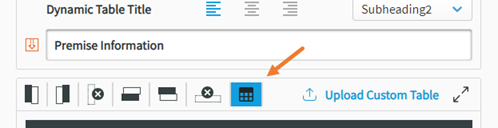
Relocated the Repeating Column Header Button
The Repeatable Column Header button has been moved to the Table Options toolbar. This new location still allows CSRs to access to the button, regardless of whether the table has a title or not.
Improved Proposal Builder Handling for Agency Contact Fields
The Simple and Back Cover pages will no longer display agency contact fields that have no associated information from AMS360.
July 2023
Proposal Builder: AMS360 23R7 [Hotfix] Release Notes
Vertafore is pleased to release Proposal Builder 23R7 [Hotfix] for AMS360. With each release, we are incrementally improving and updating Proposal Builder to provide you with the best possible experience.
Feature Update
This release includes an update to guided walk-throughs that reflect recent enhancements plus an improved interface.
June 2023
Proposal Builder: AMS360 23R6.1 Release Notes
Vertafore is pleased to release Proposal Builder 23R6.1 for AMS360. With each release, we are incrementally improving and updating Proposal Builder to provide you with the best possible experience.
Feature Updates
Proposal Builder Performance Enhancement
-
Proposal Builder will be moved to the Titan infrastructure. This improvement will bring improved stability and reduced downtime to the tool. There are no changes to current feature functionality.
April 2023
Proposal Builder: AMS360 23R4.1 Release Notes
Vertafore is pleased to release Proposal Builder 23R4.1 for AMS360. With each release, we are incrementally improving and updating Proposal Builder to provide you with the best possible experience.
Feature Updates
Added Support for Editable Cover Pages
-
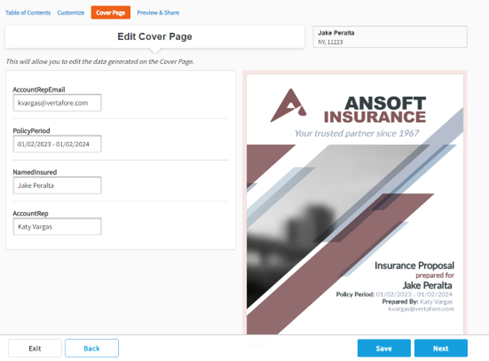
Proposal Builder users will now have the ability to edit the dynamic information that pulls to both the Custom and Simple Cover Page.
-
The new Cover Page tab will be available to users while creating/editing a proposal.
-
The fields available to edit will depend on the admin’s selections in the brand setup.
-
CSRs will be unable to edit any brand styling or images on the cover pages.
-
-
There is a new setting available for admins that allows access to this new tab.

Added Option for Repeatable Table Headers
-
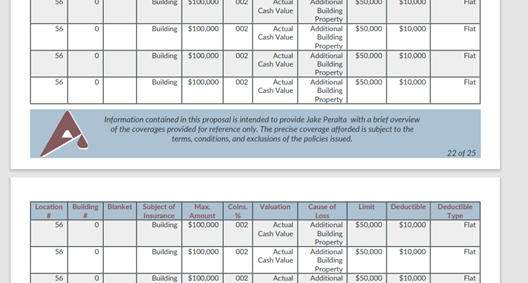
Table headers for both dynamic and static tables will now have the option to repeat on pages on which the table continues.
-
There is a new admin setting that will apply this setting to all tables.
-
This setting will be on by default.

-
-
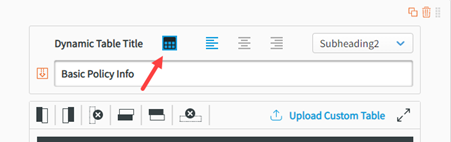
CSRs will have the ability to turn on/off this setting on a table-by-table basis while working on a proposal.
New Line of Business - Flood
-
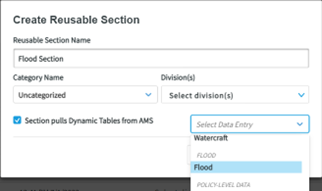
Proposal Builder now supports commercial and personal lines for Flood lines of business. Admins will now be able to create reusable sections for Flood.
-
The Flood Data entry will apply to both commercial and personal lines.
-
A default Flood section has been added to the Reusable Sections Library.
Added 2 New Tables for Equipment Additional Interests to Commercial Inland Marine
-
Proposal Builder now includes “Equipment Summary – Additional Interests” and “Scheduled Equipment – Additional Interests” tables within the Commercial Inland Marine Reusable Section.
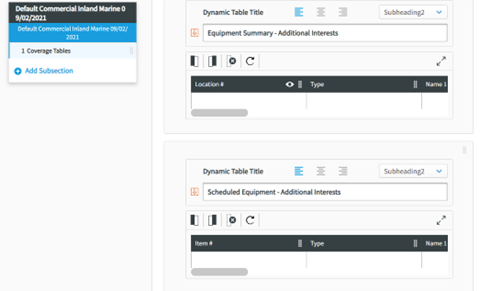
-
Data will map from the “Additional Interests” area of the Equipment Summary and Scheduled Equipment of a Commercial Inland Marine policy.
-
These tables will need to be manually added by the Proposal Builder admin.
Added New Table for Endorsements to Homeowners
-
Proposal Builder now includes an Endorsements dynamic table within the Homeowners Reusable Section.
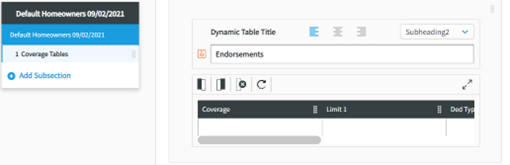
-
Data will map from the Endorsements area of a Homeowners policy.
-
This table will need to be manually added by the Proposal Builder admin.
Basic Policy Info Table Sort Order Added
-
Proposal Builder will now sort policies translated to this dynamic table by the Policy Number column in alphabetical order.
Improved Inactive Division Handling
-
Proposal Builder now hides inactive divisions from being assigned when creating or editing brands, reusable sections, and templates.
-
The Proposal Builder admin will be prompted to assign a division to any brands, sections, or templates that were only assigned to an inactive division before being able to edit.
-
Employee Headshot Element
-
Admins will now have the ability to include their employees’ headshots as a dynamic element in their sections.
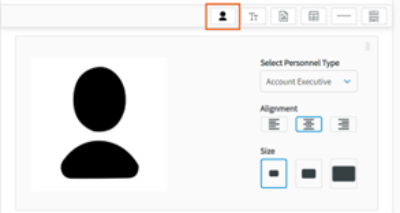
-
It can be drag and dropped anywhere within a section.
-
The image will map from the headshot area of the employee setup in AMS360.
-
Issues Fixed
-
Resolved an issue where users were unable to rename a proposal under “Preview & Share”.
-
Resolved an issue with the Simple Cover Page with commas still being present if the agency address does not exist.
-
Resolved an issue where the Exposure column within the General Liability’s “Liability Classification” table would pull a $ symbol.
-
Resolved an issue where the proposals within “All Documents” were not sorting alphabetically when set to “Sort by: Client.”
-
Resolved an issue that allowed users to save a section with no name when editing a proposal.
October 2022
Proposal Builder: AMS360 22R10.1 Release Notes
Vertafore is pleased to release Proposal Builder 22R10.1 for AMS360. With each release, we are incrementally improving and updating Proposal Builder to provide you with the best possible experience.
Feature Updates
Policy Comparison Reusable Section
-
Proposal Builder admins will now have the capability to add a "Policy Comparisons Reusable" section to their Proposal templates.
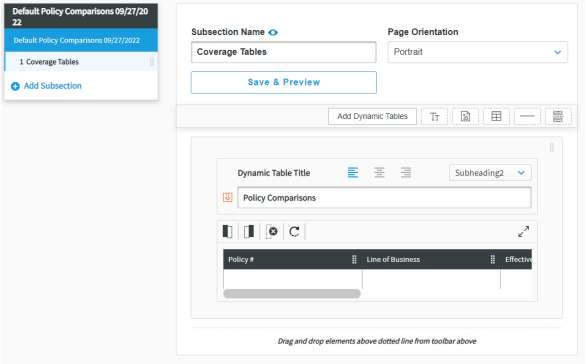
On the Fly Dynamic Sections
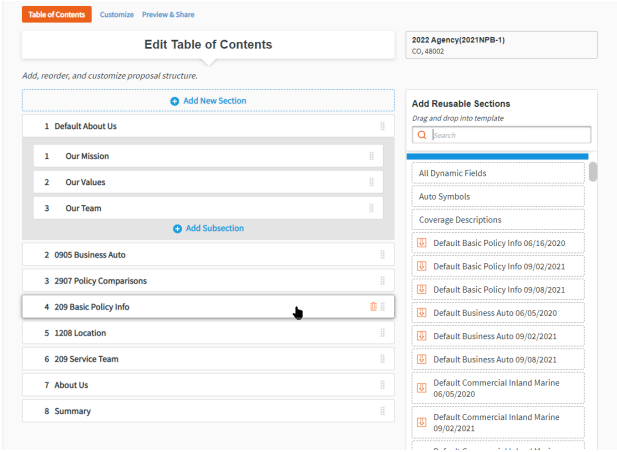
-
End-users will now have the ability to add additional dynamic sections to their proposal after the policy has been sent from AMS360.
-
The available dynamic sections will depend on the user’s divisional settings (if applicable).
-
Reusable sections will need to have an “Active” status to populate in the Table of Contents.
On the Fly Dynamic Fields
-
End users now have the ability to add dynamic fields to their proposal after their policy has been sent to Proposal Builder.
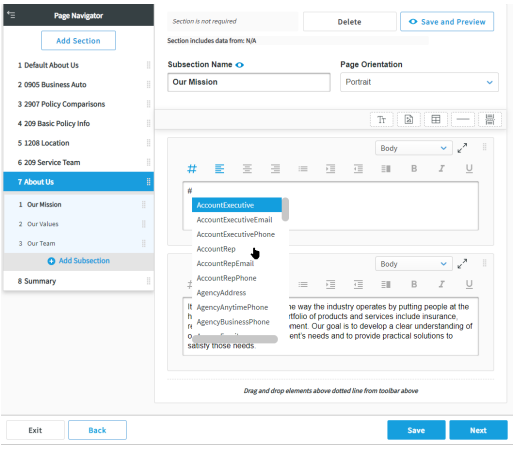
-
Dynamic fields will show as the Dynamic Field name if there is no available policy data.
Copy/Paste Elements
-
End-users will now have the ability to copy and paste elements between sections.
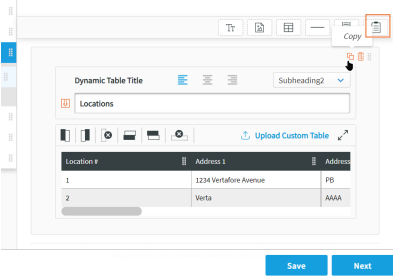
-
The paste icon will be visible after a user has copied an element. The icon can be dragged and dropped anywhere within a section.
Added a New Dynamic Field
Proposal Builder now support the following Dynamic Field:
-
#ServiceFees – maps the fees from the "Transaction Fees" section of a policy.
Issues Fixed
-
Resolved an issue where a policy with an LoB without an SDE linked would disable the Start Proposal button.
-
Resolved an issue where PDFs and images would overlay onto the next section when text elements were included in the subsection.
July 2022
Proposal Builder: AMS360 22R7.1 Release Notes
Vertafore is pleased to release Proposal Builder 22R7.1 for AMS360.With each release, we are incrementally improving and updating Proposal Builder to provide you with the best possible experience.
Feature Updates
Import/Export Multi-Select for Reusable Sections and Brands
-
Proposal Builder admins will now have the capability to select multiple Sections and Brands to export from the Library View.
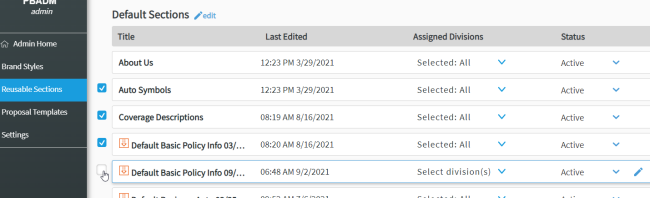
-
Brands and Sections must be in the “Active” status to be exported.
-
Each Brand or Section selected will be exported as a separate file and grouped for download in a zip folder.
-
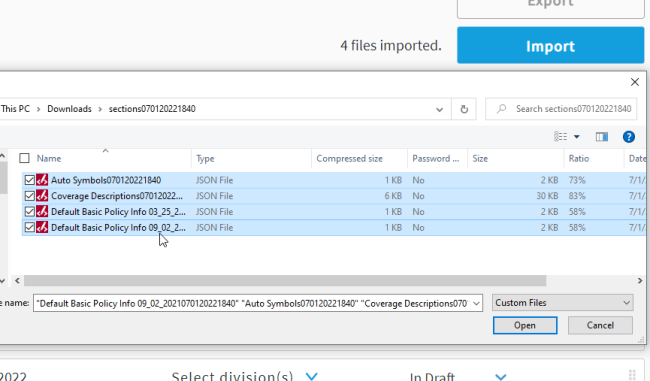
In the import menu, admins can now Ctrl + click multiple exported '.JSON' files for bulk import. Users can also click a folder to import all files in the folder.
-
All imported files will go to the “Imported” Category and be set to “In Draft”.
Added “Forms” Table to all Commercial Lines Sections
-
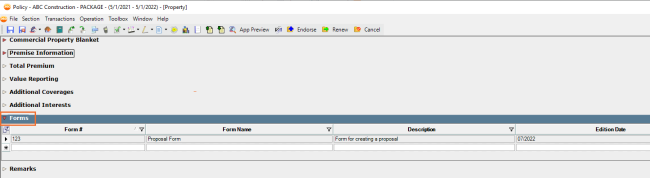
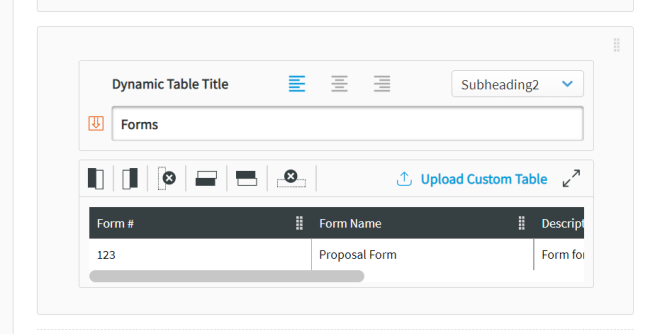
Proposal Builder now maps the “Forms” policy information to a new table for each Commercial LOB Data Entries (Property, GL, Auto, IM, Umbrella, Crime, Garage and Dealers, Truckers, and Workers Comp)
-
The new table will need to be manually added to all applicable sections by the Proposal Builder admin.
Added New Dynamic Fields
-
Proposal Builder now support the following Dynamic Fields:
-
#CustomerName – maps First and Last Name of the customer, useful in place of #NamedInsured for Personal Lines
-
#CustomerDBA
-
#ServiceTeamExecTitle and #ServiceTeamRepTitle
-
#ServiceTeamExecCell and #ServiceTeamRepCell
-
Added New Fields to Simple Cover Page
-
The Simple Cover Page now includes options for Customer Name, Firm Name, and DBA
Ended Support for Internet Explorer
-
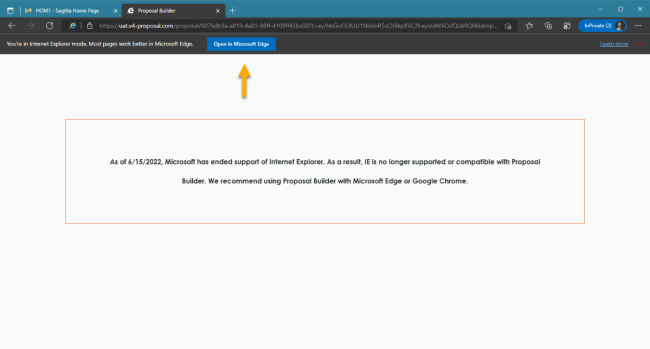
As of this release, users will no longer be able to access Proposal Builder using IE. Please use Chrome or Microsoft Edge.
-
If using Edge in “IE Compatibility Mode”, user will also be unable to access Proposal Builder. They will need to click the “Launch in Edge” button.
Issues Fixed
-
Resolved an issue with the Table of Contents not inheriting landscape orientation from Simple Cover Page
-
Resolved an issue with PDFs overlying sections when Smart Page Breaks was OFF
-
Resolved an issue where Smart Page Breaks toggle was OFF by default in new Templates
-
Resolved an issue with the Divisional Dropdown in .csv Reporting
-
Resolved an issue with Proposal Status not updating to “Generated” when exported
May 2022
Vertafore is pleased to release Proposal Builder 22R5.1 for AMS360.
With each release, we are incrementally improving and updating Proposal Builder to provide you with the best possible experience.
Feature Updates
“Send to InsurLink” Feature Added
-
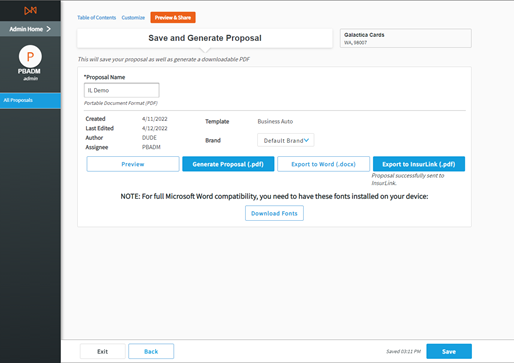
Proposal Builder will now have the capability to send completed proposals to InsurLink for end-insured access.
-
Users will find a new button in the export options that will send the proposal as a PDF.
-
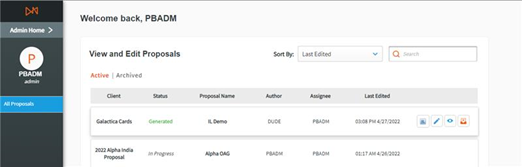
Proposals sent will be stored in a new Proposals tab in InsurLink, which will need to be enabled in the InsurLink settings.
-
Proposals sent to InsurLink will have a logo indicator in the All Proposal library.
-
If a specific customer is not set up on InsurLink, the Proposal Builder user will receive a message letting them know.
-
Agencies must have an InsurLink subscription for feature to function.
Added Loading Indicator When Change Component Status
-
Proposal Builder will now display a loading indicator when changing a brand, section, or template to Active or In Draft.

-
This resolves an issue where users might navigate away from the page before the status change was saved.
Improvements to Brand and Template Library Search Functionality
-
When entering information into the search bar of the Brand or Template libraries, the search will now filter out categories with no matching criteria.
Issues Fixed
-
Resolved an issue where manually returned lines within a table were removed in the final proposal.
-
Resolved an issue with custom column header changes not saving.
-
Resolved an issue where table changes in Customize were not saving.
-
Resolved an issue with PDFs at the end of a section creating two blank pages.