AMS360 Mobile: Added Support for Federated Biometric Login
|
Note: This update is part of the AMS360 21R1 release. Navigate to the AMS360 2021 R1 Release Notes to review other enhancements and fixes that were part of the release. |
In addition to Federated SSO, AMS360 Mobile now supports a biometric SSO sign in method, giving you the option to access the application using facial or touch recognition.
-
On the log-in screen, select the Enable Face ID for login option and click SSO Sign In.
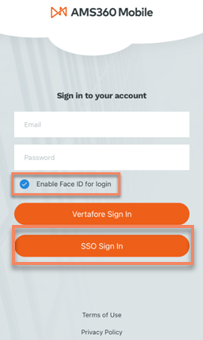
SSO Sign In
-
Upon selecting SSO Sign In, you will be prompted to log in to your VPN. Your mobile device may request permission to continue to this step, in which case you should click continue.
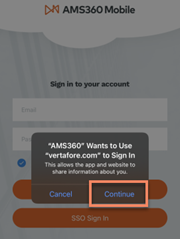
Prompt to sign in
-
Enter your VPN login information and click Sign On.

VPN log in screen
-
Once you are successfully authenticated, your device will remember to log you in using the biometric and federated log in.