Error When Voiding a Large Direct Bill Entry (DBE)
An error that occurred when voiding a Direct Bill Entry (DBE) statement (due to its large file size) has been fixed.
PREVIOUSLY:
When voiding a large Direct Bill Entry (DBE) statement, a time-out occurred before the statement could be voided due to it having too many rows. Because of the way DBE statements work, invoice voids were not processed individually but in a single transaction. When a timeout or other error occurred, the entire transaction was rolled back, resulting in no way to void the statement.
NOW:
A new system has been implemented so that users will not be affected by timeouts or other errors. Direct Bill Entry statements now process each invoice individually instead of in a single transaction. In addition, the process provides a retry button for individual invoices that were not processed, changes the statement status to "Voided" once all invoices have been voided, and implements a message that reminds users to not run reporting during an ongoing voiding process.
WORKFLOW:
After voiding a direct bill entry statement, a banner will appear that shows the void request is in progress and the related statement status is now Partially Voided. This process will begin to individually void each direct bill detail item. By clicking the refresh button, you will refresh the page to show if the void has been completed. Once the void is complete, the banner will disappear.
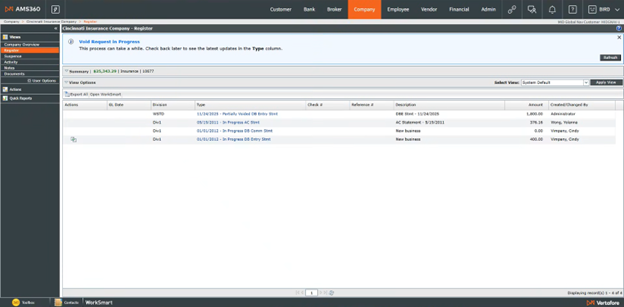
When the direct bill entry statement void has been processed, the statement will either be set to a Voided status (if all invoices were voided successfully), or it will be reset to Posted (if a transaction was skipped).
If one or more invoices were not voided, a green retry action button will appear in the Action column.
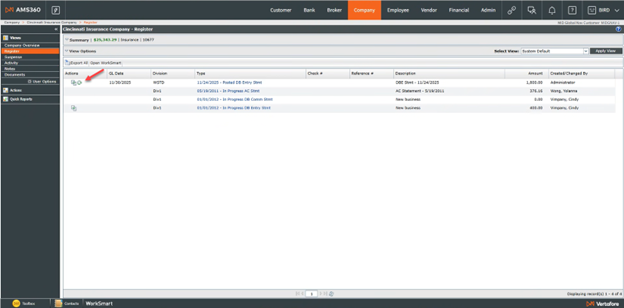
Clicking this retry button will launch the statement and allow you to see how many invoices were not actually voided.
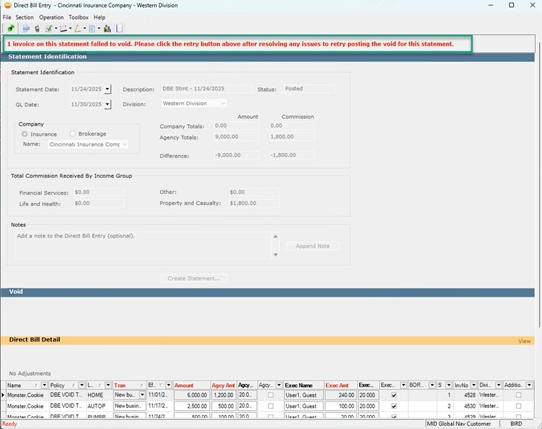
To re-attempt voiding these invoices, select the green post icon in the upper left corner; this action will restart the process.