Policy Transactions: Adding New "Annualized Premium" and "Annualized Estimated Revenue" Fields per Line of Business
Annualized Premium and Annualized Estimated Revenue fields have been added to both the Policy Transaction View and the Policy View grids. This addition will make forecasting easier, since these two fields are calculated automatically.
When opening an existing policy or making a new one, navigate to the Transaction Total Section. You will see two new non-editable fields: "Annualized Premium" and "Annualized Estimated Revenue."
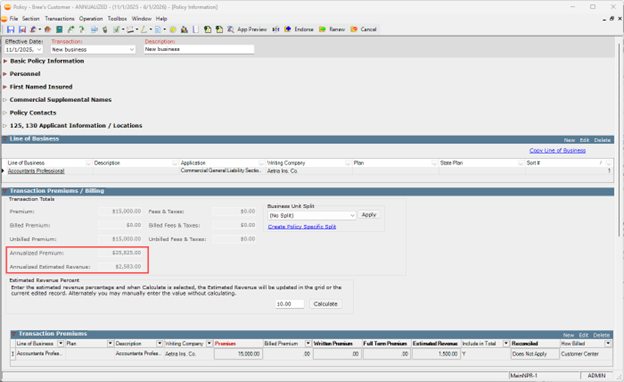
 Calculation Guidelines
Annualized Premium = (Premium/# of days transaction is active for the policy term) x (times) days in the year
Annualized Estimated Revenue = (Estimated Revenue/# of days a transaction is active for the policy term) x (times) days in the year
The formulas shown above include leap year, thereby making the “days in year” fluctuate between 365 and 366.
Additional guidelines for how and when these fields are calculated include the following:
-
“Include in Premium” must be selected on the transaction premium line for these fields to calculate.
-
Transactions effective on the last day of the policy term will not be calculated. Annualized premium will always equal the premium entered in the policy.
-
Policies that are active for 183 days or less (~6 months) will not have these fields calculated.
-
Continuous policies will not have these fields calculated.
-
Transaction types included in the calculation will depend on the admin center's policy configuration setup. Transactions that can be calculated include the following:
-
PAB - Premium audit (optional)
-
REI – Reinstatement (optional)
-
XLC - Cancellation confirmation (optional)
-
XLN - Cancellation request (optional)
-
PCH - Policy change
-
POL - Policy (unspecified)
-
REW - Rewrite
-
ARR - Anniversary re-rate
-
SYN - Policy Synchronization
-
NBS - New business
-
RWL - Renew policy
-