Growth Points
The "Growth Points" tab in Revenue Drivers provides a snapshot of business changes. Users can quickly assess a business's financial data by seeing growth year over year, plus as a weighted growth year to total year.
 Accessing Growth Points
Click the Menu icon on the top navigation bar to show the Feature Finder. Under "Analytics" is "Revenue Drivers." Growth Points is the rightmost tab within Revenue Drivers.
What are Growth Points?
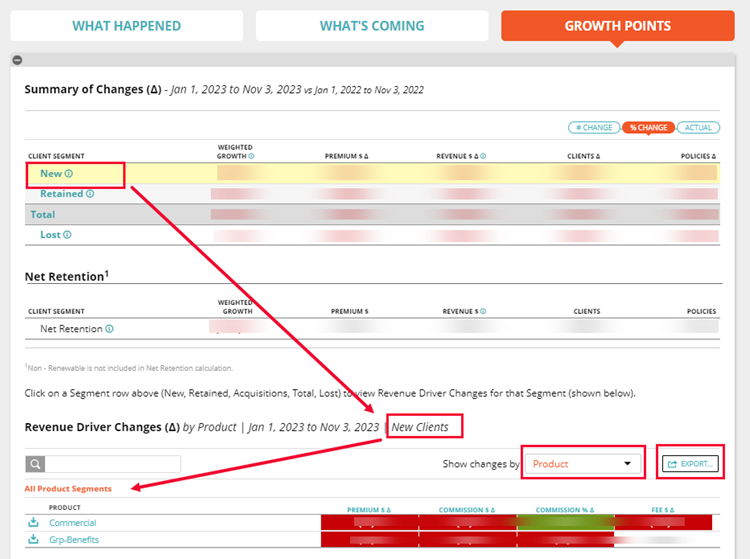
Growth Points provides a quick snapshot of your business by summarizing new, retained and acquired business. Growth Points shows a comparison from a specific time period as compared to a year earlier. Tabs show the information in terms of actual dollars or percentages.
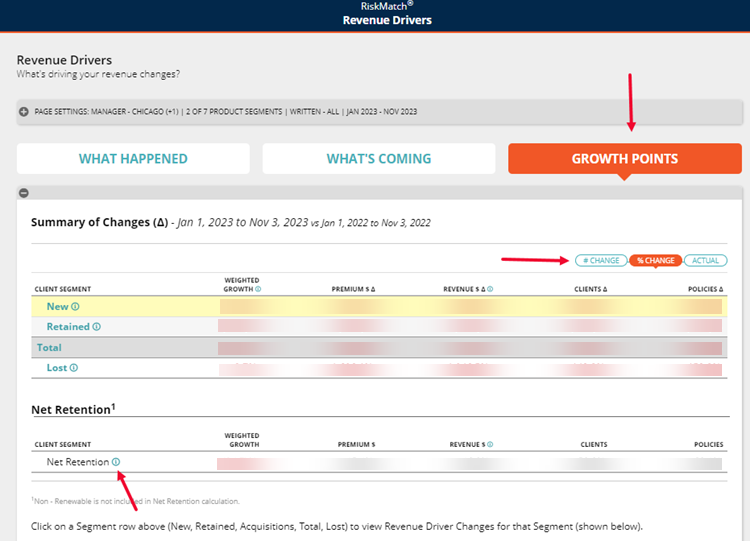
Below are figures for Net Retention, with the following definitions provided in the information icon:
-
Net retention weighted growth = retained weighted growth
-
Net retention premium = retained premium / new + retained + acquired premium (prior period)
-
Net retention revenue = retained revenue / new + retained + acquired revenue (prior period)
-
Net retention clients = retained clients / new + retained clients (prior period)
-
Net retention policies = retained policies / new + retained policies (prior period)
|
NOTE: Acquired clients / policies are included in either new or retained client & policy counts; they are excluded from net retention calculation to avoid duplication. |
By clicking on Client Segment in the main table, thereby showing new, retained and acquisitions, the table will show Revenue Drivers Changes. This information may be sorted by industry, product, client, business unit, intermediary, or market. Reports may be exported.