Multi-Browser Tabs
Multiple Tabs
In Sagitta, you can work in multiple tabs.
-
You can have multiple pages open, or zero Dashboard pages open, and still be able to work with Sagitta.
-
Left-click on a navigation icon to redirect your current view to a specific destination page, without having to open a new window. (except for the “Settings” Global Navigation item)
-
The following functions will continue to open in a separate window:
-
Opening Policy, Policies, Loss ID, Claims, Invoice Number links from the Client Search page
-
Prior / Next Term links on the policies
-
View Purge History for clients
-
Add a new client
-
Policy Info, Insured links on the memos when user opens them from the home activities page.
-
-
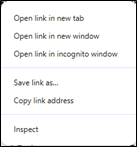
Right-click on an option or page on the Dashboard or Utilities page to access the selected page or option in a new tab or window.
-
Exceptions
-
Pages that already open in a new window (e.g., Utilities > Vertafore Services > InsurLink Admin)
-
-
You can duplicate your current tabs by using browser duplicate functionality. Right-click on the top of the tab and select "Duplicate."
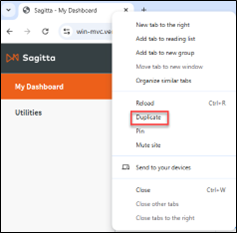
The system will assign a sequentially-numbered window identifier for every open Sagitta session.
-
AMS indicates a Client page.
-
ACT indicates an Accounting page.
-
INT indicates an Integration page.
-
SUB indicates an Other (Maintenance, Personalization, Reports, Miscellaneous, etc.) page.
Blocked State
With direct links and bookmarks introduced, you can access pages even when Sagitta is in a blocked state. A blocked state is when you are on a page and the page behind it is masked. Examples include history views, importing or exporting units, time-out inactivity, or accessing the Settings window.
If you attempt to open another window or duplicate the tab, you will receive a new Sagitta Processing page that displays the following message:
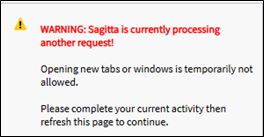
This action prevents any interruption of the ongoing process until the process is complete, or until the window is closed.
Once the process is completed, the processing page can be refreshed and its corresponding content loaded.