Sagitta 2026 R1.3.0 Release Notes
Vertafore is pleased to release Sagitta 2026 R1.3.0. With this release, we are incrementally improving and updating Sagitta to provide you with the best possible experience.
 Enhancements
The following table summarizes the enhancements in this release. The Feature column indicates whether the feature falls into one of the following categories:
-
Core: Available when the release is loaded.
-
Optional: Flag-driven or otherwise not mandatory in the core environment
|
Enhancement |
Description |
FEATURE IS... |
|---|---|---|
|
Sagitta Web Application Server |
Windows Server 2025 is certified for Web Application Server |
Core |
| New Authentication |
New Authentication for eForms and User Password Reset |
Core |
| Modernization | Modern Login and Password Reset | Core |
|
Crime Coverages and Crime Underwriting |
New Crime Coverages and Crime Underwriting pages |
Core |
|
Downloaded Document Names |
Documents are downloaded with appropriate file names for Vertafore eForms, Auto IDs, Loss Notices and Client Certificates, plus ACORD 24 and ACORD 25 |
Core |
| Prompt Removed |
Client Label Prompt is removed when creating a new client |
Core |
| Viewing Policy Pages |
Policy line-item sets can now be viewed in View mode |
Optional |
| Disable Invoicing on Payee |
New flag on Payees to disallow invoicing with specific payee code |
Optional |
|
Direct Bill Commission Statement Download |
New flag on DB Commission Statements to allow users to select a different General Ledger account for Suspense |
Optional |
| Chart of Accounts |
Date Off field added for General Ledger accounts |
Optional |
| Period Control |
Close a period end-date for all divisions with a new Close All button. |
Optional |
| Client Ledger |
Policy Number, Invoice Number and Check Number fields are increased, and case sensitivity is removed |
Optional |
| Vendor Codes |
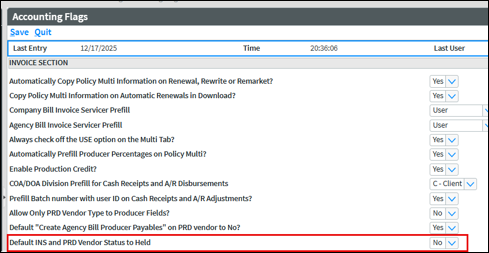
New flag on Accounting Flags to set Vendor Status to Held |
Optional |
|
Insurance Payment Process and Cash Receipts |
Division column is available on Insurance Payment Process and Cash Receipts |
Optional |
| Policy Selection List |
Payee Name and Insurer Name Columns are available on Policy Selection |
Optional |
| Purge / Archive |
New option to Import a spreadsheet of client IDs for Client Purge / Archive |
Optional |
| ACORD 25 Remarks |
A new flag to print AOI / Holder Email in the ACORD 25 Remarks |
Optional |
| ACORD Forms |
New ACORD versions and KVP Export tool to assist support with troubleshooting |
Optional |
System Requirements
For optimal performance of the application, we recommend the following as a minimal workstation configuration:
|
Hardware / Software |
Minimum RequirementS / Recommendation |
|---|---|
|
Processor/CPU Speed |
Recommended: i5, i7 or Multi-core: 2.6 GHz or above Minimum: Core 2 Duo: 2.3 GHz or above Not Supported: Single Core, Reduced-feature CPUs such as Celeron or AMD Sempron |
|
Memory |
Recommended: 16GB Minimum: 4GB |
|
Hard Drive Space |
Minimum: 150Mb of local disc space per user |
|
Operating System |
Recommended: Windows 11 Minimum: Windows 10 (64-bit) |
|
MS Office (Word, Excel) |
Recommended: Office 2016 Professional Minimum: Office 2010 Professional |
|
Browser |
Supported: Edge and Chrome |
| .NET Framework | Minimum: .NET 4.7.2 |
Feedback
https://support.vertafore.com/
We value your feedback to ensure we are working on what is most important to you. Please use MyVertafore to provide feedback. We appreciate your input, whether positive or negative, on any visible change.
What's New
Windows Server 2025 is Required for Web Application Server
Microsoft Windows Server 2025 is required for the Sagitta Web Application Server and must be updated before loading 26R1. See Sagitta Web Application Server 2025 Installation Instructions included in Sagitta 26R1 documentation.
New Authentication
Sagitta’s Vertafore Single Sign-On (VSSO) authentication has been migrated to an OAuth-based VSSO flow for Vertafore eForms and Reset Password. This 26R1 release includes the provisioning implementation, plus an updated login and reset-password experience.

|
With this new authentication, Classic eForms are no longer supported in 26R1. References to Classic eForms will be removed in 26R2. |
CHANGES TO VERTAFORE SERVICE PERSONALIZATION PAGE TO SUPPORT NEW AUTHENTICATION
-
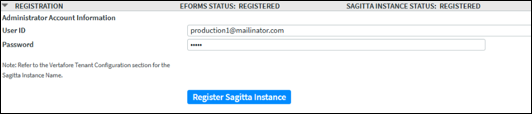
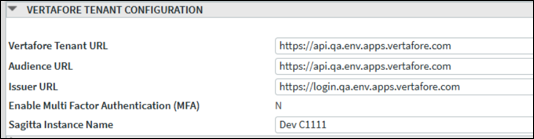
Hosted Agency
-
Sagitta Instance Name field has been moved from the Registration section to the Vertafore Tenant Configuration section, while the existing value is retained
-
A note is added in Registration section that points the user to the new location of Sagitta Instance Name field
-
-
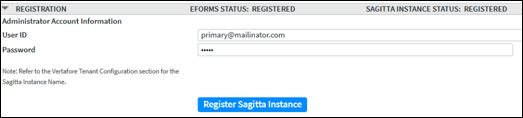
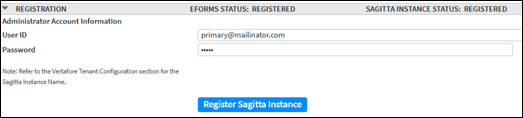
On-Premise Agency
-
The Sagitta Instance Name field has been moved from the Registration section to the Vertafore Tenant Configuration section, while the existing value is retained
-
A note has been added in Registration section that points to the new location of this field
-
New fields are added below the existing fields:
-
Service User
-
Secret
-
Tenant ID
-
Entity ID
-
All four fields will be blank when the release is installed. To add these details, please contact Customer Support.
-
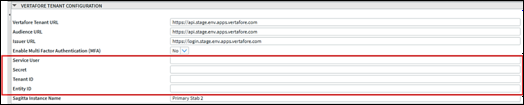
-
HOW TO REGISTER THE NEW AUTHENTICATION
-
On the Vertafore Services Personalization page, go to the Vertafore Tenant Configuration section.
-
This new section is used to register the Sagitta instance and eForms, replacing the former Registration controls at the top of the page.
-
Go to Step 2 to register if you are a hosted agency, or to Step 3 if you are an on-premise agency.
-
-
Register for hosted agencies
-
In the Vertafore Tenant Configuration section, verify that the displayed values are populated.
-
Click Register Sagitta.
-
Once registration is completed, the Status value at the top of the Vertafore Tenant Configuration section will change to Registered.
-
Go to Step 4 – Confirm Registration completed.
-
-
Register for on-premises agencies
-
Contact Vertafore Customer Support to receive the required configuration values for the Vertafore Tenant Configuration section.
-
Enter the values supplied by Customer Support into the Vertafore Tenant Configuration fields.
-
Click Register Sagitta.
-
Once registration is completed, the Status value at the top of the Vertafore Tenant Configuration section will change to Registered.
-
-
Confirm Registration completed
-
Navigate away from the Vertafore Services Personalization page, and then access it again.
-
Verify that the Registration section at the top of the page has changed:
-
The Status indicator will no longer be present.
-
The Register button (in the top Registration section) will be grayed out and inactive.
-
Within the Vertafore Tenant Configuration section, the Status will show Registered
-
-
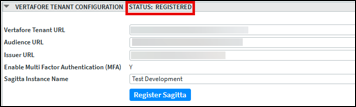

|
Watch the demo on New Authentication and How to Register. |
Login and Password Reset Modernization
The Sagitta Login and Reset Password pages have been updated to a modern interface through the use of Vertafore Authentication.
NEW SIGN-IN PAGE
The enhanced login page is only available for customers who have registered with the new Vertafore Authentication. If you have not provisioned it, you will instead continue to view the classic login pages.
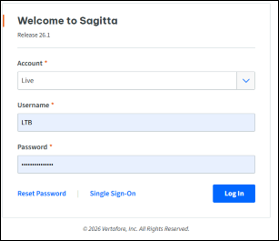
PASSWORD RESET
The Reset Password window now contains password requirements that comply with your agency’s password rules.
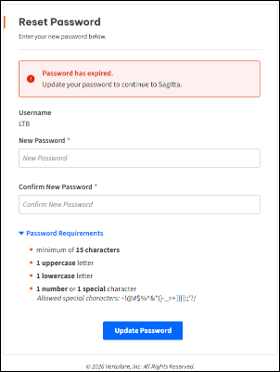
|
|
Watch the demo on Modern Login and Password Reset Pages. |
New Crime Coverage and Underwriting Pages
This update is delivered as part of Project Impact, an initiative focused on reducing inefficiencies s well as improving the user experience.
NEW CRIME COVERAGES
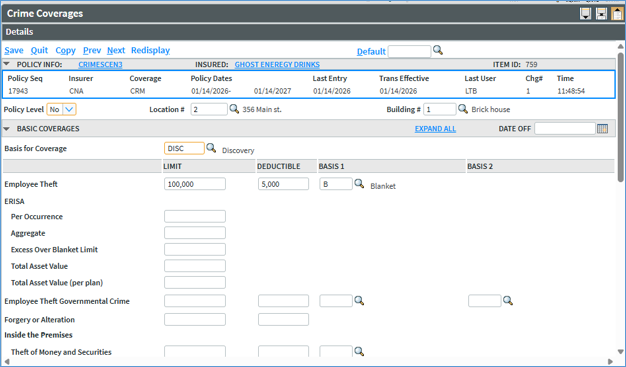
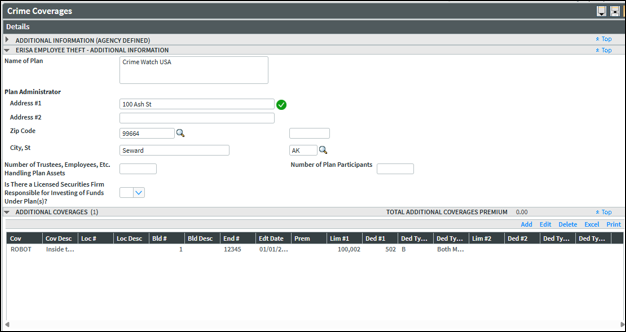
A Crime Coverages page has been introduced in Sagitta to capture crime coverage details. This page replaces crime information entered under Miscellaneous Coverages.
The Crime Coverages page supports either policy-level or location- / building-level coverage, but not both.
-
When Policy Level = Yes, only a single Crime Coverages page is allowed, and coverage applies at the policy level.
-
When Policy Level = No, multiple Crime Coverages pages may be added, each associated with a unique Location and/or Building combination.
-
A policy cannot contain both a Policy Level = Yes page and Policy Level = No pages.
NEW CRIME UNDERWRITING
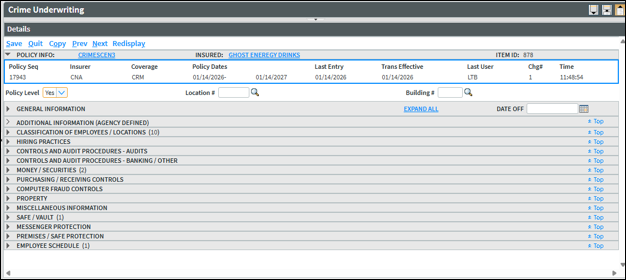
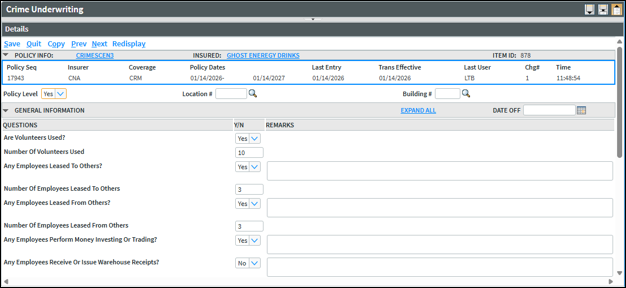
A Crime Underwriting page has been introduced in Sagitta to capture crime underwriting details. This page replaces crime information entered in Miscellaneous Underwriting.
The Crime Underwriting page supports either policy-level or location- / building-level underwriting, but not both.
-
When Policy Level = Yes, only a single Crime Underwriting page is allowed, and coverage applies at the policy level.
-
When Policy Level = No, multiple Crime Underwriting pages may be added, each associated with a unique Location and/or Building combination.
-
A policy cannot contain both a Policy Level = Yes page and Policy Level = No pages.
COPY / NEXT BEHAVIOR FOR CRIME COVERAGES AND UNDERWRITING
Copy / Next now matches records at the Policy, Location, and Building levels. If any of these values change and a matching next-term record cannot be found, Copy / Next will create a new record rather than update an existing one. Please plan your renewal and copy workflows with this behavior in mind.
AUTOMATIC DATE-OFF BEHAVIOR FOR CRIME COVERAGES AND UNDERWRITING
When a Policy Level = Yes record exists and includes location-specific Additional Coverages, dating off an individual location will remove that location’s Additional Coverages from the grid. The policy-level record itself will remain active.
When Policy Level = No records exist at the location level, dating off a location will date off all records associated with that location.
CRIME: NEW PAGES MAPPED TO ACORD 141: CRIME SECTION (2016/03)
Crime Coverage and Underwriting data captured on the new Crime Coverage and Underwriting pages now map to the ACORD 141: Crime Section (2016/03).
This process updates Crime form output from the legacy flow - Miscellaneous Coverages/Underwriting → ACORD 141 Crime Section 2000 (2015/04) to the current ACORD 141 Crime Section (2016/03).
|
|
Changes to Crime Coverages do not update on the ACORD 175 – Change Request. |
Printing The ACORD 141: Crime Section
Crime applications are printed in one of two ways:
-
At the Policy Level
-
By Location / Building, which may generate one or multiple applications, depending on your selections.
Output is determined by how Coverage Policy Level and Underwriting Policy Level are set:
Scenario 1: Coverage Policy Level = Yes and Underwriting Policy Level = Yes
-
A single application is generated.
-
Location # and Building # are blank on all pages.
Scenario 2: Coverage Policy Level = Yes and Underwriting Policy Level = No
-
Multiple applications may be generated.
-
First application:
-
Location # and Building # print on all pages.
-
All fields are populated.
-
-
Subsequent applications:
-
Location # and Building # print on all pages.
-
Coverage, ERISA, and General Questions are blank.
-
Scenario 3: Coverage Policy Level = No and Underwriting Policy Level = Yes
-
Multiple applications may be generated.
-
First application:
-
Location # and Building # print on all pages.
-
All fields are populated.
-
-
Subsequent applications:
-
Location # and Building # print on all pages.
-
Underwriting information is blank.
-
Scenario 4: Coverage Policy Level = No and Underwriting Policy Level = No
-
Multiple applications are generated based on the number of Location / Building combinations.
-
Coverage and Underwriting must align by Location / Building.
-
Each unique Location / Building combination produces a separate application.
CONVERSION OF MISCELLANEOUS COVERAGES AND UNDERWRITING TO NEW PAGES
What the Conversion Does
-
Miscellaneous Coverage and Miscellaneous Underwriting Crime records for active policies are converted to the new Crime pages once the 26R1 release is applied to Sagitta.
-
“Active” policies are defined as CNR flag = null, CNR flag = I and M
-
-
Converted Miscellaneous pages are dated off with the latest transaction date.
-
A change record is added that describes the conversion; successful conversions = C status, conversions with errors = P status.
-
Policy Information Control is updated for insurer / coverage combinations on policies that contained CRIM Miscellaneous Coverage or Underwriting.
What to Expect After the Conversion
-
Some fields do not map to the new pages and will be blank after conversion (for example, Basis for Coverage is mandatory on the new page but has no source on Miscellaneous — it will be blank and must be completed on first use).
-
User-defined fields on Miscellaneous Crime pages are not converted. Identify affected policies with these report builder statements:
-
SORT OL.UNDERWRITING.ADDLINFO 6 7 8 9 10 11 12
-
SORT OL.COVERAGES.ADDLINFO 6 7 8 9 10 11 12
-
Conversion Exceptions
-
If duplicate question codes are provided, only the last occurrence is mapped.
-
Remarks that exceed 160 characters are truncated; any content beyond 160 characters is reported as an error.
-
Only Miscellaneous pages configured for the CRIME line of business are converted. Question codes from other LOBs are reported as errors.
-
Only Primary coverage codes are mapped to Basic Coverages: EDPFR, EMPGT, EMPTH, ERISA, FORGA, FTF, MOCPC, MSECP, MSOFF, MSOP, and ROBOT. All other coverage codes are mapped to the Additional Coverages section.
-
Deductible amounts ending in .00 are converted without the decimal portion on the new page.
-
If a Miscellaneous coverage code does not exist in the Crime look-up, the record is still converted, and an error is logged, so the code can be added through Generic Codes.
-
Deductible percent amounts are not converted and are instead reported as an error.
-
Multiple Primary coverage codes mapped to mismatched locations / buildings will not be converted and instead reported as the record being skipped.
-
Codes added to the Discount / Surcharge section of the Miscellaneous Coverage page do not convert.
-
The Miscellaneous Underwriting question for question code CRIM34 — “Is a complete physical inventory made?” (If yes, how often?) — only the following remarks for this question will be converted:
-
Semi-Annual
-
Semi Annual
-
Annual
-
Quarterly
-
-
If a user-created coverage code is added to the Miscellaneous coverage codes for the CRIME lob, an entry will be logged to the error report that reads: “xxxx does not exist in ACORD.CR.COVCD.CODES. Add via Generic Codes Maintenance.”
Exceptions Report
-
The conversion program writes conversion errors to a report titled Miscellaneous Data Conversion Mapping Failures.
-
The Miscellaneous Data Conversion Mapping Failures report will appear in the Processed Reports section of the Dashboard for staff configured on the Overnight UTM Process Parameters page to receive UTM reports.
CODES ADDED IN SUPPORT OF CRIME
New files and codes are added in support of the new pages. Refer to the document, SAG26R1 New ACORD Form Codes in Support of Crime in Vertafore eForms for a comprehensive list.
|
|
Watch the demo on Crime Coverages and Underwriting Pages. |
Download Sagitta Documents with Enhanced File Names
This update is delivered as part of Project Impact, an initiative focused on reducing inefficiencies and improving user experience.
Documents downloaded from Sagitta are now downloaded with enhanced file names that include relevant details such as customer code and date. Each file name also becomes the document description in ImageRight with the drag / drop of the file into the file tree.
File Names by document type:
-
ACORD Forms – Client and Policy Level:
-
VFORM ClientCode Description Today’s Date (MMDDYYYY).pdf
-
-
Auto ID Cards:
-
VFAUTO ClientCode AutoIDTemplateDescription Today’s Date (MMDDYYYY).pdf
-
-
Loss Notices:
-
VLOSS ClientCode- Description Today’s Date (MMDDYYYY).pdf
-
-
Certificates, ACORD 24 and 25:
-
ClientCode_TemplateDescription_MasterNumber_Today’sDate(MMDDYYYY)_Staff_PID.pdf
-
|
|
Spaces in file names are not supported by all our systems. We replace them with underscores so you can access your files without any problems. |
|
|
Appropriate names for Units at Risk and EPIs will be released in a future release. |
|
|
Watch the demo on Download Sagitta Documents with Enhanced File Names. |
Client Label Prompt is Removed
This update is delivered as part of Project Impact, an initiative focused on reducing inefficiencies and improving user experience.
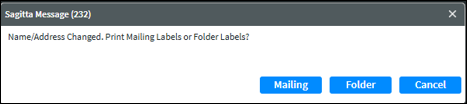
The Client label prompt will no longer be displayed on the Client Details page when the following situations occur:
-
A new client is created,
-
The name of the client is edited and saved, and
-
Any address fields are edited and saved.
Prompt removed from Client Details
|
|
Watch the demo on Client Label Prompt Removed. |
Access Policy Line Item Set Detail in View Mode
This update is delivered as part of Project Impact, an initiative focused on reducing inefficiencies and improving user experience.
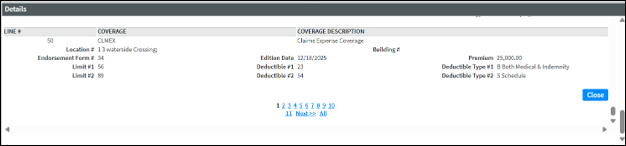
Policy Line Item Set data is now fully visible in View Mode. You are in View mode (also called Display) when you access a policy but do not choose a transaction type (Maintain, Endorse, etc.). Accessing a Policy page in View Mode will display new View and ViewAll options. When a single line is selected in the Line Item Set, and View is also selected, line item data is expanded in View Mode to show all the fields of that entry. ViewAll expands all the line items to view all the details of the Line Item Set at one time.

The single View option displays the line item and has the option to go Prev, Next, or Close.

The ViewAll option displays all the line items, per the amount to display set in Personalization. There is pagination to view additional pages of line items that are not displayed on the first page.
This new functionality is available on the following pages:
-
Business Auto Coverage
-
Business Auto Underwriting
-
Commercial Property Blankets
-
Commercial Property Location Specific Coverage
-
Commercial Property Policy Coverages
-
Commercial Umbrella Coverage
-
Commercial Property Underwriting
-
Commercial Umbrella Underwriting
-
Crime Coverage
-
Crime Underwriting
-
Equipment Floater Coverage
-
Flood Coverage
-
Garage and Dealers Coverage
-
General Liability Coverage
-
General Liability Underwriting
-
Homeowners Coverage
-
Miscellaneous Coverage Information
-
Miscellaneous Underwriting Information
-
Personal Auto Coverage
-
Personal Umbrella Coverage
-
Workers’ Compensation Coverage
-
Workers’ Compensation Underwriting
|
|
The remaining pages will be completed in a future release. |
|
|
Watch the demo on Access Policy Line Item Set Detail in View Mode. |
Disable Invoicing for Specific Payee
A new flag, Disable Invoicing, has been added to the Payee Codes page to block invoicing for a payee that has this flag set as Yes.
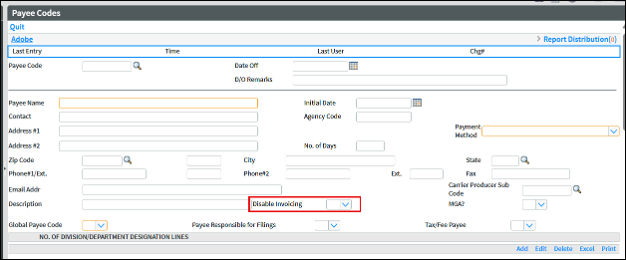
This new flag affects the following pages with a payee code that creates an invoice:
-
Client Multi Information
-
Policy Multi Information
-
Invoice Wizard
-
Multi tab
-
Installments tab
-
Finance tab
-
Invoice tab
-
-
Web Services
-
policyMulti
-
invoiceInsert
-
commissionStatementInsert
-
-
REST API
-
Client Multi
-
-
One Step Direct Bill Receipts/Disbursements
-
Direct Bill Commission Statement Processing
When a Payee Code is entered or searched where Disable Invoicing is set to Yes, an error message is displayed that states invoicing is not allowed for that Payee.
|
|
Watch the demo on Disable Invoicing for a Payee. |
New Option to Choose a General Ledger Account for Direct Bill Commission Suspense
A new flag, Prompt To Override Suspense On Batch, has been added to the Direct Bill Commission Statement Flags page to allow a different General Ledger Account to be selected when clicking Suspense on the Direct Bill Commission Statement Processing Unmatched page.
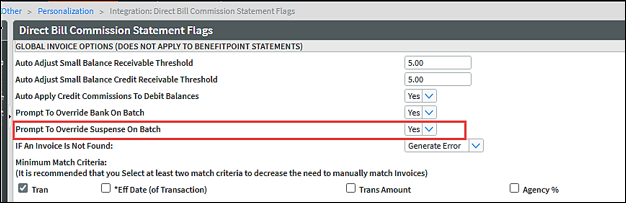
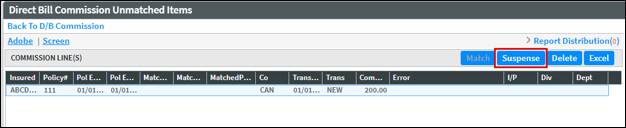
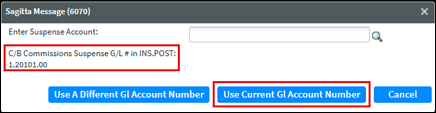
When the flag is set to blank or No and you click Suspense, the existing prompt to select a division is displayed. The General Ledger Account automatically assigns the C/B Commissions Suspense G/L# in INS.POST.
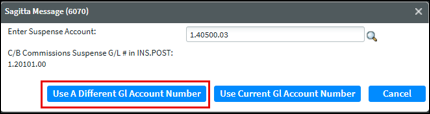
When the flag is set to Yes and you click Suspense, the existing prompt to select a division is displayed, followed by the new prompt, Enter Suspense Account.
To enter a different General Ledger Account, enter or search for an account and select Use Different GL Account Number. The General Ledger Account must match the Division chosen in the previous prompt.
To retain the prefilled account from INS.POST, select Use Current GL Account Number without making changes.
|
|
Watch the demo on Select a Different General Ledger Account for Direct Bill Suspense. |
Date Off on Chart of Accounts
Date Off and Date Off Remarks fields are now available on the Chart of Accounts page. The new Date Off field allows a General Ledger Account to be dated off, making it unavailable for selection in other programs. General Ledger Accounts may be dated off without requiring a zero balance.

If a General Ledger Account has a date in the Date Off field, the GL Account is not shown within Search. These programs are in error if the General Ledger Account is entered:
-
AR Adjustments
-
Budget Entry
-
Cash Receipts
-
Client Cash Receipts/Vendor Checks
-
Inter-divisional Journal Adjustments
-
Journal Adjustments
-
Pay Insurance Invoice
-
Vendor Payable Invoice
-
Web Services:
-
cashReceiptInsert
-
journalEntryInsert
-
vendorPayableInsert
-
vendorPayableUpdate
-
|
|
Watch the demo on Date Off in Chart of Accounts. |
Close All Month-Ends in Period Control
A new CloseAll button is now available on the Period Control page, which allows users to simultaneously close month-end periods for multiple divisions.

-
Navigate to Other > Maintenance > Accounting > Period Control.
-
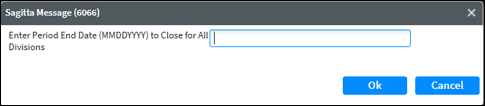
Select CloseAll at the top of the page.
-
In the prompt, enter the Period End Date and click OK.
-
A confirmation message is displayed at the top of the page that reads, All divisions are closed.
|
|
Watch the demo on CloseAll Option in Period Control. |
Client Receivable Ledger Field Enhancements
The following enhancements have been made to the Policy Number, Invoice Number, and Check Number fields on the Clients Receivable Ledger / Display page.
-
Policy Number
-
Characters entered in lowercase letters are automatically converted to uppercase letters when you tab out of the field.
-
Partial searches are now supported using [ ].
-
-
Invoice Number
-
Characters entered in lowercase letters are automatically converted to uppercase letters when you tab out of the field.
-
The field length has been expanded to 12 characters.
-
-
Check Number
-
Characters entered in lowercase letters are automatically converted to uppercase letters when you tab out of the field.
-
The field length has been expanded to 15 characters.
-
|
|
Watch the demo on Client Receivable Ledger Field Enhancements. |
Vendor Codes – Default Vendor Status
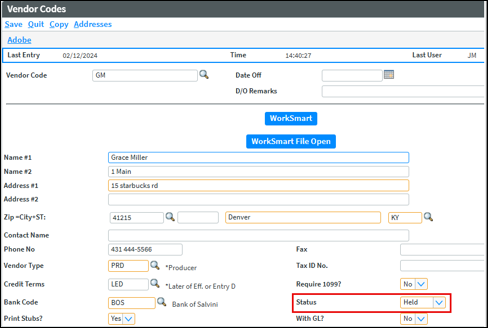
When a vendor code is automatically created by adding a payee or staff code, the Vendor Status behavior can now be controlled through a new flag.
A new flag, Default INS and PRD Vendor Status to Held, has been added to the Accounting Flags page. Available values are blank, Yes, or No.
-
Blank or No: Vendor Status continues to default to Released when a payee or staff code is created.
-
Yes: Vendor Status defaults to Held when a payee or staff code is created.
Example of PRD Vendor Code
|
|
Watch the demo on Default Vendor Code Status to Held. |
Division Column Available in Insurance Payment Process and Cash Receipts
A new Div column is now available to add in the Insurance Payment Process and Cash Receipts grids. These columns are defaulted to Hidden.
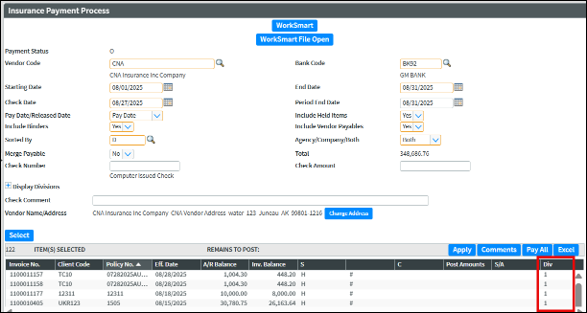
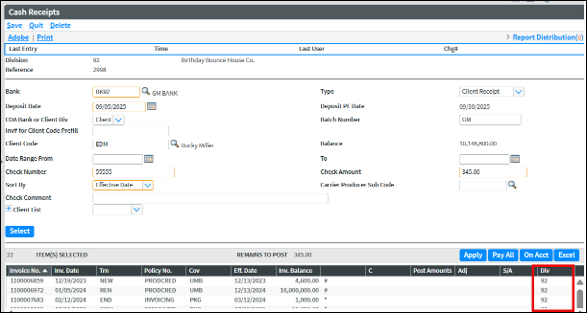
Please refer to the online Help article titled, Changing How a Grid Displays, to un-hide the Div column for AP_110_LIS_1 (Insurance Payment Process) and AR_105_LIS_2 page (Cash Receipts).
|
|
Watch the demo on Division Column on Insurance Payment Process and Cash Receipts. |
New Insurer and Payee Name Columns Available on Policy Selection Grid
New Payee Name and Insurer Name columns are now available to add into the Policy Selection grid. These columns are defaulted to Hidden.
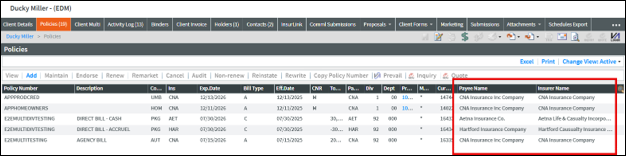
Please refer to the online Help article titled, Changing How a Grid Displays, to un-hide the Payee Name and Insurer Name for PI.100 (Policy Selection).
|
|
Watch the demo on Insurer and Payee Name Columns on Policy Selection. |
Import Client IDs on Purge / Archive
The Purge / Archive process has been enhanced to simplify the record selection process on the page, which will allow more granular control of the records to be purged or archived.
The Purge / Archive template is available for downloading from the Dashboard, under Utilities > Templates.
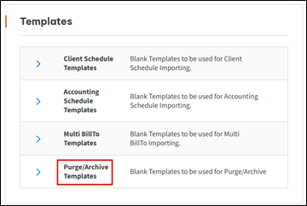
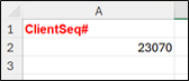
To include a Client in the Purge or Archive, add its Item ID to the ClientSeq# column in the downloaded XML file.
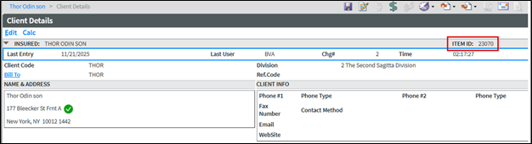
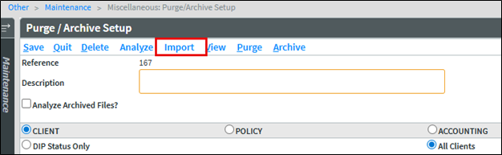
On the Purge / Archive Setup page (Other > Maintenance > Miscellaneous), the XML file can be imported by clicking the Import button.
|
|
Import is only available for the Client Purge / Archive type, and it is only available when a Reference number is loaded. |
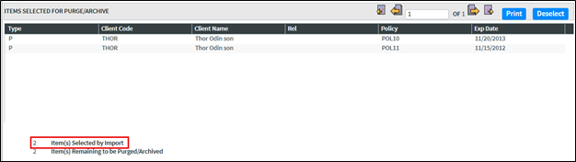
The selected Clients and their Policies will be displayed in the Items Selected for Purge / Archive grid. The number policies and clients selected will be indicated below the grid as Item(s) Selected by Import.
|
|
Watch the demo on Import Client IDs on Purge/Archive. |
Additional Interests and Holders Email on ACORD 25
A flag has been added to the Certificates/EPI’s personalization page (Other > Personalization > System) titled, Print Additional Interests/Holders Email in Remarks for ACORD 25?
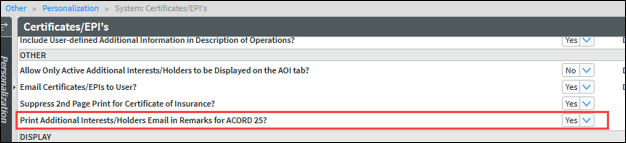
When the flag is set to blank or No, Additional Interest/Holder emails will not print on the ACORD 25 (2016/03).
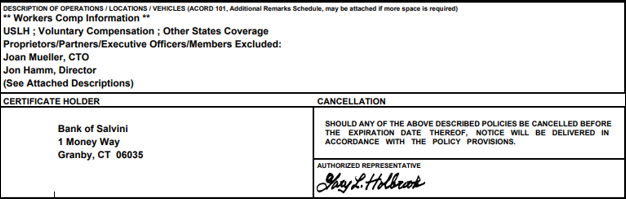
When the flag is set to Yes, Additional Interest/Holder emails will print to the Description of Operation section of the ACORD 25 (2016/03) form, following Coverage and Supplemental Name Information.
Additional information:
-
If no emails exist, the header is still placed, but no addresses are listed.
-
This behavior applies only to the ACORD 25 (2016/03) version.
-
Emails are also reflected on certificates issued through InsurLink.
|
|
Additional Interest/Holder emails will print to the Description of Operation section after Coverages and Supplemental Names, with the exception of Additional Interests that have associated Locations, Vehicles, and/or Scheduled Items. These units will print after the Additional Interest/Holder emails. |
|
|
Watch the demo on AOI/Holder Email Prints to ACORD 25 Remarks. |
Commission Statement Insert GUIDs
Commission Statement Insert GUIDs from BenefitPoint will be deleted after 60 days, regardless of the Commission GUID setting on the Web Service Import page. Commission Statement Insert GUIDS from other sources will be deleted, based upon the setting on Web Service Import.
New Additions to the Vertafore ACORD Library
|
acord form |
state |
version |
form name |
|---|---|---|---|
| ACORD 1 | CA | 2023/01 | Property Loss Notice |
| ACORD 2 | CA | 2023/01 | Automobile Loss Notice |
| ACORD 3 | CA | 2023/11 | General Liability Notice of Occurrence/Claim |
| ACORD 25 | 2025/12 | Certificate of Liability Insurance | |
| ACORD 38 | DE | 2021/07 | Delaware Notice of Information Practices |
| ACORD 38 | VA | 2018/12 | Virginia Notice of Information Practices |
| ACORD 38 | WV | 2020/09 | West Virginia Insurance Information Practices |
| ACORD 50 | FL | 2025/08 | Florida Auto Insurance Identification Card |
| ACORD 50 | IA | 2025/04 | Iowa Auto Insurance Identification Card |
| ACORD 50 | LA | 2024/10 | Louisiana Auto Insurance Identification Card |
| ACORD 51 | CA | 2024/10 | California Auto Insurance Identification Card |
| ACORD 52 | NV | 2025/05 | Nevada Auto Insurance Identification Card |
| ACORD 60 | TX | 2025/02 | Personal Automobile Insurance |
| ACORD 61 | CA | 2025/10 |
California Auto Supplement, Mandatory Uninsured Motorists Bl Offer |
| ACORD 61 | ME | 2025/09 | Maine Auto Supplement |
| ACORD 61 | MI | 2025/07 | Michigan Choice of Bodily Injury Liability Coverage Limits |
| ACORD 61 | NM | 2025/07 | New Mexico Auto Supplement |
| ACORD 61 | VA | 2025/07 |
Virginia Auto Supplement – Notice of Optional Medical and Disability Coverage |
| ACORD 61 | WI | 2025/02 |
Wisconsin Auto Supplement, Mandatory Uninsured Motorists Bl Offer |
| ACORD 61 | UT | 2025/09 | Utah Auto Supplement |
| ACORD 62 | GA | 2025/08 |
Georgia Auto Supplement – Uninsured Motorists Coverage Selection / Rejection |
| ACORD 62 | TX | 2025/02 | Texas Auto Supplement (Spanish Version) |
| ACORD 62 | UT | 2025/09 | Utah Auto Supplement |
| ACORD 64 | NJ | 2025/07 | New Jersey Auto Supplement |
| ACORD 130 | CA | 2023/03 | California Workers Compensation Application |
| ACORD 133 | 2025/05 | Workers Compensation Insurance Plan Assigned Risk Section | |
| ACORD 133 | FL | 2020/01 |
Florida Workers' Compensation Joint Underwriting Association, Inc. Addendum to ACORD 130 FL |
| ACORD 133 | NJ | 2025/03 |
New Jersey Workers Compensation Insurance Plan, Coverage Request Form |
| ACORD 137 | MT | 2025/04 | Montana Commercial Auto Coverages/Limits Section |
| ACORD 137 | NJ | 2025/05 | New Jersey Commercial Auto Coverages/Limits Section |
| ACORD 138 | MT | 2025/04 | Montana Garage and Dealers Coverages/Limits Section |
| ACORD 138 | NJ | 2025/05 | New Jersey Garage and Dealers Coverages/Limits Section |
| ACORD 141 | 2016/03 | Crime Section |
ACORD FORM UPDATES
LOSS NOTICES
When creating a Loss Notice, it follows this hierarchy for selecting the proper Loss Notice form:
-
Selecting Loss Type will generate the specific form for that Loss Type (ACORD 1, 2, or 3).
-
It then checks the state entered on the claim; if that field is blank, it checks the state on Policy Details.
-
If the policy state is blank, the (non-state-specific) 1, 2, or 3 Loss Notice is generated.
-
If the state of CA is entered as the State on the claim, or as the State on Policy Details, the CA state-specific version of the form is generated.
-
The ACORD forms for CA Loss Notices are now available in the Vertafore ACORD Library.
-
Please refer to the Loss Notices Help page for more information regarding Loss Notices.
DIAGNOSTIC TOOLING FOR NEWLY MAPPED ACORD FORMS
Use the Export tool for ACORD forms on the Create Forms page, Client or Policy level, to diagnose ACORD forms issues. You will only need to use this at the request of Customer Service
To export from the Create Forms page, follow these steps:
-
Access the Create Forms page from the Client or Policy level.
-
Select the form intended for export.
-
Right-click the form and click the Export option.
-
Form data will be saved as an XML file to your Downloads folder for recently mapped ACORD forms.
-
The following error will be displayed on forms that are not mapped with newer techniques: Export Not Available, Use JSONEXPORT from Policy Details Page.
|
|
Watch the demo on ACORD Forms Exported to KVP. |
ACORD FORM MAPPING UPDATES
Notable mapping updates include the following:
-
The Producer Email Address maps on the ACORD 133 and ACORD 133 NJ in the Producer’s Certification section of the form.
-
ACORD 64 NJ is now included with the 137 and 138
-
ACORD 130 follows this pattern for pre-filling SIC codes:
-
If an SIC code is present in both Supplemental Name and on Policy Details, SIC code data is pulled from the Supplemental Name.
-
If no Supplemental Name is present, the SIC code data is retrieved from the Policy Details page if available.
-
If a Supplemental Name is present with no SIC code data, and the SIC code is available on Policy Details, the SIC code field on the form is left blank.
-
ACORD 25 VERSION UPDATE
The Certificate of Liability has been updated to the latest version: 12/2025. Please refer to ACORD Certificate Policy Selections Page, Form Version Drop-Down Section for more information.
|
|
Watch the demo on ACORD 25 Version Update. |
ACORD FORM MAPPING GUIDES IN SAGITTA HELP
ACORD Form mapping guides are available in Sagitta Help. As newer versions of forms are added to Sagitta, mapping guides for the previous and newer edition of each form will be available.
|
|
Watch the demo on ACORD Forms. |
Report Builder and SQL Dictionaries Added
For a list of Crime Dictionaries and Web Service tags, refer to the document SAG26R1 New Dictionaries and Web Service Tags for Crime.
|
Sagitta file |
attribute dict's |
synonym dictionaries |
odbc sql dictionaries |
|---|---|---|---|
| CHART.OF.ACCOUNTS.MASTER | 16 | DATEOFF | DATEOFF |
| CHART.OF.ACCOUNTS.MASTER | 17 | DATEOFFREMARKS | DATEOFFREMARKS |
| PAYEES | 40 | DISABLEINVOICING | DISABLEINVOICING |
Web Service Tags Added
|
SAGITTA FILE |
WEB SERVICE TAG |
|---|---|
| CHART.OF.ACCOUNTS.MASTER | DateOff |
| CHART.OF.ACCOUNTS.MASTER | DateOffRemarks |
| PAYEES | DisableInvoicing |
Fixes
| area | id | release notes |
|---|---|---|
| Accounting | DS1087 |
The Pay All option now applies to both same division (*) invoices and different division (#) invoices that are set up in Interdivisional Control on Insurance Payment Process, Vendor Payables Payment Process and Company Bill Insurer Receipts. (DE14305) |
| Accounting | DS11296 |
The Direct Bill Commission Statement now adjusts the invoice, instead of splitting it, when multiple commission lines are selected to apply to one invoice and Adjust is selected. (DE9609) |
| Accounting | DS12535 |
Direct Bill Commission Statement Matching was updated so that, when applying an Adjust to an invoice, insurer receivables remain accurate regardless of the order in which multiple unmatched lines are selected. (DE29655) |
| Accounting | DS13253 |
Installments has been updated so that using the POST option now successfully posts invoices with an effective date greater than 12/31/2029. (DE65992) |
| Accounting | DS13742 |
The system will no longer stop responding when there is no personalization in Interdivisional Control, with the user attempting to create an invoice. (DE68848) |
| Accounting | DS13783 |
The Production Report can now generate large amounts of data for date ranges that exceed one year. (DE69174) |
| Accounting | DS13989 |
A company bill invoice, which generated an error regarding a missing general ledger account number, can now be deleted. (DE69985) |
| Accounting | DS13990 |
A carrier payable created from Multi BillTo with two payees that are the same, now displays the correct amounts on the payable. This was a display issue. (DE68979) |
| Accounting | DS14615 |
The Insurer Receivables Ledger no longer has duplicate entries. (DE73121) |
| Accounting | DS14666 |
A commission adjustment now posts the correct agency amount when a company bill receipt is adjusted on an invoice that has an additional transaction, e. g., FEE. (DE73005, DE75206 and DE75434) |
| AgencyOne | DS14161 |
The Bento Box is now displayed for users who do not possess the system coordinator role in Role Based Security. (DE71801) |
| AgencyOne | DS14430 |
Client Names that include an apostrophe are successfully returned when performing the Sagitta - Unified Search. (DE72362) |
| AgencyOne | DS14676 |
The Bento Box now opens the expected modal window for menu selections, such as Accounting, when accessed from supported pages. (DE56706) |
| Client | DS4964 |
Producer Title, Servicer Title, and Servicer Work Phone now prefill properly in AMSWord. (DE30594) |
| Client | DS10328 |
The leading zeroes provided in the FEIN field for clientInsert and clientUpdate SOAP Web Methods are retained. (DE44782) |
| Client | DS11214 |
Claim Contact Notes no longer adds incorrect line breaks in Chrome and Edge. (DE51495) |
| Client | DS13540 |
The Client Contact page displays the Contact Type Desc and Contact Code Desc columns. (DE67651) |
| Client | DS13717 |
The Client Details page no longer loads a blank page. (DE68708) |
| Client | DS14732 |
Client Multi API now prevents create, update, and delete actions when the Staff Security Policy has Client Screen Display Only set to Yes. (DE74125) |
| Download | DS14036 |
Company Download AUTOB transactions no longer fail (UPDF) when there is a vehicle with a Company# of four digits, e.g., 1001. (DE71129) |
| Grids | DS11246 |
Holders/Additional Interests Tab on the ACORD 24 and ACORD 25 Certificates, Insurance Payment Process and Company Mailbox now display large amounts of data in grids when using Chrome or Edge. (DE51501) |
| Integrations | DS14018 |
Sagitta launches WorkSmart from the Claims page with a flow that matches other key pages in the application. Authentication is presented when needed, so users can continue into WorkSmart without error. (DE70967) |
| Invoicing | DS14469 |
A BenefitPoint commission statement with 100 percent house producer, now updates the Agency%, Agency Amount and Producer Amount correctly. (DE73861) |
| Maintenance | DS14216 |
An email address can now accept a – (dash) as part of its name. (DE72128) |
| Reporting | DS13649 |
Reports that print to a PDF no longer display ampersands at the end of dollar amounts. (DE75181) |
|
User-Defined Fields |
DS11820 |
A Multiline text user-defined field now uses the Row Length instead of Length field to determine the size of each row. (DE48794) |
|
User-Defined Fields |
DS11895 |
A user-defined field with a date format now retains the date when a calendar look-up is used. (DE55969) |
|
Vertafore eForms |
DS246 & DS10352 |
On ACORD 130 and 130 FL, General Questions for additional states listed under Workers Comp Underwriting are displayed on the ACORD 101 Additional Remarks Schedule. (DE7618 & DE10226) |
|
Vertafore eForms |
DS1736 |
On ACORD 130, Experience Modification information for additional states listed under Workers Comp Underwriting is displayed on the ACORD 101 Additional Remarks Schedule. (DE16900) |
|
Vertafore eForms |
DS4217 |
On the ACORD 133, the location information is no longer mapped to Question 13: Do You or Your Employees Regularly Operate From a Base Terminal which are used to Load, Unload, Store or Transfer Freight? If Yes, Please Provide a List of Terminal Addresses. (DE26984) |
|
Vertafore eForms |
DS10346 |
On ACORD 127, Row 9 of the Driver# column is now aligned with the other Driver numbers listed on the form. (DE13838) |
|
Vertafore eForms |
DS11060 |
ACORD forms now print and save with the title, VFORM. Previously, they printed or saved with VFAUTO. Auto IDs will continue to print and save with VFAUTO. (DE50379) |
|
Vertafore eForms |
DS11094 |
On ACORD 130, only Additional Interests that contain WORK and CPKGE in the ACORD Line of Business for eForms will be displayed in the Additional Interest section of the form. (DE50317) |
|
Vertafore eForms |
DS11286 |
Line 2 of a Supplemental Name now pre-fills to ACORD 130. If the character limit is exceeded, the remaining text flows to the 101 Additional Remarks Schedule. (DE47106) |
|
Vertafore eForms |
DS12090 |
Secondary Name for Auto ID Cards pre-fills to ACORD 50 TX. (DE57263) |
|
Vertafore eForms |
DS13504 |
The Company Phone and Auto Claim Reporting Number now pull from the Auto ID Creation Vehicles screen to ACORD 50 AR, 50 IA, 50 TX, and 50 WV. (DE55584) |
|
Vertafore eForms |
DS13597 |
Auto ID Cards now print the endorsement date on the card when the option to Use Endorsement Date over Effective Date is selected. (DE68093) |
|
Vertafore eForms |
DS13721 |
The ACORD 131 Umbrella / Excess Section no longer prints blank headings in the Remarks section. (DE68726) |
|
Vertafore eForms |
DS13984 |
ACORD 125 and ACORD 125 CA now display all locations, whether they have a building number or not. (DE71051) |
| Web App | DS13561 |
The error message, Sagitta windows from the external app won’t be launched, will be displayed where appropriate while not preventing a switch between Sagitta tabs. (DE67874) |
| Web Services | DS13586 |
The Policy Multi SOAP Web Service no longer removes the Multi BillTo Information when Production Credit values are updated. (DE68063) |
| Web Services | DS13872 |
cashReceiptInsert receipt imports will now properly create a COA receivable. (DE69790) |
| Web Services | DS14165 |
COA amounts are not doubled when sent from Web Services. (DE71837) |
Questions?
If you encounter problems or have questions concerning this release, Vertafore offers the following helpful resources:
-
Search the Knowledge Base on My Vertafore.
-
Create a Case at My Vertafore.
|
|
Watch all the demos for 26R1. |