This feature is used to convert an agency bill invoice into a direct bill company invoice when the MGA is bypassed and the agent or insured’s payment is sent directly to the carrier or finance company.
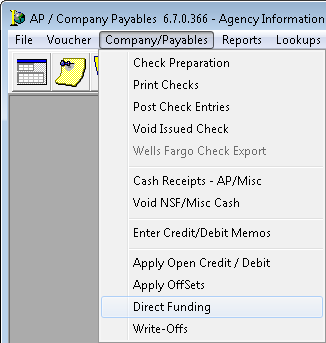
- On the Company/Payables menu, click Direct Funding.
-
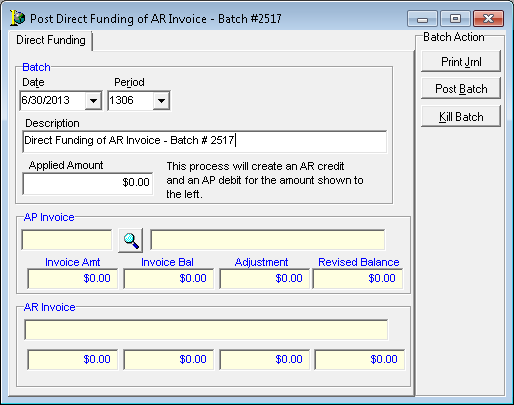
In the Period field, ensure that the proper period is selected.
-
In the Applied Amount field, enter the amount that was sent to the carrier or finance company.
-
Click the magnifying glass to search for the AP invoice.
-
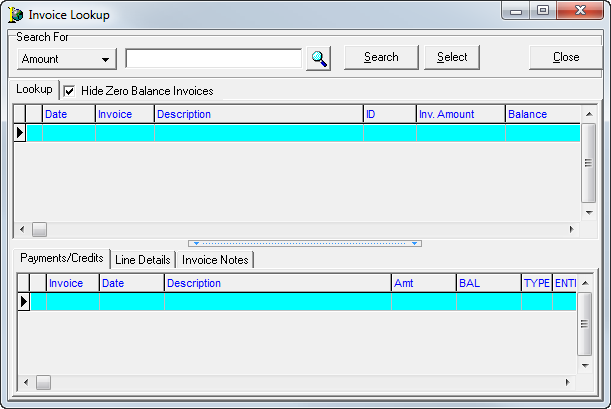
In Invoice Lookup, use the buttons and features described in the table below to perform an invoice search.
| Field/Feature | Function |
|---|---|
| Search For |
Select the criteria to be used to search for an invoice. |
| Magnifying glass | Open the Invoice Search dialog box for an in-depth search of the system. |
| Search | Click to complete the search process once the search criteria have been entered. |
| Select | Add the invoice into the batch |
| Close | Exit Invoice Lookup |
| Hide Zero Balance Invoices | Suppress invoices that have no monetary impact |
| Lookup tab | Displays selected details for the invoices |
| Payments/Credits tab | Displays all payments and credits for the highlighted Invoice |
| Line Details tab | Displays the accounts and amounts that were debited and credited |
| Invoice Notes tab | If an invoice note has been added to the invoice, you can access them using this tab |
- Enter the search criteria, and then click Search.
- Select the applicable invoice.
- Click Select.
- In the Post Direct Funding of AR Invoice dialog box, review the Revised Balance field for accuracy.
- Click Print Jrnl to print the journal.
- Click Post Batch to post the batch.
|
To reverse a credit invoice batch, a user must process two debit credit memos to the affected invoice as described in Direct Fund a Credit Invoice. The first Dr/Cr memo is processed in AR to move the balance to an adjustment or wash account. The second Dr/Cr Memo is processed in Company Payables to move the balance from the adjustment or wash account back onto the invoice. |
 See Also