Global Navigation: Bento Box

|
Note: This update represents only a portion of the AMS360 24R2 release. Please navigate to AMS360 2024 R2 Release Notes to review other enhancements and fixes that were part of this release. |
Formerly, AMS360 employed an older functionality to provide users with access to other Vertafore products. Now, the Bento Box / Vertafore Suite serves as a central hub for quick access to these other products. This newly designed look contains navigation buttons (links) that will allow users to effortlessly transition to various associated systems or views.
|
Note: The Bento Box is exclusively available to AgencyOne users, ensuring that only authorized personnel are capable of leveraging this enhanced functionality. |
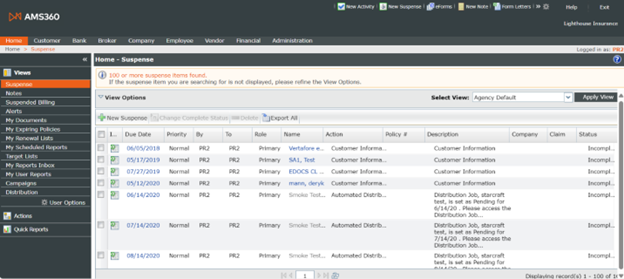
Previous AMS360 page:
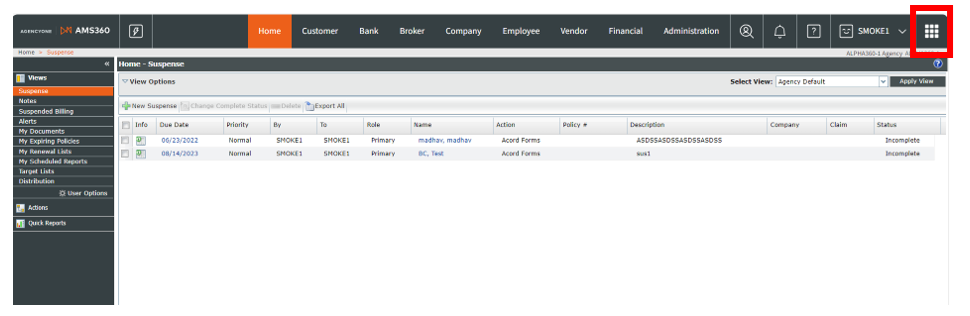
NEW AMS360 page, depicting AGENCY ONE:
As of 25R2, we have updated the centers to what is shown below:

Step 1: Log into the Global Nav environment with your VSSO-enabled user credentials that were configured with Agency One and AMS360 products. Other integrated products include Commercial Submissions, Credential Manager, PL Rating, ImageRight, and Reference Connect.
Step 2: Click on the Vertafore Single Sign-On link and enter your credentials to successfully log in.
Step 3: Select "Agency" and enter "AMS360."
Step 4: As verification, the AMS360 home page should pop up with the Agency One logo in the corner, as well as the updated navigation bar. You will see the Bento Box in the upper right-hand corner (nine small dots as shown in Figure 1). If the page has been collapsed due to screen size or font size, you will instead see the Hamburger in that location (three horizontal lines as shown in Figure 2):
Figure 1 (Bento Box):

Figure 2 (Hamburger):

Step 5: If you have entering via the Hamburger, clicking on it will activate a drop-down menu, where the Bento Box/ Vertafore Suite will be available (see Figure 3):
Figure 3 (Bento Box via Hamburger drop-down menu):
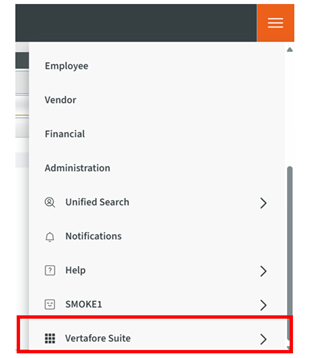
Step 6: Whether you are entering from the Bento Box or from the Hamburger, the Vertafore suite will present a "drawer." Within this drawer you will find various integrated product links:
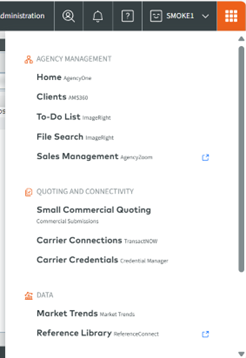

VSSO products that include PL Rating and Credential Manager will load in the same tab.
Non-VSSO product, such as Agency Zoom will open in a new tab, as indicated by the pop-out-box icon.