AMS360 2024 R2 Release Notes
We are pleased to release AMS360 2024 R2. With each release, we are improving and updating AMS360 to provide you with the best possible experience.
 System Requirements
Required
Minimum workstation requirements as shown in the AMS360 Software Support Matrix.
Supported
-
Microsoft Edge
-
Google Chrome

|
Note: As of August 17, 2021, no Microsoft 365 app or service supports IE 11. |
Operating Systems
- Microsoft Windows 11 (32-bit and 64-bit)
Microsoft Office
- Office 2016 (32-bit)
- Office 2019 (32-bit and 64-bit)
-
Office 2021 (32-bit and 64-bit)
.Net
-
.NET 3.5
-
.NET 4.8
Supported Systems
Microsoft Office
- Office 365 (32-bit and 64-bit)
- We only support Microsoft Word, Excel, and Outlook locally.
Technical Requirements
XPS Message
Microsoft has changed the way they are giving customers the XPS viewer, which is used for some functionality in eForms manager.
Depending on the build number of the OS (operating system) you have, you may need to install the new viewer. Click here for further details.
-
You will receive the following error message when the system is logging an activity that uses print functionality versus fax or email.
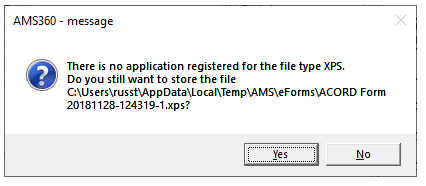
AMS360 Message
|
We will be deprecating all older versions of OData prior to v22. Once we deprecate these older versions, they will not be available for use with any version of AMS360. OData v22 will be compatible with the older versions of AMS360. This deprecation will occur with the EA release of AMS360 25R2, which is scheduled for August 2025. |
What's New
Major Enhancements
| enhancement | description | |
|---|---|---|
| ONS | ||
|
Previously, certain notification types returned entity information for V1 and V2 recipients. With this release, only a select few notification types will return limited entity information. If you currently are not making API calls when receiving notifications to get the full entity data, and you are using notification to only keep certain data in sync, you will want to check out the changes to these notifications. You may need to make API calls to get the data you need. Value: Notification size is reduced, thereby increasing performance. If additional information is needed, recipients can make calls to AMS360 using any of our existing APIs, like WSAPI, to obtain additional data. |
||
 IDEAS That Are Now Features IDEAS That Are Now Features
|
Customer IDEAS Portal |
| enhancement | description |
|---|---|
| ACORD | |
|
Default Writing Company in Underlying Liability Section for Personal and Commercial Umbrella |
In earlier versions, the “Underlying Liabilities Policies” and “Primary Policy Information” sections in the personal and commercial umbrella lines of business defaulted to the Policy Parent Company in the company drop-down menu. With this release, these sections now default to the writing company in that drop-down. Value: This new alignment requires fewer clicks to enter data needed for ACORD forms. [Idea: AMS360-I-1005] |
| DOWNLOAD | |
|
Change Writing Company on System Policy to Match Download |
Previously, when a download came in with a different writing company than what was on the system policy, the download moved to the assignment transactions list for manual assignment. Now, when a download comes in with a different writing company, the system policy writing company is changed to match the download. The "My Agency Reports Download Detail" report has been updated to show a new warning message, if the writing company was changed on the policy when it was downloaded. The message reads as follows: "Download updating the writing company from Company A to Company B. You may want to verify this is correct." This same message has been added to the logged activity whenever a download is uploaded. Value: This revised process saves time from having to manually assign transactions to policies and change the writing company on the policy to match the download. [Idea: AMS360-I-1201] |
Other Major Enhancements
| enhancement | description | |
|---|---|---|
| ACCOUNTING | ||
|
Both parent and writing company commission parameters can now be set up by a specific division and branch. When determining what amounts to apply to the policy, the system will always look for a specified division and branch after looking for writing company commissions. Value: This feature allows a company's commission to be defined at a more detailed level, saving the user time from manually changing the commission amounts during the invoicing process. |
||
|
Before this release, AMS360 did not account for Outsourced Checks (OSC). With this release, Outsourced Checks (OSC) has been added to bank options. Note: Handwritten, printed, and OSC check types will be in incremental order, even if a check is pending. When you type in a check number you will not be able to put in a lower number. For example, if you put check number 10 and post it, and on the next check you try to type in 9, you will get an error message. If the check is deleted before being posted, the check number can be deleted and replaced. We did this to accommodate the check approval process. Value: OSC will now have the same functionality as handwritten checks, which includes having a check number and showing up in reports. |
||
| ACORD | ||
| ACORD 88NY Form 2022/02 |
ACORD 88NY 2022/02 has been added to AMS360 as a partially integrated form. Value: Having the most up-to-date ACORD forms within AMS360 ensures that users will use the correct ACORD forms for their daily business while also ensuring that carriers will accept these forms. |
|
|
ACORD 212 Form: Commercial Umbrella - Overflow Underlying Schedule |
Previously, when a user had an overflow from ACORD Form 13: Commercial Umbrella, both the 2016 and 2017 versions was incorrectly mapped. (The information is mapped to Underlying Liability Policies overflow (OFCUAUTO), Comml Umbrella - Addtl Underlying General Liab (General Liability), and Comml Umbrella - Addtl Underlying Employers Liab (Employer Liability) Now, the aforementioned overflow pages have been replaced with ACORD 212, which will automatically attach to ACORD 131, while the information connected to the "Other Liability" fields in AMS360 will be mapped into the ACORD 212 form. |
|
|
We have added the most up-to-date ACORD 137 NY form (2023/08) and removed the outdated ACORD 137 NY form (2014/12). |
||
| ADMINISTRATION CENTER | ||
|
You can now set which fields in Customer Contacts are Required or Recommended from a new section labeled “Field Importance Setup” Customer Contacts Fields view in the Administration Center. Value: This feature offers better data collection during policy creation by requiring and recommending fields to be entered. |
||
| CERTIFICATIONS | ||
| SQL Server 2022 Certification | SQL Server has been updated to Version 2022. | |
| Windows Server 2022 Certification | Windows Server has been updated to Version 2022. | |
| COMMISSION TEMPLATE | ||
| New Commission Template |
A new commission template feature allows users to assign predetermined employee commissions across many policies without having to make manual updates. Value: This feature saves time by reducing the amount of manual entry needed to ensure that commissions have been entered correctly for employees. It also provides a more flexible way for agencies to handle commission splits and differing commission contracts for multiple renewal terms. Click here to visit the "Commission Template" page. |
|
| CUSTOMER | ||
|
Update NAICS List to Include New Field for Storing Index Item Descriptions |
We have added a new field in the Customer Center- Edit Customer- Additional Customer Information section titled "NAICS Sub-Description," which allows users to add a sub-description field. Value: This feature allows gives users the ability to add new Index Item descriptions for NAICS codes, since this information is vital to underwriters. |
|
|
A user may now transfer money between "On Account" and "Policies/Invoices" in any Division they can access. Value: This feature offers greater financial flexibility and saves steps. |
||
| Customer Profile Questions: Required Fields and List-Type Answers |
In earlier releases, Customer Profile Questions were optional. With this release, the Profile Question Setup has been enhanced, as follows:
Value: It is now possible to capture the answer to a question from your custom list of text items. |
|
| DAILY PROCESS | ||
|
Add Customer Inactive Activity Generated from Daily Process |
When the daily process is run, a customer can now be made inactive via the Customer/Policy Tasks check-box, where setting the date will trigger a "Customer Status Update" activity. Value: AMS360 now automatically creates the Customer Status Updated activity when the customer is marked "Inactive" via the Daily Process, which saves time for users.
NOTE: You must possess admin credentials to run the Daily Process. |
|
| FINANCIAL | ||
|
Journal Entry View: Create an Uncheck-/Check-All Button for Type Filter Boxes |
We have added buttons that allow users to click to have Journal options unchecked or checked. Value: By allowing users to easily uncheck or check all options, it saves time from having to manually perform these functions. |
|
| GLOBAL CHANGE OF PERSONNEL | ||
|
Users could not change personnel back to an employee previously listed on the policy, which resulted in a duplicate employee error message. Users can now change employee A to B (existing functionality) and then change B to A (new functionality) without seeing a "Duplicate" error message. Value: This will allow special edge cases that require a user to change employee A to B and back from B to A for unbilled and billed policies. |
||
| GLOBAL NAVIGATION | ||
| Top Navigation Bar |
In all previous releases, the AMS360 top navigation bar had a traditional look and user experience. The NEW top navigation bar is slimmer and more modern. It feels the same but better, with the same functionality as before, but much more. All Vertafore products will share this new look and feel. Value: AMS360 offers a sleek new look and easier access across all Vertafore products. |
|
| Global Navigation: Bento Box |
Formerly, AMS360 employed an older functionality to provide users with access to other Vertafore products. Now, the Bento Box / Vertafore Suite serves as a central hub for quick access to these other products. Value: This newly designed look contains navigation buttons (links) that will allow users to effortlessly transition to various associated systems or views. |
|
| Global Navigation: Unified Search |
For AMS360 users who are VSSO-enabled and provisioned for AgencyOne, a button-activated Unified Search function is now available. Value: This enhancement improves navigation efficiency and the user experience, making it easier for users to access and manage client information across multiple systems. |
|
| ONS | ||
|
Previously, if a notification recipient was misconfigured or not responding, notifications sent to that recipient were deleted whenever a new notification arrived for that recipient. Notifications were only sent once, and broken recipients had to be cleared manually, Now, if a notification recipient is misconfigured or not responding, clearing it will not require customer intervention. Value: No user intervention is required to turn off broken notifications. Broken or unused notifications will be shut off after two weeks, which prevents the potential blockage of notification queues whenever a large global change is applied. |
||
|
Previously, certain notification types returned entity information for V1 and V2 recipients. With this release, only a select few notification types will return limited entity information. If you currently are not making API calls when receiving notifications to get the full entity data, and you are using notification to only keep certain data in sync, you will want to check out the changes to these notifications. You may need to make API calls to get the data you need. Value: Notification size is reduced, thereby increasing performance. If additional information is needed, recipients can make calls to AMS360 using any of our existing APIs, like WSAPI, to obtain additional data. |
||
|
We have added new functionality to the “Notification Service Setup” form that allows a user to specify the recipient to continue to block notification messages until acknowledged, or to allow a single retry (after five seconds), and then delete the blocked messages if not acknowledged upon retry. Value: This feature will improve the performance of the notification system by unclogging blocked notification messages. |
||
|
In the event there are blocked notifications when a user logs into AMS360, an updated pop-up message with additional details regarding blocked notification recipients is now displayed. Value: More detailed information is now available to the user regarding blocked notifications, where the user can use it to take further action, such as:
|
||
| POLICY | ||
|
Anyone who uses ImageRight may now navigate to ImageRight directly from the AMS360 Dec Page View. Value: This feature increases accessibility to ImageRight from within the AMS360 declaration page, thereby making a CSR’s work more efficient. Also, a CSR will not need to leave the declarations page in order to reach the "Documents" option in ImageRight. |
||
|
Show Future Personnel and Start Date in View Commission Grid |
Future personnel data now appear in the "View Commission" form. In addition, a new start date column has been added to show when personnel become active on the policy. Value: Showing future personnel allows greater transparency when assigning both new personnel and commissions to a policy. |
|
EMS / API Endpoints
| enhancement | description |
|---|---|
| COMMISSION TEMPLATES | |
| Producer Commission Split Template |
Users may now search for and delete commission templates and their associated terms. Value: This element provides additional integration functionality for both internal Vertafore products and external agencies, so users can search for and delete commission template information more quickly. New EMS Endpoints:
|
| APIs Added to Commission Templates |
To accommodate commission templates, validation has been added to 20 existing endpoints. This validation will reject the call if a template exists on the policy. This validation helps prevent a mismatch between template-defined commissions and personnel, when users manually entering these values into the endpoints.
In addition, the OData endpoint POST /DirectBillEntry/DirectBillEntry/Save has been made obsolete. |
| COMPANY COMMISSION | |
| Import Company Commission Rows |
Users may now import company commission rows with the following fields: Effective Date; Division; Branch; Type of Business; Line of Business; Plan; Transaction; State; plus either % of Premium and Fees, or Flat Rate. Value: This feature provides additional integration functionality for both internal Vertafore products and external agencies, so users can make faster updates to the user interface (UI). New EMS Endpoints:
|
| POLICY | |
|
Update Basic Policy Info for Unbilled Policies: Update Personnel |
Users will be able to use this API to update the following fields under Basic Policy information for unbilled policies: Primary Service Group:
Value: This element will further enhance functionality and allow for additional integration for internal Vertafore products and external agencies, so users can interact with AMS360 unbilled policies via the EMS API. |
|
Users are now able to update Basic Policy information for unbilled policies by using API/EMS. Value: This element allows agencies, internal product partners, and external partners to update Basic Policy information for unbilled policies via API/EMS. |
|
|
Update Basic Policy Info for Unbilled Policies: Update Business Units |
Users are now able to update Basic Policy information for unbilled policies via API/EMS. Value: This element will allow agencies, internal product partners, and external partners to update Basic Policy information for unbilled policies via API/EMS. The following items are the fields a user can now update for an unbilled policy:
Checkboxes for: Filter data entry and lines of business by Type of Business, Business New to Agency, Premium Financed, Not Renewable, Exclude from Download, Exclude from Purge
|
|
Get, Create and Update Policy Line of Business |
Users are now able to create and update policy lines of business, as well as retrieve additional lines of business information: These include: Line of Business; Company Plan; Description; Writing Company; State Plan; Sort Order. Value: This element allows for additional integration functionality for both internal Vertafore products and external agencies, so users can make faster updates to the user interface (UI). New EMS Endpoints:
|
|
Enhance Basic Policy Info: PUT and GET |
We are providing two endpoints for users to allow them to obtain additional policy information (GET"~/policy /additional-information"): Parameter: PolicyId Returns: PolicyAdditionalInfoResponse that contains complete information regarding policy and update PUT "~/policy/ additional-information": Parameter: Full Data of PolicyAdditionalInfo Returns: Result of update operation on Policy Additional Info . Value: This element allows agencies, internal product partners and external partners to use CRU functions related to additional Basic Policy data with EMS APIs when creating, retrieving and updating AMS360 Policies. |
| Policy AOI: GET |
As a user who needs to create a Binder in the new Certificate Management tool, it is important for them to get AOI listed on the policy. Previously, we did not have an endpoint to: GET a list of Additional Interests (AFW_CommAddOtherInt). We have added endpoints for Getting list of Additional Interests (AFW_CommAddOtherInt) GET "~/policy/additional-interest" Parameter is PolicyId, LobId, Effective Date User should provide existing policy Id and have access to it Fields returned Type, Name1, Name2, Contact, Address, Phone, PhoneExt, Fax, FaxExt, Email. If you do not have access to the policy, you will see a 403 error "Forbidden Returned" as a paged list. Value: Adding these endpoints allows users to get AOI. |
|
Retrieve Invoices with Broker on a Policy for POST/Invoices Endpoint: ePay |
Users are now able to retrieve invoices for policies that have a broker (new functionality) or do not have a broker (existing functionality). Value: This element allows users to display invoices associated with a policy that have a broker via EMS. |
Security Updates
| enhancement | description |
|---|---|
|
Commission Templates: To Access and Update Commission Templates |
|
|
Commission Templates: To Update the Renewal / Term Count |
|
|
Commission Templates: To Open and Update the View Commission Form |
|
|
Commission Templates: Commission Template View |
|
Defects Fixed
The following defects have been resolved:
| defect no. | description |
|---|---|
| ACCOUNTING | |
| DE47542 |
Fixed the error that occurred once a policy was saved following invoicing by adding code to attempt to repair the Primary Key, when the error is triggered. This was released with the 24R1 EA release and is being released with the 24R2 EA. |
| ACORD | |
| DE47762 |
Fixed the error within the ACORD eForm Tree Item Selection from not being consistent after expanding Certificate Holders to View, so now the proper number ordering process is consistent. This was released with the 23R3 and 24R1 August 2024 service packs and is being released with the 24R2 EA. |
| DE48522 |
Fixed the error that was causing Certificate Holders to be displayed out of alphabetical order in the eForms Manager. This was released with the 23R3 and 24R1 August 2024 service packs and is being released with the 24R2 EA. |
| DE50127 |
Fixed the error that was causing slowness when loading the eForms manager. This is being released with the 24R2 EA. |
| ADMIN CENTER | |
| DE42808 |
Fixed the issue that was causing the error message, "No records are selected for global change for personnel," when processing a Global Change for Personnel Import. This was released with the 24R1 June service pack and is being released with the 24R2 EA. |
| DE50739 |
Fixed the error that was causing the primary contact as listed in the Notification Service Setup to not be saved. This is being released with the 23R3 and 24R1 November service packs and is being released with the 24R2 EA. |
| DE51840 |
When updating or creating a business unit assignment group in the administration center and then selecting "Save," the form did not indicate that saving was in progress. To fix this, a loading circle has been added to the form. As saving proceeds, users will not be able to make changes or exit the form. |
| BANK CENTER | |
| DE42051 |
Fixed the error that was causing Import Deposits in the Bank Center to fail when imported. This is being released with the 24R2 EA. |
| CLASSIC REPORTS | |
| DE48892 |
Fixed the error that was causing the Future Invoices report to display an incorrect Agency Commission amount when a specific Line of Business was chosen in the selection criteria. This was released with the 23R3 and 24R1 August service packs and is being released with the 24R2 EA. |
| DE51550 |
When a line of business was set up with the maximum allowed characters, 150, the Classic Company Commission Setup CSV report did not previously load. This issue has been corrected. |
| DE53484 |
Fixed the error that was causing the Form Letters button in the Customer List Classic Report to generate an error. This is being released with the 24R2 EA. |
| CUSTOMER CENTER | |
| DE49475 |
Fixed the error that was causing the eForms manager to load slowly. This was released with the 23R2, 23R3, and 24R1 June service packs and is being released with the 24R2 EA. |
| DE49795 |
Fixed the error that was slowing down the retrieval of Customer Notes. This is being released with the 24R2 EA. |
| DE50808 |
Fixed errors with invalid NAICS and SIC codes on the Customer Analysis report and those found under Customer Overview. This was released with the 24R1 August service pack and is being released with the 24R2 EA. |
| EMPLOYEE CENTER | |
| DE52920 |
Fixed the error where a commission payable statement was created from the Employee Center, which caused users to receive an error message no matter which selections were made; this subsequently prevented the statement from being created. This was released with the 23R3 and 24R1 November service packs and is being released with the 24R2 EA. |
| GLOBAL CHANGE OF PERSONNEL | |
| DE47433 |
Fixed the error where the message, “Additional personnel record not found for” JobStepMsg," was displayed if there was more than one record with the same current personnel short name. This was released with the 24R1 EA service pack. |
| DE48042 |
The type of Business column must not have numeric values, it must be All, Personal Lines, Commercial Lines, Non-Property & Casualty, Benefits, Life, Health, or Financial Services. This was released with the 24R1 EA service pack. |
| DE48231 |
The exception code was corrected for the GCPA process when the “Global Change for Personnel” lock exists. The exception code is 27. This was released with the 24R1 EA service pack. |
| DE48271 |
The exception code was corrected for the GCPA process if the same TOB primary personnel already exists. This was released in the 24R1 EA service pack. |
| DE48593 |
A user should only be able to upload a .csv file format to run GCPI for Customer Additional Customer. Users will now receive a pop-up if they do not have a file in .csv format, or if their .csv file is void of data. |
| OUTLOOK ADD-IN | |
| DE49097 |
Fixed the error that was causing policies to display twice in the policy dropdown with the Outlook Add-In. This was released with the 23R3 and 24R1 August 2024 service packs and is being released with the 24R2 EA. |
| DE49785 |
Fixed the error that was causing the Outlook Add-In to not create an Activity/Suspense from an incoming email, since the tray failed to load. This was released with the 23R3 and 24R1 August 2024 service packs and is being released with the 24R2 EA. |
| ONS | |
| DE52291 |
V3 Notifications are designed to be successfully sent to the delta sync. Previously, half these efforts were failing. This issue is now resolved. |
| WSAPI | |
| DE52289 |
This issue involved a legacy defect for this endpoint. When the WSAPI endpoint set the UICodeLOBS to null, it prevented the user from editing any information in the System Data Entry fields, which could not be fixed without a data change. The issue has since been corrected. |
| DE53396 |
When attempting to use Quiker, an error popped up that stated: “Quiker cannot communicate with AMS360’s API (or server). Please do not proceed, Close out the Activity and try again. Quiker’s functionality will be available almost immediately.” |
Feedback
We value your feedback to ensure we are working on what is most important to you. If you have an idea to improve the product, you can suggest and vote on product enhancement requests on Vertafore Ideas. On My Vertafore, click Submit Idea in the upper right corner of the page. We appreciate your input to help us provide you with the highest-quality product.
For more information on using Ideas, please see the following documents. You must be registered with My Vertafore and signed in to access these documents.
-
Ideas Overview (Doc ID: 13054)
-
How to Submit Ideas (Doc ID: 13049)
-
What are the statuses in Vertafore Ideas? (Doc ID: 13055)