Journal Entry View: Create an Uncheck-/Check-All Button for Type Filter Boxes

|
Note: This update represents only a portion of the AMS360 24R2 release. Please navigate to AMS360 2024 R2 Release Notes to review other enhancements and fixes that were part of this release. |
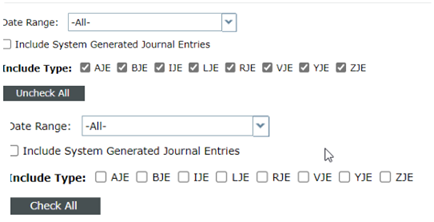
We have added buttons that allow users to click to have Journal options unchecked or checked.
In the Financial Center, navigate to Journal Entries > View Options > Include Type:
-
You will now see an Uncheck All button that, when clicked, will uncheck all the Journal Types.
-
When the choices are all unchecked, the button will show Check All. When that button is clicked, all the Journal Types check-boxes will become checked.