Customer Profile Questions: Required Fields and List-Type Answers

|
Note: This update represents only a portion of the AMS360 24R2 release. Please navigate to AMS360 2024 R2 Release Notes to review other enhancements and fixes that were part of this release. |
In earlier releases, Customer Profile Questions were optional. With this release, the Profile Question Setup has been enhanced, as follows:
-
Questions can be established as "Required."
-
Questions can be a new “List” type, where the user creates a customer to select one from a drop down menu.
In the Administration Center, navigate to the Customer/Policy section for Profile questions. When you create or edit a question, you can make it required by checking the "Is Required" box.
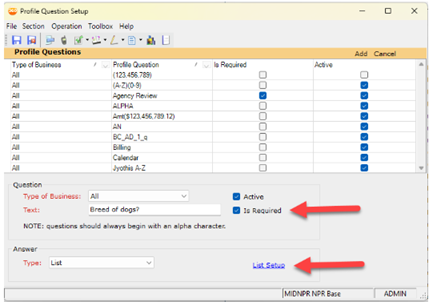
You can also select an "Answer Type" of List. The link titled "List Setup" will open a form where you can create a custom selection list. The empty list appears as follows:
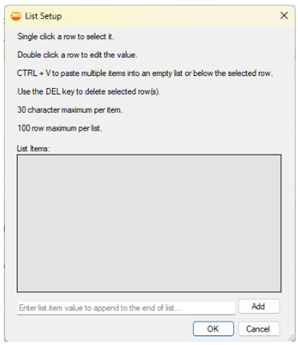
You can then type into the List Items, one per row, or you can paste in a list from another source (e.g., Notepad, Word, and others. The depiction below shows how it looks with a list entered:
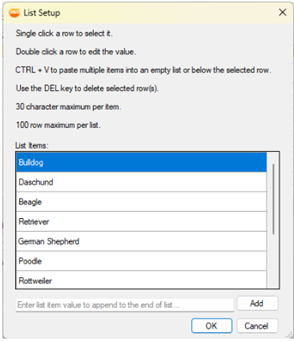
Select "OK." Save the Profile Question Setup.
In the Customer Center, navigate to Customer Setup, Profiles. You will see the List type questions with a drop-down box that has the selections you set up, where an answer can be chosen from the accompanying list.