Adding OSC Check Options to Bank Setup/Checks and Classic Report Check Register, plus Cash Disbursement Journal

|
Note: This update represents only a portion of the AMS360 24R2 release. Please navigate to AMS360 2024 R2 Release Notes to review other enhancements and fixes that were part of this release. |
Before this release, AMS360 did not account for Outsourced Checks (OSC). With this release, Outsourced Checks (OSC) has been added to bank options.
Note: Handwritten, printed, and OSC check types will be in incremental order, even if a check is pending. When you type in a check number you will not be able to put in a lower number. For example, if you put check number 10 and post it, and on the next check you try to type in 9, you will get an error message. If the check is deleted before being posted, the check number can be deleted and replaced. We did this to accommodate the check approval process.
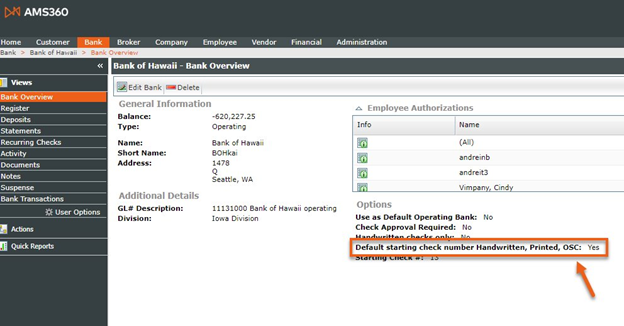
Navigate to the Bank Center > search and select a Bank > select Bank Overview. Here you will see that OSC appears under “Options.”
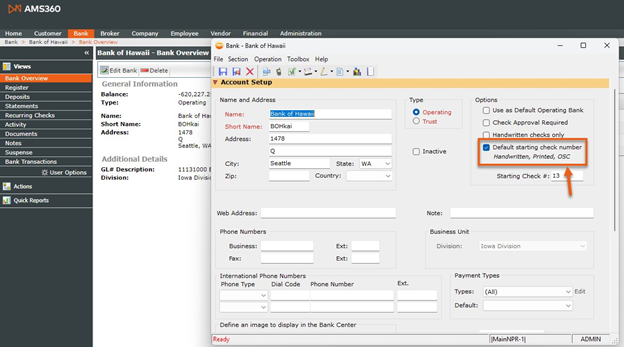
On the Bank page, OSC will show under “Options.”
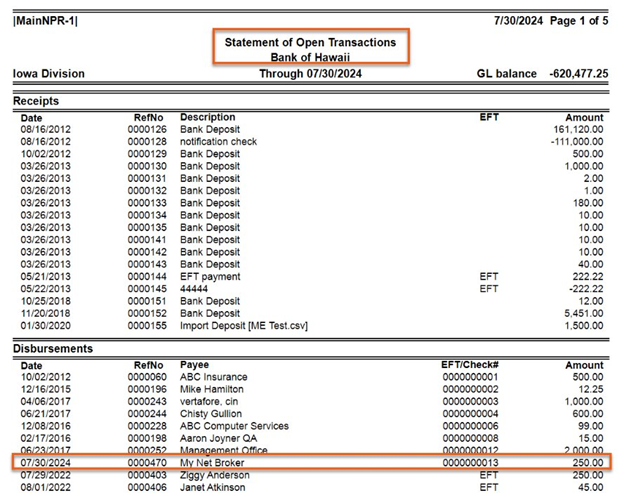
OSC has been added to the Classic Report Check Register
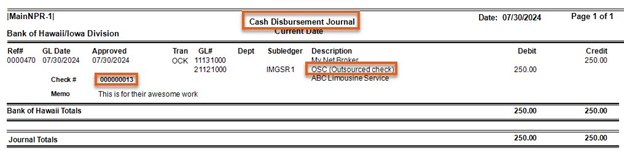
OSC is also now added to the Cash Disbursement Journal.