Company Commission Setup by Division and Branch

|
Note: This update represents only a portion of the AMS360 24R2 release. Please navigate to AMS360 2024 R2 Release Notes to review other enhancements and fixes that were part of this release. |
Both parent and writing company commission parameters can now be set up by a specific division and branch. When determining what amounts to apply to the policy, the system will always look for a specified division and branch after looking for writing company commissions.
 Company Setup
In the company center, select and edit an insurance or brokerage company. In the Commission Setup section, create a new commission row, or edit an existing row. Any of the following business unit combinations are allowed in the drop downs:
-
Division: All Branch: All
-
Division: Specific Branch: All
-
Division: Specific Branch: Specific
-
Division: All Branch: Specific
The division and branch drop-downs are required fields.
|
NOTE: These fields are also considered unique when following duplicate company commission row rules. It is possible to have a commission row set up with the same values in every column, so long as the division and branch combinations are different for each row. |
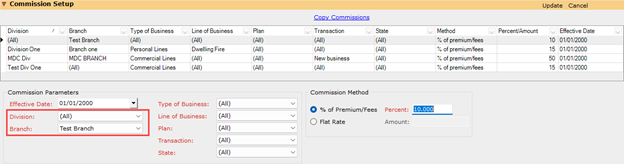
Both the drop-down selections and the commission setup grid are filtered by the logged-in users' business unit access. Consequently, a user may not have access to see all company commission rows.
|
NOTE: After this initial upgrade to version 24R2, all existing company commission rows will default where a division and branch will be set to "All." This indicates the commission row will apply to All divisions and branches to which the logged-in user has access. |
Copy Commissions
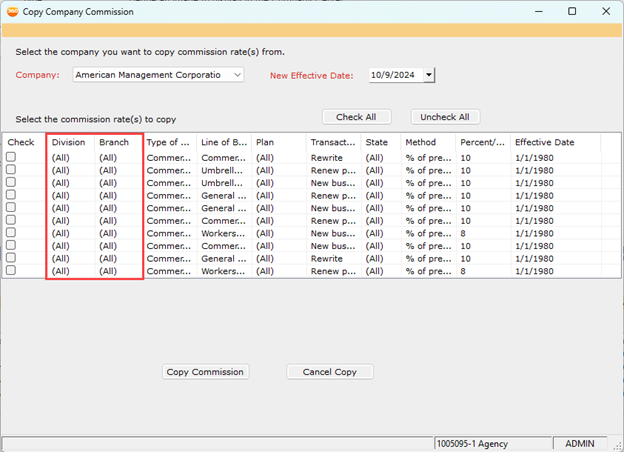
When utilizing the Copy Commissions feature, company commission rows will be filtered by the logged-in users' business unit access. Users will only be able to copy commission rows to which they have access.
Company Utility
When merging commissions from one company into another by using the Company Utility feature, a user will only be able to merge commission rows to which that they have access. If the user does not have access to the commission row and still chooses to go ahead with the "merge," the row will be permanently deleted from the system. A warning message will appear prior to merging to confirm that the indicated rows will be deleted.
Agency Commission Parameter Setup
Division and Branch designations have been added to the agency commission parameter ranking setup. The parameter is set as Rank 2 and cannot be changed.
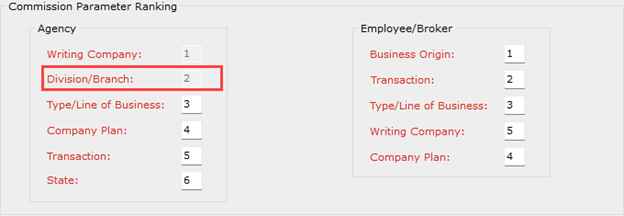
If a commission row has a division and/or branch setup that matches the policy business unit, that commission row will always be applied before any other commission parameters are considered. If both division and branch are set to All, the next parameter in rank order will then be considered.
|
NOTE: After the initial upgrade to version 24R2, all existing agency commission parameters will increase in rank by +1. |
Company Commission Setup Report
With the addition of division and branch parameters, users will only see commission rows based on business unit access. If a logged-in user does not have access to any business units, the only commission rows viewable in this report will be ones where both the division and branch are set to “All.”
Global Change Division Consolidation
When performing a global change division consolidation process, any company commission row setup with the "from" division specified will be permanently deleted once the process has been completed.
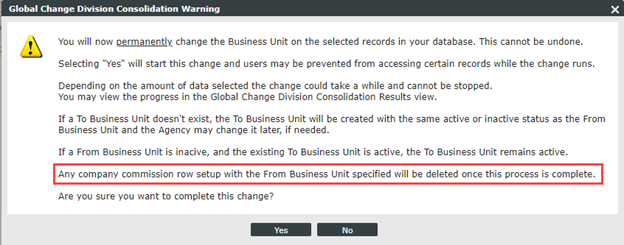
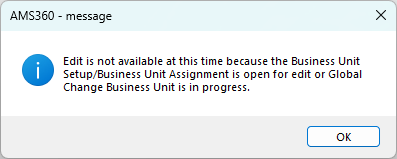
The division consolidation process cannot be run at the same time a company is in edit mode, and a company also cannot be edited during the division consolidation process. This element prevents changes from being made to commission rows that involve the consolidated division.
Division Consolidation Error Message:

Company Form Error Message:
|
NOTE: It is recommended that users thoroughly read all warning messages before running a division consolidation process. Once this process runs, it cannot be undone. |