Field Importance Setup: Customer Contact

|
Note: This update represents only a portion of the AMS360 24R2 release. Please navigate to AMS360 2024 R2 Release Notes to review other enhancements and fixes that were part of this release. |
You can now set which fields in Customer Contacts are Required or Recommended from a new section labeled “Field Importance Setup” Customer Contacts Fields view in the Administration Center.
In the Administration Center's "Field Importance Setup" section, "Customer Contacts Fields," check the box to require the user to enter at least one contact to "Save" the customer.
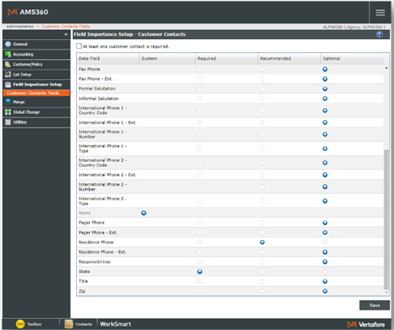
Next, for each of these Contacts fields, you can use the radio button to decide if the field is (a) "Required" for saving the customer (as indicated by a red asterisk next to that field name in Customer Contacts). (b) "Recommended" as important to enter (as indicated by a blue asterisk) where you can save with or without entering a value, or (c) "Optional," which is less important and a choice that allows you to save with or without entering a value.
The Customer Center form for Customer Setup Contacts depicted below shows the "Required" red asterisks and the "Recommended" blue asterisks.
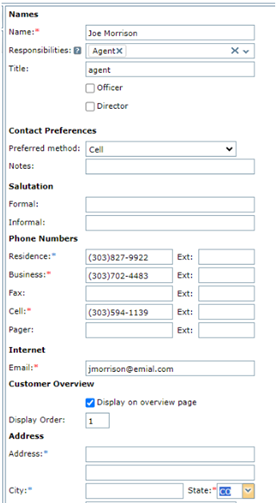
If you Save without entering a "Required" field, you will see an error message to that effect, and you will not be able to Save until you enter a value.