Sagitta 2024 R2.2.0 Release Notes
Vertafore is pleased to release Sagitta 2024 R2.2.0. With this release, we are incrementally improving and updating Sagitta to provide you with the best possible experience.
 Enhancements
The following table summarizes the enhancements in this release. The Feature column indicates whether the feature falls into one of the following categories:
-
Core: Available when the release is loaded.
-
Optional: Flag-driven or otherwise not mandatory in the core environment
|
Enhancement |
Description |
FEATURE IS... |
|---|---|---|
| Sagitta Modernization |
Sagitta windows operate independently |
Core |
| Address Validation |
Addresses are validated on Insurers and Payees |
Core |
| Password Security |
Password expirations updated for tighter security |
Core |
| Remove Diary Prompt |
An unnecessary prompt was removed for downloaded policies |
Core |
| Policy Multi Update Notification |
New toast message on Policy Details whenever a producer is added, modified or deleted |
Core |
| Remove Extra Save Prompt |
An extra Save prompt does not display for a policy page that was already saved or did not have changes |
Core |
| Updated ACORD Forms |
ACORD Forms are updated to current versions |
Core |
| Unattended Download |
New DLAgent for Unattended Download |
Core |
| Copy Policy Number |
Copy the policy number from the Policy Selection List |
Optional |
|
New Columns on Contacts and Client Contacts Grids |
The Contact Type Description and the Contact Code Description are available as new columns on the Contacts and Clients grid |
Optional |
| New Column on Holder Grid |
Supplemental Name is available as a new column on the Holders grid and exports in the data extract |
Optional |
| eForms Mapping |
New ACORD form mapping guides are available in Sagitta Help |
Optional |

|
If you are upgrading to 24R2 from 23R1.1.0, it is important for you to read 24R1.2.0 Release Documentation. Refer to this document for details on additional Enhancements and Features included in 24R1.2.0, since these are also included in this 24R2 release: |
System Requirements
For optimal performance of the application, we recommend the following as a minimal workstation configuration:
|
Hardware / Software |
Minimum RequirementS / Recommendation |
|---|---|
|
Processor/CPU Speed |
Recommended: i5, i7 or Multi-core: 2.6 GHz or above Minimum: Core 2 Duo: 2.3 GHz or above Not Supported: Single Core, Reduced-feature CPUs such as Celeron or AMD Sempron |
|
Memory |
Recommended: 16GB Minimum: 8GB |
|
Hard Drive Space |
Minimum: 150Mb of local disc space per user |
|
Operating System |
Recommended: Windows 11 Minimum: Windows 10 (64-bit) |
|
MS Office (Word, Excel) |
Recommended: Office 2016 Professional Minimum: Office 2010 Professional |
|
Browser |
Recommended: Chrome Support: Chrome, and Edge |
| .NET Framework | Minimum: .NET 4.7.2 |
Feedback
https://support.vertafore.com/
We value your feedback to ensure we are working on what is most important to you. Please use MyVertafore to provide feedback. We appreciate your input, whether positive or negative, on any visible change.
What's New
Sagitta Modernization
Welcome to modern browsing in 24R2! Sagitta windows now operate independently and eliminate the need for the Home page to be open. Each section will highlight various user interface enhancements.
ENHANCED VIEW IS THE ONLY VIEW
-
The classic home page view has been replaced by the Dashboard page
-
Edge in IE Mode is no longer supported, and you must access Sagitta through a Chromium Browser (Chrome or Edge)
For a seamless experience when using Chrome or Edge on your workstation, there are settings that should be established prior to accessing Sagitta:
-
Pop-ups are allowed for *.vertafore.com if you are an online user
-
Sleep mode is turned off for Vertafore sites
-
Cache is cleared
Refer to Online Help for step-by-step instructions for Sagitta and Google Chrome or Sagitta and Edge.
-
-
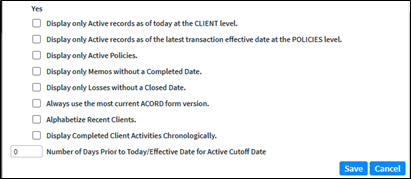
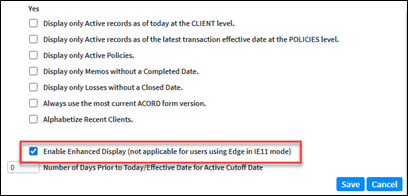
The Settings options "Enable Enhanced Display" (not applicable for users using Edge in IE11 mode) is no longer displayed.
Setting in 24R2
Setting prior to 24R2
NEW GLOBAL NAVIGATION
Global Navigation is new and consistent across all pages, including secondary pages.
Dashboard

Clients

Accounting
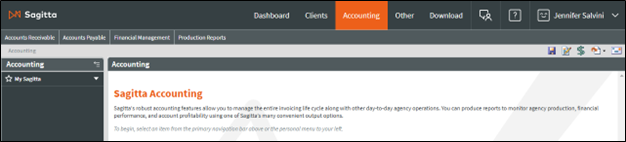
Other
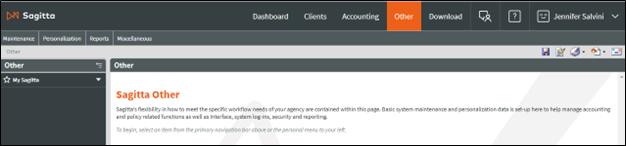
Download
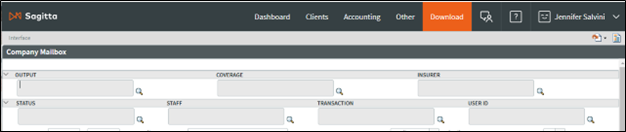
Notable Global Navigation elements:
-
The Home page link has been renamed to Dashboard and is shown on secondary pages.
-
Clicking on the Sagitta logo will access the Dashboard
-
The Interface link has been renamed Download
-
The Close button has been removed from secondary pages
-
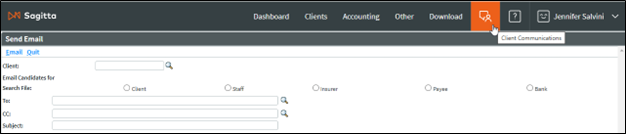
The Client Communications icon will access Send Email in the same window. Right click on the icon and select "Open link in a new tab" for an improved experience.
-
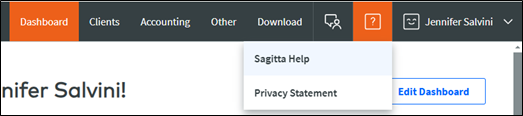
The Help icon will access Sagitta Help and Privacy Statement and opens each element in a new tab.
-
The active user section drop-down menu will display Settings and Log Out across all pages.

MULTIPLE BROWSER TABS AND URL NAVIGATION
Removing the Home Page dependency introduces a new work approach in Sagitta. Instead of having the Dashboard always active, with secondary pages always shown in separate windows, each page now becomes independent and can work separately, even if the Dashboard is closed. Internal Sagitta links will open in the same window, whereas external links will open in a new tab.
Here is the new multi-tab workflow:
-
You can have multiple pages open, or no Dashboard pages open, to work with Sagitta
-
A left mouse click on a navigation icon will redirect your current view to the destination page without opening a new window (except for the “Settings” Global Navigation item)
-
These functions continue to open in a separate window
-
Opening Policy, Policies, Loss ID, Claims, Invoice Number links from the Client Search page
-
Prior/Next Term links on the policies
-
View Purge History for clients
-
Add a new client
-
Policy Info, Insured links on the memos when user opens them from the home activities page.
-
-
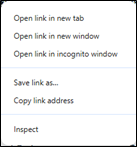
A right mouse click on an option or page on the Dashboard, or on the Utilities page, provides access to the selected page or option in a new tab or window.
-
Exceptions:
-
Pages that already open in a new window (e.g., Utilities > Vertafore Services > InsurLink Admin)
-
-
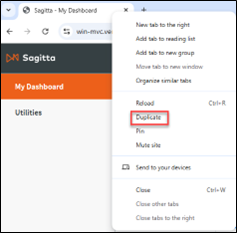
You can duplicate your current tabs by using browser-duplicate functionality with a right click on the top of the tab and then selecting Duplicate
-
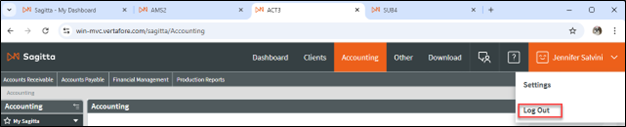
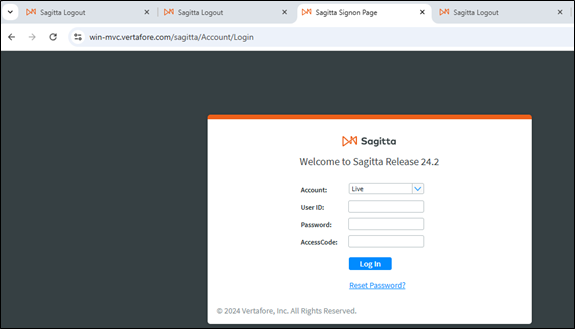
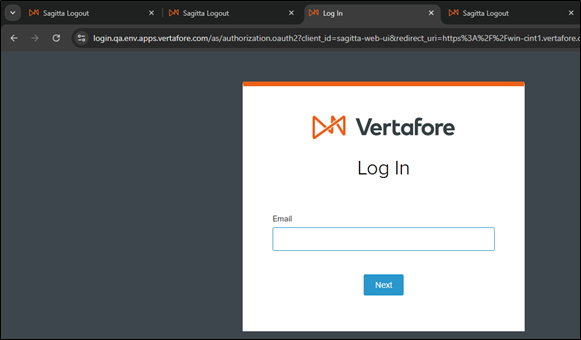
Logging out can be done from any open page in the current session. The page from which the logout is selected is redirected to the Login page for non-SSO logins, or to the Logout View for SSO. All other tabs will display this message: "You have been logged out of Sagitta."
Multiple tabs open
-
-
Main Page will display Login page for non-SSO login
-
Main Page will display Logout page for SSO
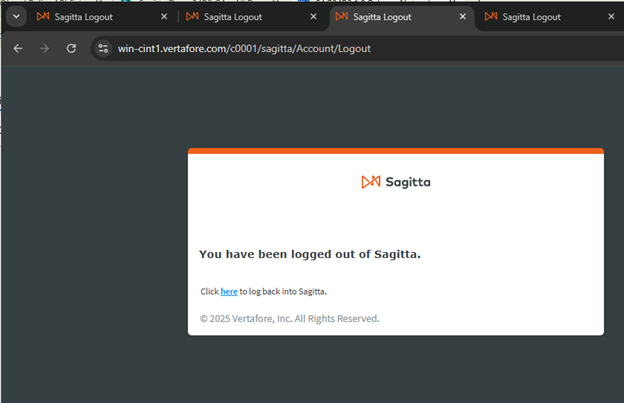
Remaining tabs are logged out with Sagitta message
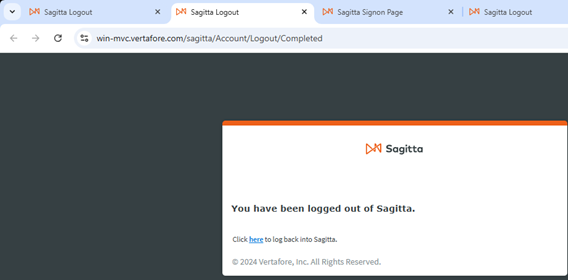
MORE BROWSER FEATURES
-
Back, Refresh and Close (x) buttons will not trigger a Sagitta logout
-
Back navigates you to the previous page
-
Refresh refreshes your current page
-
Close (x) closes your current tab
-
-
New prompts will be displayed when you attempt to leave a page before changes have been saved, or if you are trying to log out and have unsaved work on any tab.
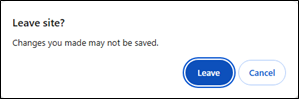
WIDGET UPDATES
The Expiring Policies and Aged Receivables widgets now support a large number of Policies and Sales records in the system.
DIRECT URL NAVIGATION
Many Sagitta pages can be accessed by pasting a URL directly into the browser. Therefore, when you log out and the session is active, you immediately access that page.
These pages include the following:
-
Global Navigation (Dashboard, Clients, Accounting, Other, Download and Email)
-
Direct links from Dashboard widgets to Client, Policy, Claims and View Invoice
-
Utilities, System Software Report and View All Processed Reports
You can save the URL as a bookmark and then return to that page.
If you are not logged in, you are prompted for your credentials and then automatically redirected to the desired destination.
BLOCKED STATE
With the introduction of direct links and bookmarks , you can access pages even when Sagitta is in a blocked state. A blocked state is when you are on a page and the page behind it is masked. Examples include history views, importing or exporting units, timeout inactivity, or accessing the Settings window.
If you try to open another window or duplicate the tab, you will receive a new Sagitta Processing page with the following view.
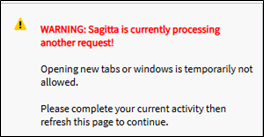
This action prevents any interruption of the ongoing process until the process is complete, or until the window is closed.
Once the process has been completed, the processing page can be refreshed, and corresponding content loaded.
SPEEDLINK CHANGES
There are updates to the SpeedLink session life-cycle. There is no session termination after closing the Dashboard page — or any other tab — even when it was the only active page.
SpeedLink terminates a session after a user has been inactive for a given amount of time.
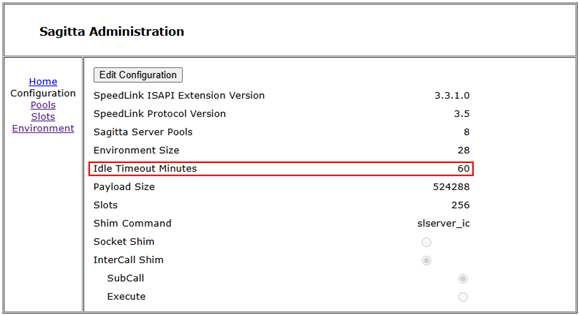
This setting can be managed in the SpeedLink Admin Page under Configuration > Idle Timeout Minutes. For additional information, please refer to the "SpeedLink 3.3.1.0 Web Services Install" document.

|
Watch the demo on Sagitta Modernization. |
Address Validation
Insurers and Payees addresses now use an API called Melissa Data to perform address lookups for U.S. addresses. Search by using type-ahead auto-completion in the Address #1 or Mail Address field to select the best match. An address validation indicator checkmark (Melissa Address Key or MAK in Report Builder and ODBC) next to the Address section will display different colors of verification.
INSURER CODES ADDRESS VALIDATION
On the Insurer Codes page, valid addresses are displayed in a drop-down after typing two characters in the Address #1 field. Continue typing until the desired address is shown. Select the address to prefill the Address #1, City, State, and Zip Code. Address #2 does not usually populate Melissa Data, but it can be added manually.
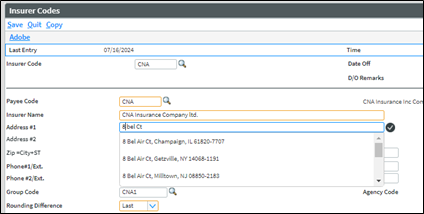
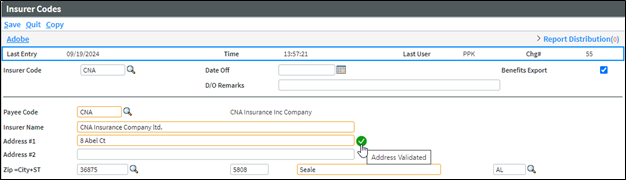
After the address is populated, the checkmark next to the address will show up Green. Hover over the check mark to display a tool-tip of Address Validated.
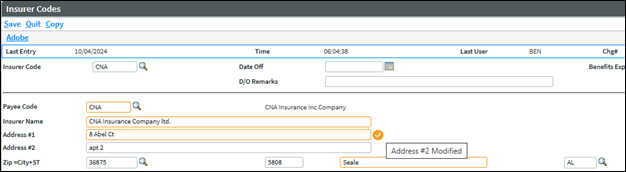
The checkmark will show Yellow when Address #2 is entered. Hover over the checkmark to display a tool-tip of Address #2 Modified.
The checkmark will show Gray when Address #1, City, State or Zip Code is modified, or when a user bypasses the drop-down options and manually enters the address. Hover over the checkmark to display a tool-tip of Address Not Validated.
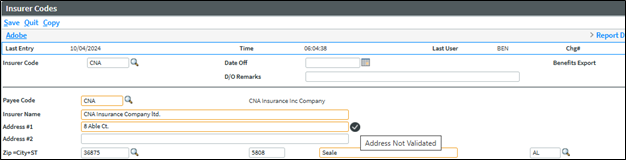
If an Address in Insurers and Payees page is not previously validated but is still a valid address as presented in Melissa Data, clicking on the checkmark will validate the address by turning it green.
A payee with a validated address, added to the Insurer Code, automatically updates the Insurer Code Address as Address Validated.
PAYEE CODES ADDRESS VALIDATION
On the Payees Code page, valid addresses are displayed in a drop-down after typing two characters in the Address #1 field. Continue typing until the desired address is shown. Select the address to prefill the Address #1, City, State, and Zip Code. Address #2 does not usually populate from Melissa Data, but it can be added manually.
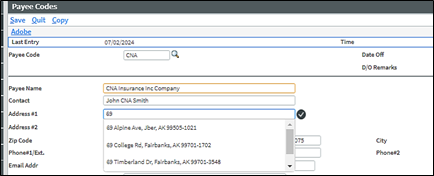
After the address is populated, the checkmark next to the address will show up Green. Hover over the check mark to display a tool-tip of Address Validated.
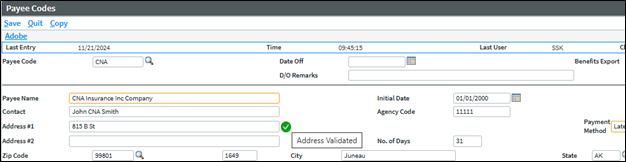
The checkmark will show Yellow when Address #2 is entered. Hover over the checkmark to display a tool-tip of Address #2 Modified.
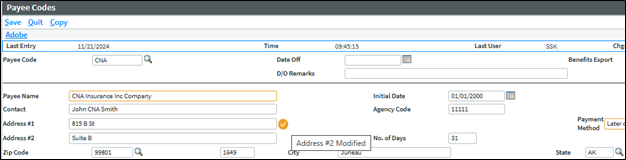
The checkmark will show Gray when Address #1, City, State or Zip Code is modified, or when a user bypasses the drop-down options and manually enters the address. Hover over the checkmark to display a tool-tip of Address Not Validated.
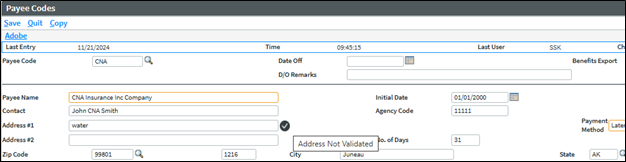
If an Address in Insurers and Payees page is not previously validated but is still a valid address as presented in Melissa Data, clicking on the checkmark will validate the address by turning it green.
ADDRESS VALIDATION TIPS
-
When an address with a ZIP Code that does not exist in the Sagitta database is selected from the drop-down options, the new ZIP code is added to the ZIPS file.
-
P.O. Box numbers are returned without the periods, e.g., PO.
-
Most P.O. Box numbers are not included as part of the validated address drop-down options.
-
Search for Apartment by using Apt or Suite using Ste. or Ste (Suite).
|
|
Watch the demo on Address Validation. |
Password Enhanced Security
PASSWORD RESTRICTIONS PAGE UPDATED
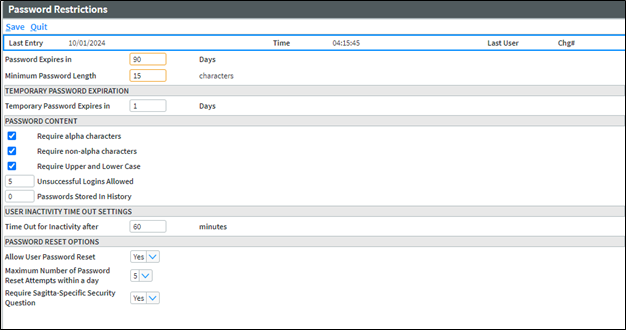
The Password Restrictions page has been updated for a higher level of cyber security by removing the options for Password Not Required and Password Never Expires. Passwords are also now required to be a minimum length of 15 characters. A 15-character password provides more entropy and complexity for attackers to decipher, making it more difficult to crack.
If your agency had Password Not Required prior to 24R2, existing users will be prompted upon login to reset their password to a 15-character minimum password.
Password Expires in ___ Days is now mandatory. A blank field or number that exceeded 91 days or more prior to 24R2, is now displayed with the industry standard of 90 days. This field is editable and can be set anywhere from one to 365 days.
Minimum Password Length ___ characters is now mandatory, and the minimum length is 15 characters. If the field was left blank prior to 24R2, the 24R2 installation will default to 15.
INTEGRATION ACCOUNT DROPDOWN ON STAFF CODES
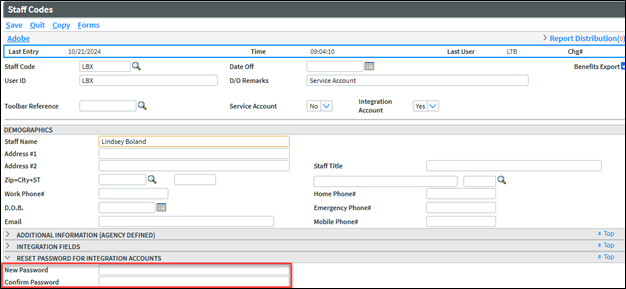
Integration Account is a new drop-down field on Staff Codes. This element allows integrating products to use a Sagitta login with a password that does not expire. This user does not have access to the Sagitta user interface and is restricted from resetting his/her password on the login screen.

Once 24R2 is loaded, a report is generated with a list all staff codes that were previously set to never expire. This report can be found in Processed Reports for the user that is listed on the Overnight UTM Process Parameters, Staff ID for UTM reports.
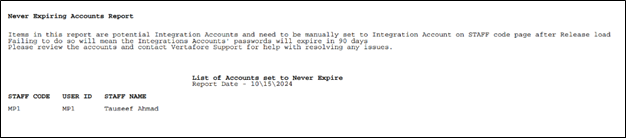
Review each Staff Code and, if they are not a staff used with integrating partners, go to Staff Codes to reset their password.
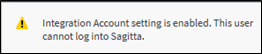
If they are a staff used with integrating partners, update the Integration Account drop-down to "Yes" for each code. The following toast message is displayed:
A new section is displayed, Reset Password for Integration Accounts, to add a New Password and Confirm Password. Enter the password that complies with the Password Restriction parameters. Click "Save" and the staff code’s password will not expire.

|
Reset Password link on the top of the page no longer displays for Integration Account Staff Codes after the New Password and Confirm Password are entered and saved. |
TEMPORARY PASSWORD MINIMUM LENGTH UPDATED
The temporary password listed in the email for a password reset is now 15 characters in length.
|
|
Watch the demo on Password Enhanced Security. |
New AMS Download Agent v1.3 for Unattended Download
A new Download Agent version is included as part of Sagitta 24R2.
There is now an online checkbox to support the new AWS configuration of sagitta.vertafore.com. If AWS customers do not run this new DLAgent install and configuration, Unattended Download will not work.
On-premise Sagitta customers must install this new DLAgent, but prior configurations can remain the same.
Refer to the document, Download Agent 1.3 Installation and Configuration.
Project Impact
Project Impact is an initiative to deliver technology enhancements and workflow improvements that make the work of account managers, customer service representatives, and other core agency staff more efficient.
Over the next two years, Project Impact aims to deliver up to two hours of time savings per day for each servicer. This will be accomplished via a combination of Sagitta enhancements from day-to-day activities to major product improvements, with a focus on the most important workflows at an agency.
In 24R2, Sagitta has made the following workflow improvements:
COPY POLICY NUMBER
A policy number can now be copied directly from the Policy Selection List. A link to Copy Policy Number is displayed on the transaction bar of the Policy Selection List.

Select a policy from the Policy Selection List and select Copy Policy Number. A toast message at the top of the page will show the message: Policy Number <policynumber> copied.

The policy number will then be available to paste to another source.
|
|
Watch the demo on Copy Policy Number. |
DIARY PROMPT IS REMOVED ON A DOWNLOADED POLICY
Previously, a company downloaded policy that was maintained would display the following invalid diary prompt: This diary is closed! Do you wish to continue?
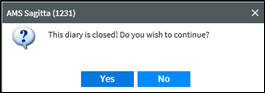
A company downloaded policy with the status of C(losed) will no longer display the prompt after maintaining the policy.

|
|
Watch the demo on Diary Prompt is Removed on a Downloaded Policy. |
POLICY MULTI UPDATE NOTIFICATION
A new toast message will be displayed at the top of the Policy Details page when a producer is added or removed from the Producer fields and when the Policy Multi Information contains Split Information. Clicking Save will show the following message: You have modified a Producer with a Policy Multi record. Please amend Split Information.

|
|
Watch the demo on Policy Multi Update Notification. |
REMOVE UNNECESSARY SAVE PROMPT ON POLICY PAGES
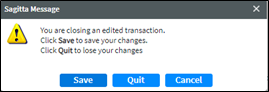
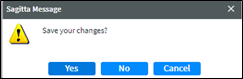
There is no longer a prompt to Save, Quit, or Cancel as part of the following scenarios when you access a different policy page or exit the policy transaction.
-
The policy page has already been saved
-
There were no changes to the page
Exiting the policy transaction
Navigating within the policy pages
|
|
User Defined pages that have default values will continue to display the message, You are closing an edited transaction, if the page is exited without changes. |
|
|
Watch the demo on Remove Extra Prompt for Save on Policy Pages. |
NEW COLUMNS AVAILABLE IN CONTACTS AND CLIENT DETAILS
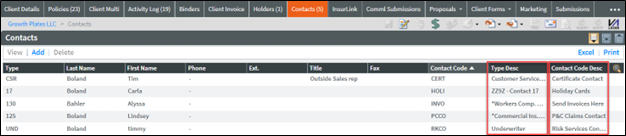
Type Desc and Contact Code Desc columns are available to add to the Contacts grid.
Type Desc and Contact Code Desc columns are available to add to the Client Details, Contact grid.
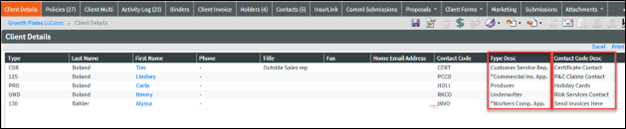
Refer to Online Help, Changing How a Grid Displays, to unhide the Type Desc and Contact Code Desc columns for CP.400 (Contacts) and CP_100_3_LIS_1 (Client Details Contacts) pages.
|
|
In Grid Display, the CP_100_3_LIS_1 heading of Category Codes has been fixed to read Contact Code. |
|
|
Watch the demo on Contacts and Client Contacts New Columns. |
NEW COLUMN AVAILABLE IN HOLDERS GRID AND DATA EXTRACT FOR SUPPLEMENTAL NAME
The Supplemental Name column is available to add to the Holders grid.

Click Excel on the Holders grid. The Supplemental Name column has been added to the data extract and will display the first Supplemental Name.

Export

Refer to Online Help, Changing How a Grid Displays, to unhide the Supplemental Name column for the CP.516 (Holders) page.
|
|
Watch the demo on Holders New Column. |
Production Credit
The SOAP Web Services commissionStatementInsert has been added to the list of programs that use Production Credit.
Insurers API
There is a new API to use that allows you to GET, PUT and POST Insurer records. For more information, refer to https://link.vertafore.com/VERTAFORE/documentation/SAGITTA/introduction
Vertafore Services Personalization Update
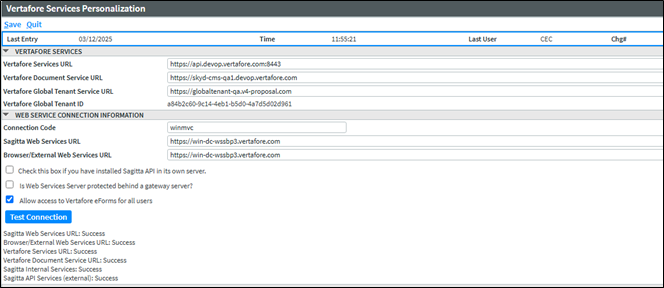
On the Vertafore Services Personalization page, there is a new field titled Browser/External Web Services URL. This new field will be used to manage the requests of the Browser Client, such as loading the Dashboard and Widgets when a user logs into Sagitta and interacts with them. Upon installing the release, the value currently in the Sagitta Web Services URL field will be copied over to the new field.
On-premise Sagitta customers will not see any differences, since the URL will be and must be the same. For a Sagitta Online customer now being hosted in AWS, Vertafore will update the URLs so the configuration will match what is needed to support the new AWS configuration. The public-facing Web Services URL will continue to be provided for requests being made externally against Sagitta’s APIs. For Sagitta Online customers, this will be the value stored in the Browser/External Web Services URL field.
The Test Connection functionality was enhanced to support the new field, and labels were updated to be more concise as to which response status matches up to which fields on the VSP page.
New Additions to the Vertafore ACORD Library
|
acord form |
state |
version |
form name |
|---|---|---|---|
| 35 | 2017/05 |
Cancellation Request / Policy Release |
|
| 61 | AK | 2022/10 | Alaska Auto Supplement |
| 61 | AR | 2010/04 | Arkansas Auto Supplement |
| 61 | AZ | 2020/07 | Arizona Auto Supplement |
| 61 | CA | 2023/01 |
California Auto Supplement, Mandatory Uninsured Motorists BI Offer |
| 61 | CO | 2018/04 |
Colorado Auto Supplement – Colorado Private Passenger Automobile Insurance – Summary Disclosure Form |
| 61 | CT | 2018/01 | Connecticut Auto Supplement |
| 61 | DE | 2018/06 |
Delaware Auto Supplement, Delaware Motorist’s Protection Act |
| 61 | IA | 2002/02 | Iowa Auto Supplement |
| 61 | ID | 2023/08 |
Idaho Auto Supplement – Idaho Uninsured Motorist and Underinsured Motorist Disclosure |
| 61 | IL | 2023/01 | Illinois Auto Supplement, Uninsured / Underinsured Motorists |
| 61 | LA | 2001/05 | Louisiana Homeowners Supplement |
| 61 | MA | 2017/11 |
Massachusetts Property Insurance Underwriting Association Instructions for Completing Homeowners Application |
| 61 | MI | 2020/07 | Michigan Choice of Bodily Injury Liability Coverage Limits |
| 61 | MS | 2013/07 | Mississippi Auto Supplement Non-Stacking UM Insurance |
| 61 | NJ | 2023/01 | New Jersey Auto Supplement |
| 61 | NM | 2010/12 | New Mexico Auto Supplement – Selection/Rejection UM Coverage |
| 61 | NV | 2021/10 |
Nevada Auto Supplement – Mandatory Offer of Medical Payments Coverages and Uninsured Motorists Coverage |
| 61 | NY | 1994/03 | New York Auto Supplement |
| 61 | OR | 2016/01 | Oregon Auto Supplement |
| 61 | RI | 2012/12 | RI Auto Supp, Uninsured Motorists |
| 61 | SC | 2021/09 |
South Carolina Auto Supplement, Offer of Optional UM/UIM Coverage |
| 61 | SD | 2013/02 | South Dakota Personal Umbrella Supplement |
| 61 | UT | 2013/04 |
Utah Auto Supplement Uninsured / Underinsured Motorist Coverage Selection |
| 61 | VA | 2023/07 | Virginia Auto Supplement |
| 61 | WV | 2016/01 |
West Virginia Uninsured / Underinsured Motorists Coverage – Offer of Split Limits Liability |
| 62 | AK | 2022/12 | Alaska Auto Supplement |
| 62 | AL | 1998/05 | Alabama Insurance Application Supplement |
| 62 | AR | 2013/09 | Arkansas Personal Umbrella Supplement |
| 62 | CT | 2011/07 |
Connecticut Personal Insurance Supplement, Summary of Consumer Protection |
| 62 | DC | 2022/05 |
District of Columbia Personal Property Supplement, Notice Regarding Flood Insurance |
| 62 | DE | 2004/10 |
Delaware Auto Supplement – Personal Injury Protection Deductible Options |
| 62 | FL | 2013/12 | Florida Commercial Auto Supplement |
| 62 | IA | 1998/02 | Iowa Auto Supplement |
| 62 | ID | 2023/08 |
Idaho Auto Supplement – Idaho Uninsured Motorist or Underinsured Motorist Rejection Form |
| 62 | IL | 2007/08 |
Illinois Property Supplement – Notice of Availability of Earthquake Insurance |
| 62 | LA | 1998/04 | Louisiana Commercial Property Supplement |
| 62 | MD | 1998/01 | Maryland Commercial Auto Supplement |
| 62 | MI | 2020/07 |
Michigan Auto Supplement, Michigan Collision Insurance Options Notice |
| 62 | MN | 2000/01 | Minnesota Auto Supplement |
| 62 | MO | 2007/08 |
Missouri Property Supplement – Notice of Availability of Earthquake Insurance |
| 62 | MS | 2016/07 |
Mississippi Auto Supplement – Selection / Rejection of Uninsured Motorist Insurance |
| 62 | ND | 2015/04 | North Dakota Insurance Supplement |
| 62 | NJ | 2018/05 |
New Jersey Auto Supplement Basic Policy Coverage Selection Form |
| 62 | NV | 2001/05 | Nevada Umbrella Supplement |
| 62 | NY | 2009/04 |
Application for Dwelling Insurance – New York Property Insurance Underwriting Associations |
| 62 | OH | 2011/05 |
Ohio Auto Supplement – Important Optional Disclosure Notice Uninsured Motorist Property Damage Coverage |
| 62 | OK | 2006/05 |
Oklahoma Property Supplement – Notice to Property Owners in Rural Fire Protection Districts |
| 62 | OR | 2006/01 |
Oregon Personal Lines Supplement – Notice of Use of Loss History Report – Home Insurance |
| 62 | RI | 2006/01 |
Rhode Island Property Supplement – Notice of Flood Coverage Exclusion |
| 62 | SD | 2019/10 |
South Dakota Auto Supplement for New Personal Umbrella Policies: Notice Regarding Uninsured or Underinsured Motorist Coverage |
| 62 | TX | 2021/11 | Texas Auto Supplement (Spanish Version) |
| 62 | VA | 1997/06 | Virginia Property Supplement |
| 62 | 2020/09 |
Insurance Supplement – Standard Fire Policy Only, Policyholder Disclosure, Notice of Terrorism Insurance Coverage |
|
| 125 | CA | 2023/01 | California Commercial Insurance Application |
| 131 | 2017/11 | Umbrella / Excess Section (standalone version) | |
| 137 | AL | 2015/12 | Alabama Commercial Auto Coverages / Limits Section |
| 137 | AK | 2015/12 | Alaska Commercial Auto Coverages / Limits Section |
| 137 | AZ | 2015/12 | Arizona Commercial Auto Coverages / Limits Section |
| 137 | AR | 2015/12 | Arkansas Commercial Auto Coverages / Limits Section |
| 137 | CA | 2023/01 | California Commercial Auto Coverages / Limits Section |
| 137 | CO | 2015/12 | Colorado Commercial Auto coverages / Limits Section |
| 137 | CT | 2015/12 | Connecticut Commercial Auto coverages / Limits Section |
| 137 | DC | 2015/12 | District of Columbia Commercial Auto Coverages / Limits Section |
| 137 | DE | 2015/12 | Delaware Commercial Auto Coverages / Limits Section |
| 137 | FL | 2015/12 | Florida Commercial Auto Coverages / Limits Section |
| 137 | GA | 2015/12 | Georgia Commercial Auto Coverages / Limits Section |
| 137 | HI | 2015/12 | Hawaii Commercial Auto Coverages / Limits Section |
| 137 | IA | 2015/12 | Iowa Commercial Auto Coverages / Limits Section |
| 137 | ID | 2023/09 | Idaho Commercial Auto Coverages / Limits Section |
| 137 | IL | 2015/12 | Illinois Commercial Auto Coverages / Limits Section |
| 137 | IN | 2015/12 | Indiana Commercial Auto Coverages / Limits Section |
| 137 | KS | 2016/04 | Kansas Commercial Auto Coverages / Limits Section |
| 137 | KY | 2015/09 | Kentucky Commercial Auto Coverages / Limits Section |
| 137 | LA | 2015/12 | Louisiana Commercial Auto Coverages / Limits Section |
| 137 | MA | 2015/12 | Massachusetts Commercial Auto Coverages / Limits Section |
| 137 | MD | 2015/12 | Maryland Commercial Auto Coverages / Limits Section |
| 137 | ME | 2015/12 | Maine Commercial Auto Coverages / Limits Section |
| 137 | MI | 2020/07 | Michigan Commercial Auto Coverages / Limits Section |
| 137 | MN | 2015/12 | Minnesota Commercial Auto Coverages / Limits Section |
| 137 | MO | 2015/12 | Missouri Commercial Auto Coverages / Limits Section |
| 137 | MT | 2015/12 | Montana Commercial Auto Coverages / Limits Section |
| 137 | NC | 2015/12 | North Carolina Commercial Auto Coverages / Limits Section |
| 137 | ND | 2015/12 | North Dakota Commercial Auto Coverages / Limits Section |
| 137 | NE | 2015/12 | Nebraska Commercial Auto Coverages / Limits Section |
| 137 | NH | 2018/05 | New Hampshire Commercial Auto Coverages / Limits Section |
| 137 | NJ | 2015/12 | New Jersey Commercial Auto Coverages / Limits Section |
| 137 | NM | 2015/12 | New Mexico Commercial Auto Coverages / Limits Section |
| 137 | NV | 2015/12 | Nevada Commercial Auto Coverages / Limits Section |
| 137 | NY | 2023/08 | New York Commercial Auto Coverages / Limits Section |
| 137 | OH | 2015/12 | Ohio Commercial Auto Coverages / Limits Section |
| 137 | OK | 2015/12 | Oklahoma Commercial Auto Coverages / Limits Section |
| 137 | OR | 2016/01 | Oregon Commercial Auto Coverages / Limits Section |
| 137 | PA | 2015/12 | Pennsylvania Commercial Auto Coverages / Limits Section |
| 137 | RI | 2015/12 | Rhode Island Commercial Auto Coverages / Limits Section |
| 137 | SC | 2015/12 | South Carolina Commercial Auto Coverages / Limits Section |
| 137 | SD | 2015/12 | South Dakota Commercial Auto Coverages / Limits Section |
| 137 | TN | 2021/11 | Tennessee Commercial Auto Coverages / Limits Section |
| 137 | TX | 2015/12 | Texas Commercial Auto Coverages / Limits Section |
| 137 | UT | 2015/12 | Utah Commercial Auto Coverages / Limits Section |
| 137 | VA | 2016/12 | Virginia Commercial Auto Coverages / Limits Section |
| 137 | VI | 2014/08 | Virgin Islands Commercial Auto Coverages / Limits Section |
| 137 | VT | 2015/12 | Vermont Commercial Auto Coverages / Limits Section |
| 137 | WA | 2016/12 | Washington Commercial Auto Coverages / Limits Section |
| 137 | WI | 2015/12 | Wisconsin Commercial Auto Coverages / Limits Section |
| 137 | WV | 2015/12 | West Virginia Commercial Auto Coverages / Limits Section |
| 137 | WY | 2015/12 | Wyoming Commercial Auto Coverages / Limits Section |
| 138 | AK | 2015/12 | Alaska Garage and Dealers Coverages / Limits Section |
| 138 | AL | 2015/12 | Alabama Garage and Dealers Coverages / Limits Section |
| 138 | AR | 2015/12 | Arkansas Garage and Dealers Coverages / Limits Section |
| 138 | AZ | 2015/12 | Arizona Garage and Dealers Coverages / Limits Section |
| 138 | CA | 2016/02 | California Garage and Dealers Coverages / Limits Section |
| 138 | CO | 2015/12 | Colorado Garage and Dealers Coverages / Limits Section |
| 138 | CT | 2015/12 | Connecticut Garage and Dealers Coverages / Limits Section |
| 138 | DC | 2015/12 |
District of Columbia Garage and Dealers Coverages / Limits Section |
| 138 | DE | 2015/12 | Delaware Garage and Dealers Coverages / Limits Section |
| 138 | FL | 2015/12 | Florida Garage and Dealers Coverages / Limits Section |
| 138 | GA | 2015/12 | Georgia Garage and Dealers Coverages / Limits Section |
| 138 | HI | 2015/12 | Hawaii Garage and Dealers Coverages / Limits Section |
| 138 | IA | 2015/12 | Iowa Garage and Dealers Coverages / Limits Section |
| 138 | ID | 2015/12 | Idaho Garage and Dealers Coverages / Limits Section |
| 138 | IL | 2015/12 | Illinois Garage and Dealers Coverages / Limits Section |
| 138 | IN | 2015/12 | Indiana Garage and Dealers Coverages / Limits Section |
| 138 | KS | 2016/04 | Kansas Garage and Dealers Coverages / Limits Section |
| 138 | KY | 2015/09 | Kentucky Garage and Dealers Coverages / Limits Section |
| 138 | LA | 2015/12 | Louisiana Garage and Dealers Coverages / Limits Section |
| 138 | MA | 2015/12 | Massachusetts Garage and Dealers Coverages / Limits Section |
| 138 | MD | 2015/12 | Maryland Garage and Dealers Coverages / Limits Section |
| 138 | ME | 2015/12 | Maine Garage and Dealers Coverages / Limits Section |
| 138 | MI | 2020/07 | Michigan Garage and Dealers Coverages / Limits Section |
| 138 | MN | 2015/12 | Minnesota Garage and Dealers Coverages / Limits Section |
| 138 | MO | 2015/12 | Missouri Garage and Dealers Coverages / Limits Section |
| 138 | MS | 2016/07 | Mississippi Garage and Dealers Coverages / Limits Section |
| 138 | MT | 2015/12 | Montana Garage and Dealers Coverages / Limits Section |
| 138 | NC | 2015/12 | North Carolina Garage and Dealers Coverages / Limits Section |
| 138 | ND | 2015/12 | North Dakota Garage and Dealers Coverages / Limits Section |
| 138 | NE | 2015/12 | Nebraska Garage and Dealers Coverages / Limits Section |
| 138 | NH | 2015/12 | New Hampshire Garage and Dealers Coverages / Limits Section |
| 138 | NJ | 2015/12 | New Jersey Garage and Dealers Coverages / Limits Section |
| 138 | NM | 2015/12 | New Mexico Garage and Dealers Coverages / Limits Section |
| 138 | NV | 2015/12 | Nevada Garage and Dealers Coverages / Limits Section |
| 138 | NY | 2021/03 | New York Garage and Dealers Coverages / Limits Section |
| 138 | OH | 2015/12 | Ohio Garage and Dealers Coverage / Limits Section |
| 138 | OK | 2015/12 | Oklahoma Garage and Dealers Coverages / Limits Section |
| 138 | OR | 2016/01 | Oregon Garage and Dealers Coverages / Limits Section |
| 138 | PA | 2015/12 | Pennsylvania Garage and Dealers Coverages / Limits Section |
| 138 | RI | 2015/12 | Rhode Island Garage and Dealers Coverages / Limits Section |
| 138 | SC | 2020/08 | South Carolina Garage and Dealers Coverages / Limits Section |
| 138 | SD | 2015/12 | South Dakota Garage and Dealers Coverages / Limits Section |
| 138 | TN | 2021/11 | Tennessee Garage and Dealers Coverages / Limits Section |
| 138 | TX | 2015/12 | Texas Garage and Dealers Coverages / Limits Section |
| 138 | UT | 2015/12 | Utah Garage and Dealers Coverages / Limits Section |
| 138 | VA | 2015/12 | Virginia Garage and Dealers Coverages / Limits Section |
| 138 | VI | 2015/06 | Virgin Islands Garage and Dealers Coverages / Limits Section |
| 138 | VT | 2015/12 | Vermont Garage and Dealers Coverages / Limits Section |
| 138 | WA | 2016/12 | Washington Garage and Dealers Coverages / Limits Section |
| 138 | WI | 2015/12 | Wisconsin Garage and Dealers Coverages / Limits Section |
| 138 | WV | 2015/12 | West Virginia Garage and Dealers Coverages / Limits Section |
| 138 | WY | 2015/12 | Wyoming Garage and Dealers Coverages / Limits Section |
| 139 | 2015/12 | Statement of Values |
ACORD Form Mapping Updates
Notable mapping changes include the following:
ACORD 35 - Cancellation Request / Policy Release
-
Cancellation Request box is no longer checked automatically
-
Policy Type displays the line-of-business description instead of the line-of-business code
All ACORD 125 forms include Florida and California
-
A long name on Supplemental Name #1 now displays on the first line. If the name exceeds the field length, the remaining name displays on Remarks.
ACORD 131 – Umbrella / Excess Section (standalone version)
-
The Expiring Pol# field pre-fills with the prior term. If there is no prior term, the field pre-fills with the first policy number from Prior History
-
Transaction Type selects Claims Made when Proposed or Current Retroactive Date is populated
-
Transaction Type selects Occurrence when Proposed and Current Retroactive Date are not populated
-
Primary Location, Location Description displays the building name
ACORD 137 FL – Florida Commercial Auto Coverages / Limits Section
-
Automatically attaches ACORD 61 FL and ACORD 62 FL
ACORD 139 – Statement of Values
-
Only locations that are attached to blankets are displayed on this form. To display locations not attached to blankets, use the ACORD 159 – Schedule of Property Limits
-
Locations that populate to a second page do not total on the first page. The final page totals all pages
Additional Coverage and Endorsements Overflow
• There is a new Remarks field
|
|
Watch the demo on ACORD Forms. |
ACORD FORM MAPPING GUIDES IN SAGITTA HELP
ACORD Form mapping guides are now available in Sagitta Help, exhibiting a new format that is easier to read and follow.
Select Sagitta Help from the Help icon to land on the Sagitta Help home page. Use the eForms Mapping drop-down at the top of the page.
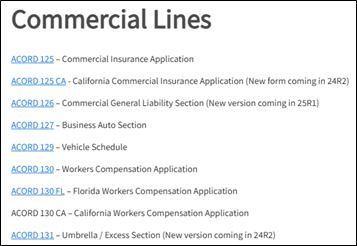
Forms are categorized by Auto ID Cards, Certificates, Commercial Lines, Loss Notices, and Personal Lines. There are older guides under the heading Guides Prior to 24R2; however, as guides are updated, they will move from this heading to the appropriate category.
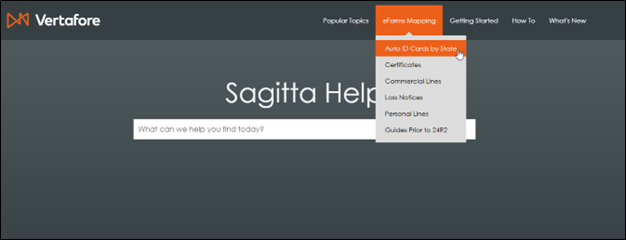
Click on a heading and find your form by clicking the hyperlink.
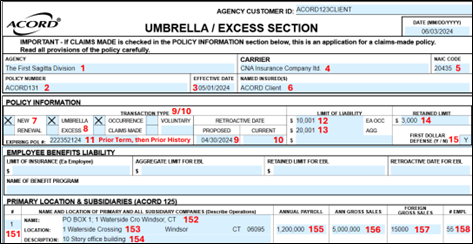
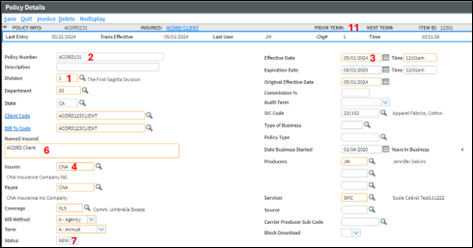
The form and its corresponding data entry pages are numbered so you can follow how the data flows to the form.
ACORD Form
Sagitta entry pages
Report Builder and SQL Dictionaries Added
|
Sagitta file |
attribute dict's |
synonym dictionaries |
odbc sql dictionaries |
|---|---|---|---|
| INSURORS | 92 | ADDRESSVALIDATION | MAK |
| PAYEES | 39 | ADDRESSVALIDATION | MAK |
| STAFF | 117 | INTEGRATION.ACCOUNT | INTEGRATIONACCOUNT |
Web Service Tags Added
|
SAGITTA FILE |
WEB SERVICE TAG |
|---|---|
| INSURORS | AddressValidation |
| PAYEES | AddressValidation |
| STAFF | IntegrationAccount |
Fixes
| area | id | release notes |
|---|---|---|
| Accounting | DS11436 |
Invoice Print and Update can no longer run without entering a division when the division field is set to user mandatory. (DE9628) |
| Accounting | DS10524 |
The One Step Direct Bill, Receipts, Insurer Receipts, and Insurance Payment Process grids now tab in order instead of skipping lines and fields. (DE46174) |
| Accounting | DS11089 |
Client Statements now wrap policy numbers, which exceed a character length of 12, to a maximum length of 25 characters. (DE50375) |
| Accounting | DS11844 |
Changing the Transaction Amount under Add Installments tab now updates with the updated amounts in the grid. (DE46680) |
| Auto ID Cards | DS11291 |
The Registered Name on New York Auto ID Cards (FH1, FH1B, FS83, FS21 and FS20) has been increased from 19 to 25 characters to prevent names from wrapping on the card. (DE51559) |
| Auto ID Cards | DS11554 |
Auto ID Cards Policy Number, Effective Date and Expiration Date are now mapped using the values on the Auto ID Creation page instead of Policy Details. (DE53433) |
| Certificates | DS12034 |
Evidence of Property forms generated from Policy Level no longer error when using OneDoc. (DE57036) |
| Certificates | DS12101 |
Certificates no longer display an error with the message, Could not save to print pocket, and instead print successfully when using OneDoc. (DE57472) |
| Certificates | DS12266 |
Multiple email addresses in the Email Addresses field on Holders and Additional Interests (Policy and Client level) that were entered with spaces, carriage returns, or semicolons as separators, will display without those separators, and no longer cause an error when creating a Certificate or EPI with the Distribute All option. In addition, each line in the Email Address fields was limited to 100 characters. Entering a long list of email addresses on a single line would cause the list to wrap at 100 characters, breaking apart a valid email address onto two or more lines. Because of this, there is the possibility that some lines in the email addresses field will not be valid even after the release is loaded and that 100-character line length restriction is removed. This is because neither the release nor the field validation will validate that the text entered is a valid email address. It is recommended that you review the Email Addresses field to make sure that previously entered email addresses are correct. (DE59159) |
| Claims | DS12442 |
Edit option is now available on a claim that was accessed through Activities. (DE60483) |
| Client | DS11879 |
The Primary NAICS code description now displays for insertClient and updateClient (DE55693) |
| Dashboard | DS11466 |
The Aged Receivables widget on the Dashboard will no longer error (There was an error loading this module. Please try again) when a receivable is missing a client code. (DE52614) |
| Dashboard | DS11520 |
Selecting the CBD Document Query button or Generate CBD Profile buttons from the Activities will now launch to CBD. (DE53022) |
| Dictionaries | DS11599 |
Production Credit Dictionaries headings in CLIENTS.ACCT.PREFILL and POLICIES.ACCT.PREFILL are now listed in capital case. (DE53240) |
| Grid Print | DS11484 | The "Grid Print" option on grids is now functional. (DE52781) |
| History | DS11823 |
Viewing History on a Client or Policy level User-Defined page no longer displays the error message, Unable to connect to the database! Event Id: page_load (DE55455) |
| Integration | DS11674 |
Auto IDs in InsurLink no longer fail on policies with supplemental names. (DE54479) |
| Integration | DS11767 |
eDocs are now attached to the Client, rather than the BillTo client. (DE54959) |
| Invoicing | DS9098 |
An installment schedule on a BOR (Broker of Record) policy will no longer stop responding when an installment is added. (DE42658) |
| Invoicing | DS9112 |
An installment schedule using transaction codes that are set up as All Commissionable in Transaction Codes will no longer stop responding when Single Line Edit is used to update a field. (DE42655) |
| Invoicing | DS11417 |
A direct bill invoice will no longer show the error error, The payee must be entered in all invoice slices!, after an incorrect department is used on the Invoice tab. (DE52242) |
| Invoicing | DS11668 |
An installment schedule on a BOR (Broker of Record) policy, using transaction codes that are set up as All Commissionable in Transaction Codes, will no longer stop responding when Single Line Edit is used to update a department. (DE53718) |
| Invoicing | DS11669 |
An installment schedule on a BOR (Broker of Record) policy, using transaction codes that are set up as All Commissionable in Transaction Codes, will no longer stop responding when Single Line Edit is used to update an effective date. (DE53958) |
| Invoicing | DS11844 |
Transaction Amount updated from Add Installments grid now displays with the correct updated value in the Installments grid. (DE57938) |
| Policy | DS10493 |
Additional Messages on an END(orsement) now saves correctly to the Memo Description on an activity. (DE45888) |
| Policy | DS11546 |
The Policy Search on the Service Fees & Related Policies now includes Coverage Description, Policy Description, Insurer Name, Payee Name, CNR and CNR Date. (DE50250) |
| Policy | DS12373 |
Duplicate Coverages and Underwriting records are removed from policies. (DE60046) |
| Report Builder | DS12287 |
In Chrome or Edge, Report Builder statements no longer re-space themselves after being entered when a user clicks anywhere outside of the Access Statement field. This was an issue when hyphenated words, such as BY-DSND or BY-EXP, fall at the end of a line. (DE59280) |
| Reports | DS10306 |
The Overnight Report Listing page will now open the selected report. (DE44604) |
| System | DS11392 |
The AF_PrntGenXfer.asp has been updated so that the process of selecting OneDoc to generate a certificate properly generates the Certificate PDF. (DE52135) |
| System | DS11426 |
You can now access the Dashboard page on the Training account. (DE51608) |
| System | DS11591 |
The MFA Personalization, Save and Quit buttons now work in Chrome. (DE43963) |
| System | DS11660 |
The BenefitPoint Extract page will no longer display the error, PageMaster: ValidateFolder is moving from the PageMaster, when selecting Export. (DE9606) |
|
Vertafore eForms |
DS10974 |
The ACORD 3 Liability Loss Notice Claimant Name field in the Insured/Property Damaged section has been increased from 11 to 35 characters. (DE49481) |
| Vertafore eForms | DS11237 |
On the ACORD 3 Liability Loss Notice, a claimant without an Injured/Owner/Driver designation no longer prefills the name and address to the Insured/Property Damaged section. Multiple claimants with a designation of Injured, Owner or Driver, prefill the name and address of the first claimant listed and the remaining claimants name and address prefill to the 101 Additional Remarks Schedule. (DE51498) |
| Vertafore eForms | DS3685 |
The ACORD 35 Cancellation Request checkboxes for Cancellation Request (Policy attached) and Policy Release (Complete Signatures section below) are no longer checked incorrectly. A user can check the boxes manually. (DE24289) |
| Vertafore eForms | DS10790 |
The ACORD 35 Cancellation Request now displays the ACORD Line of Business Description in the Policy Type field. Previously the code displayed. (DE49290) |
| Vertafore eForms | DS4272 |
On the ACORD 125 Commercial Insurance Application, all lines of a Supplemental Name will now display in the Application Information section. A name that exceeds the field length will print Additional Remarks. (DE49288) |
| Vertafore eForms | DS10274 |
The ACORD 125 Commercial Insurance Application now respects the Auto Symbols on the Liability Coverage on the Business Auto Coverages page. (DE49291) |
| Vertafore eForms | DS12303 |
Policy Level Questions, Is the Applicant a Subsidiary of Another Entity? and Does the Applicant Have Any Subsidiaries on ACORD 125 and ACORD 125FL now display the correct indicator for Yes or No. (DE59390) |
| Vertafore eForms | DS11074 |
On the ACORD 127 Business Auto Section, only Additional Interests that contain AUTOB, TRKRS and MTRCR in the ACORD Line of Business for eForms display in the Additional Interest section of the form. (DE50318) |
| Vertafore eForms | DS11536 |
On the ACORD 130, the OFSUPPNAME Supplemental Names (Other Named Insured) overflow page now displays the full Supplemental Name instead of the first letter. (DE53262) |
| Vertafore eForms | DS11567 |
The ACORD 101 now displays the full Supplemental Name instead of the first letter. (DE53387) |
| Vertafore eForms | DS417 |
On the ACORD 131 Umbrella / Excess Section, additional policies added to Umbrella Coverages -Underlying Insurance sections will now overflow to Remarks. (DE9605) |
| Vertafore eForms | DS458 |
On the ACORD 131 Umbrella / Excess Section, additional locations added to Umbrella Underwriting - Primary Location & Subsidiaries sections will now overflow to Remarks. (DE9641) |
| Vertafore eForms | DS4439 |
On the ACORD 131 Umbrella / Excess Section, Umbrella Coverages - General Liability Annual Premiums with values of 0.00 will now display as blank under the Annual Renewal Premium section. (DE27771) |
| Vertafore eForms | DS10793 |
Other Vehicle Types on the Umbrella Underwriting page will now populate to Remarks on the ACORD 131 – Umbrella / Excess Section. (DE4669) |
| Vertafore eForms | DS11211 |
The ACORD 131 Umbrella / Excess Section now checks the Occurrence and Claims Made boxes correctly. (DE10514)
No date entered in the Current Retroactive Date or Proposed Retroactive Date checks the Occurrence field. |
| Vertafore eForms | DS259 |
The ACORD 137 GA (Georgia) Commercial Auto Coverages/Limits Section now prefills the symbol, limits, and deductible for the Uninsured Motorist coverage. (DE10305) |
| Vertafore eForms | DS341 |
The ACORD 137 TX (Texas) Commercial Auto Coverages/Limits Section Covered Auto Symbols now prefill correctly. (DE10641) |
| Vertafore eForms | DS2915 |
The ACORD 137 Commercial Auto Coverages/Limits Section for multiple states now prefill PIP and APIP Limits. One PIP or APIP Limit on the form prefills from the Business Auto Coverages, Coverage section. More than one limit on the form prefills from PIP and APIP in Additional Coverages, Limit1 and Limit2. (DE9631) |
| Vertafore eForms | DS10283 |
The ACORD 137 Commercial Auto Coverages/Limits Section for Truckers Line of Business now prefills Comprehensive and Collision Deductibles and Truckers Hired/Borrowed Liability and Non-Owned Auto Liability Symbols. (DE10638) |
| Vertafore eForms | DS247 |
The ACORD 139 Statement of Values now prints one form with all coverages when a policy has multiple blanket coverages. (DE7679) |
| Vertafore eForms | DS7694 |
The ACORD 139 Statement of Values no longer prints duplicate locations. (DE26970) |
| Vertafore eForms | DS10353 |
The ACORD 139 Statement of Values now totals the fields 100% Values and Premium. A form that has multiple pages displays CONT. on each page and the final page displays the totals. (DE10588) |
| Vertafore eForms | DS10791 |
The ACORD 139 Statement of Values, building numbers now display in numerical order. (DE6130) |
| Vertafore eForms | DS10792 |
The ACORD 139 Statement of Values, with a dated off location on Commercial Property Coverage, will no longer generate an error. The dated off locations do not print on the form. (DE7680) |
| Web Services | DS8420 |
The cashReceiptInsert web method will now apply COAs (Cash on Account). (DE41153) |
| Web Services | DS11600 |
The rolodexContains web method no longer fails with a fatal error. (DE9620) |
Questions?
If you encounter problems or have questions concerning this release, Vertafore offers the following helpful resources:
-
Search the Knowledge Base on My Vertafore.
-
Create a Case at My Vertafore.
|
|
Watch all demos for 24R2. |