AMS360 2026 R1 Release Notes
March 6, 2026
We are pleased to release AMS360 2026 R1. With each release, we are improving and updating AMS360 to provide you with the best possible experience.
 System Requirements
Required
Minimum workstation requirements as shown in the AMS360 Software Support Matrix.
Supported
-
Microsoft Edge
-
Google Chrome

|
Note: As of August 17, 2021, no Microsoft 365 app or service supports IE 11. |
Operating Systems
- Microsoft Windows 11 (64-bit)
- Microsoft Windows 11 (32-bit)
Microsoft Office
- Office 2021 (64-bit) [25R2, 26R1]
- Office 2021 (32-bit)
- Office 2019 (64-bit) [25R2, 26R1]
-
Office 2019 (32-bit)
-
Office 2016 (32-bit)
.Net
-
.NET 3.5
-
.NET 4.8
Supported Systems
Microsoft Office
- Office 365 (32-bit and 64-bit)
- We only support Microsoft Word, Excel, and Outlook locally.
Technical Requirements
XPS Message
Microsoft has changed the way they are giving customers the XPS viewer, which is used for some functionality in eForms manager.
Depending on the build number of the OS (operating system) you have, you may need to install the new viewer. Click here for further details.
-
You will receive the following error message when the system is logging an activity that uses print functionality versus fax or email.
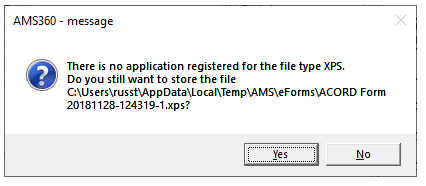
AMS360 Message
|
We have deprecated all older versions of OData prior to v22. Following this deprecation, they are no longer available for use with any version of AMS360. However, OData v22 will remain compatible with older versions of AMS360. |
|
|
 Project Impact is a time-saving initiative for users on Vertafore products. When you see the clock symbol, the work was performed with this initiative in mind.
What's New
Major Enhancements
| enhancement | description |
|---|---|
| ACORD | |
| New & Updated ACORD Forms |
See the attached document for a list of new ACORD forms, as well as those that were updated in this release. |
| AGENCY ONE | |
| New Certs Tool Launch Point |
Users can now access an AO certificates page directly from AMS360. |
| CRYSTAL REPORTS | |
|
AMS360 updates have been applied to additional Crystal Reports to allow for larger invoice numbers to be correctly displayed. This enhancement applies to a number of Classic Reports, which are listed in the accompanying document. |
|
| DIRECT BILL ENTRY | |
|
With this release, each invoice is processed individually whenever a void is initiated. If an error or timeout occurs, the statement is shown as "Partially Voided" and can be retried, if necessary. In addition, if specific invoices block the process from being completed, the user will see an "alert" message prior to any reattempt. |
|
| OUTLOOK | |
| New Outlook Add-In |
There is a new Outlook Add-In with a new style and workflow. However, the old Outlook Add-In is still available. |
EMS / API Endpoints
New and updated EMS / API endpoints are now being aggregated and reported on a separate Help page. Click EMS / API Release Notes to view this information.
Defects Fixed
The following defects have been resolved:
| defect suite | salesforce case no. | impact area | description of fix |
|---|---|---|---|
| DS13845 | 4459114 |
Application Catalog |
Unable to generate a Agency Key from the AMS360 UI admin for a particular third party. |
| DS13263 | 4345423 |
Bank Center |
When multiple fees or taxes were billed on a cancellation transaction, AMS360 combined the separate line items into a single line in the Register tab and on the invoice, if the charge type was the same for each item. |
| DS12468 | 4189461 |
Bank Center |
When users printed invoices via the link on the Invoices View, the Print Date did not update. |
|
Reports: Classic |
There was a delay when a user wanted to "Create CSV" or do a Print Preview on the Balance Sheet. |
||
|
Reports: Classic |
Error when generating a CSV for the Cash Disbursement Journal report. |
||
| DS13375 | 4361201 |
Reports: Classic |
The Classic Report, Billing Register was displaying the commission rate (percentage) in hashtag (###) format, if Installment Reporting was selected. |
| DS13019 | 4299927 |
Reports: Classic |
The email icon was missing when a user previewed an invoice after it was posted. |
| DS13288 | 4349866 |
Reports: Classic |
The toggle button for the grouping panel was missing in the following elements: Classic Reports. Download Session Log, Download Detail, and Download Electronic Email. |
| DS12658 | 4227462 |
Reports: My Agency Reports |
When using the export option for the MAR Production Analysis report, with "Include cover sheet" and "Export Filtered Data" selected, the report failed to export. |
| DS11560 | 3967111 | Certificates |
Certificate Holders appeared in incorrect alphabetical order in the eForms Manager eForms tree. |
| DS12922 | 4279575 | Check |
When a check was copied and the bank was changed, the check winform disappeared from the screen and instead presented the following error: "Unexpected error while previewing checks." |
| DE66417 | N/A |
Contacts: Winform |
The Contacts Winform showed an error when the user attempted to hit email with an attachment. |
| DS13728 | 4433774 |
Customer Center |
The "Select Multiple" hyperlink in Activity/Suspense was not displaying for all policy types. |
| DS12563 | 4211192 | Dec Page |
Users saw the message "Unexpected error" when trying to save a policy after opening it from the Dec Page. |
| DS7681 | 3468516 | Downloads |
The Agency Negotiated Commission was not being retained with downloaded policy renewals. |
| DS12196 | 4139946 | eForms |
An XFDL error occurred when trying to distribute certificates or print to PDF. |
| DS13302 | 4351667 | eForms |
Certificates could not be deleted from the Customer Center, nor could they be opened in eForms. |
| DS12541 | 4207693 |
Notification Services |
When cancellations were entered into AMS360, the notification service did not consistently send the notification to the third-party application. |
| DS12366 | 4173762 | Policy | Policy transactions did not pull to a Direct Bill Statement. |
| DS12178 | 4134798 | Policy |
When attempting to invoice / bill a policy, users were unable to do so because of a personnel mismatch. |
|
DS13141 / DS13275 |
4326239 / 4346549 |
Policy |
In situations where a user deleted coverage from a vehicle on a business auto policy, saved and closed it, and then went back into the policy, the coverages would reappear. |
| DS13275 | 4346549 | Policy |
When a policy was endorsed and a user added vehicles, coverages from pre-existing vehicles were deleted. |
| Policy |
A change request was created to ensure it also included additional personnel. |
||
| DS13623 | 4413652 |
The clipboard did not copy when documents were in AWS S#. |
|
| DS14149 | N/A | Policy |
Users can now invoice a continuous policy that includes a Broker, where policy will not go into suspended status. |
Feedback
We value your feedback to ensure we are working on what is most important to you. If you have an idea to improve the product, you can suggest and vote on product enhancement requests on Vertafore Ideas. On My Vertafore, click Submit Idea in the upper right corner of the page. We appreciate your input to help us provide you with the highest-quality product.
For more information on using Ideas, please see the following documents. You must be registered with My Vertafore and signed in to access these documents.
-
Ideas Overview (Doc ID: 13054)
-
How to Submit Ideas (Doc ID: 13049)
-
What are the statuses in Vertafore Ideas? (Doc ID: 13055)